Feb 13, 2026

4 min read

Mobile app templates are essentially pre-built starting blocks for new applications. They give you a solid foundation to build upon so you can stop wasting time on repetitive setup and get right to building the features that make your app unique.
Think of it like getting a professional blueprint for a house. You get the frame, wiring, and plumbing already in place, which lets you focus on the interior design and custom finishes that actually make it a home. This approach really cuts down on development time and helps you get your product out the door much, much faster.
Every developer knows the pressure to ship a great app yesterday. We've all been there, staring at an empty project folder, facing that "blank canvas" problem. It can be a huge hurdle, easily eating up weeks or even months of foundational work before you even touch the core features your users will actually care about.
This is where mobile app templates completely change the game.
Instead of coding user authentication, settings screens, or navigation from scratch, you begin with a production-ready foundation. This isn't just about taking a shortcut; it's a smart, strategic move. You're choosing to invest your most valuable resource—developer time—on what truly matters.
The mobile app industry is booming, and speed and quality are everything. The market, valued at USD 330.61 billion in 2025, is expected to explode to USD 1,230.23 billion by 2035. With a staggering 255 billion app downloads projected for 2025 alone, the competition is intense. A faster, more efficient development cycle isn't just nice to have; it's a critical advantage.
Mobile app templates give you that head start. If you want to dive deeper, you can explore more on the latest mobile application market trends to see just how competitive things are.
By starting with a pre-built, professionally engineered template, you get to bypass the initial grind. You can jump straight into the business logic and unique user experiences that will make your app stand out from the crowd. It transforms development from a marathon of boilerplate setup into a focused sprint on innovation.
Let's break down the key differences.
Here's a quick look at how the two approaches stack up when it comes to time, cost, and where your team's energy goes.
| Aspect | Building From Scratch | Using a Mobile App Template |
|---|---|---|
| Time to Market | High (months to a year) | Low (weeks to months) |
| Upfront Cost | Very High | Low |
| Team Focus | Building foundational infrastructure | Building unique features |
| Initial Risk | High (architectural mistakes) | Low (uses a proven structure) |
Ultimately, a template shifts your focus from how to build the basics to what unique value you can deliver to your users.
Consider all the common pieces almost every single mobile app needs:
Building these features from the ground up is not only time-consuming but also full of potential bugs. A high-quality template, especially one built with modern tools like React Native, Expo, and TypeScript, handles all of this for you. You inherit a robust, well-tested architecture, freeing your team to solve the real problems your app was designed to address.
Diving into the world of mobile app templates can feel like walking into a massive hardware store. You know you need tools, but with so many options staring back at you, it’s tough to know what you’re grabbing. Is it a simple screwdriver or a full-blown drill press? Each type of template has a specific job, and picking the right one is your first real step toward a successful, efficient build.
To make things easier, templates generally fall into one of three buckets. Each one offers a different level of pre-built functionality, kind of like choosing between raw ingredients, a meal-prep kit, or a fully catered dinner. Getting these distinctions right means you get exactly what your project needs without paying for bells and whistles you won’t use or, worse, getting a tool that doesn't do nearly enough.
The decision tree below really gets to the heart of the choice developers face, showing exactly when a template is the smart play.
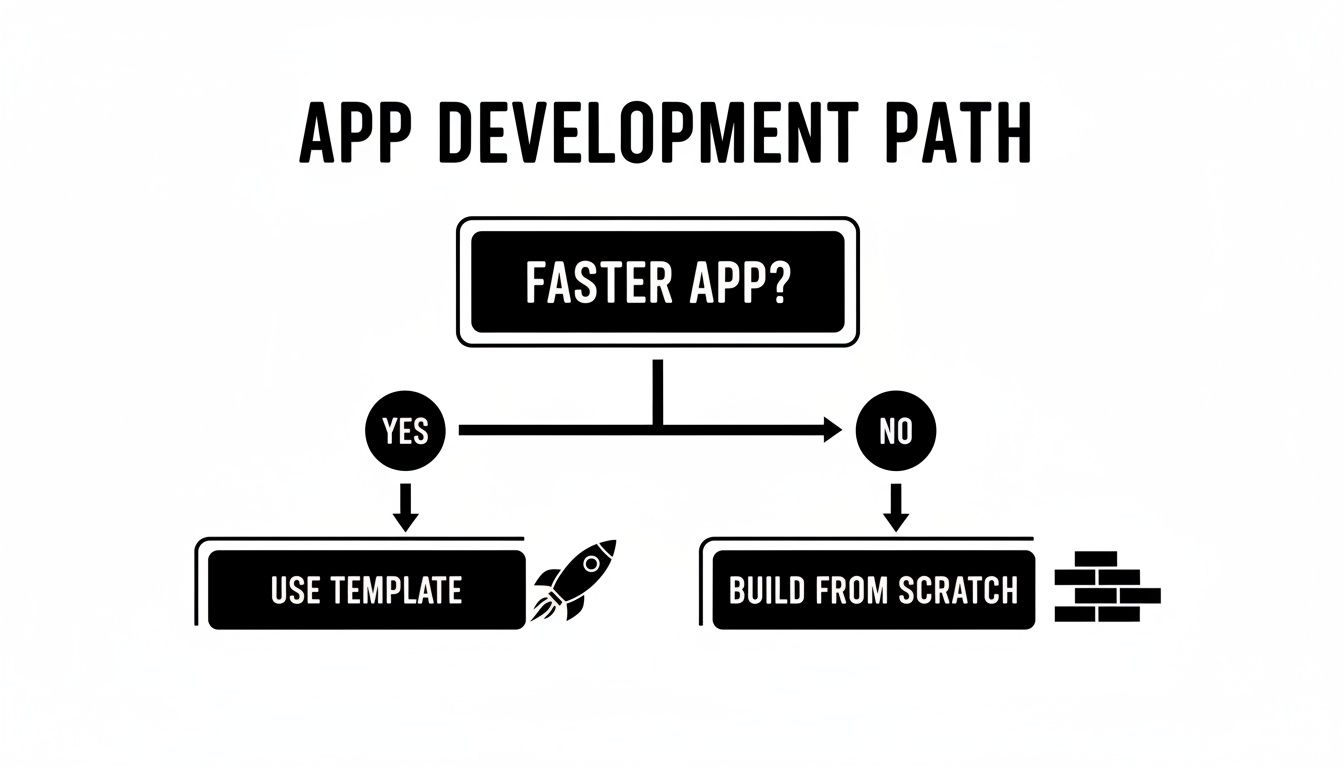
As you can see, when getting to market quickly is the name of the game, a template is the clear winner over building everything from the ground up.
Think of a UI Kit as your personal collection of pre-designed, ready-to-use visual components. It’s like being handed a massive box of high-quality LEGO bricks—you get all the pieces you need to build a gorgeous interface, but you’re still the one snapping them together and wiring up all the logic.
These kits are laser-focused on the front-end experience.
A UI kit is your best bet when the main goal is to shave hundreds of hours off front-end coding while keeping total control over how your app actually works.
Next up are domain-specific starters. These templates take things a step further than just looks. They give you a functional skeleton for an app in a specific niche, like a fitness tracker, a personal finance manager, or a dating app. They're the meal-prep kits of the template world—you get the ingredients (UI) and the recipe (core logic) all in one box.
This means common, industry-specific features are already built and ready to go. For that fitness app, you might find workout logging and progress tracking already implemented.
A domain-specific starter lets you launch a feature-rich app way faster because the foundational logic for your niche is already sorted. You can focus on customizing the brand and adding your unique twist without reinventing the wheel.
Finally, we have full-stack starters, the most comprehensive option you can find. They deliver a complete, end-to-end application—we're talking a pre-configured backend, database, and even user authentication. This is the fully operational kitchen, ready for service from day one. AppLaunchKit is a prime example, built to get a complete product to market with almost no setup.
These starters are a godsend for teams that need to launch a Minimum Viable Product (MVP) as fast as humanly possible, without sinking resources into backend development. With the app development market projected to jump from USD 305.18 billion in 2026 to USD 618.65 billion by 2031, speed is everything. It's no surprise that by 2026, analysts predict 80% of new apps will be built using tools like these.
To get a better handle on this approach, take a look at our guide on React Native templates.
Let's be honest: not all mobile app templates are created equal. It's easy to get drawn in by a slick design, but the real value is always under the hood—in the code, the structure, and the support that comes with it.
Choosing the wrong template can feel like buying a beautiful car only to discover it has a busted engine. It won't get you very far. You'll end up tangled in technical debt, battling performance bugs, and wasting countless hours trying to decipher someone else’s messy work.
To avoid that trap, you need to develop a sharp eye for quality that goes beyond just the visuals. Think of yourself as a home inspector for code. You’re not just looking at the new paint; you’re checking the foundation to make sure it’s solid. A great template should speed you up, not sabotage your project from day one.
First things first: the code itself is the most critical checkpoint. A high-quality template is built with modern, industry-standard tech that’s designed for stability and easy maintenance. It’s not about chasing every new, shiny tool; it’s about using the right tools correctly to build a clean, understandable, and scalable architecture.
Keep an eye out for templates built with a solid stack like:
Another dead giveaway of quality is a clean, well-organized file structure. If the code looks like a tangled mess of spaghetti, you’re in for a world of pain when you try to customize it. A logical structure makes it simple to find components, tweak styles, and plug in your own logic without accidentally breaking the entire app.
The promise of React Native is "learn once, write anywhere," but making an app that feels truly native on iOS, Android, and the web takes real skill. A top-tier template has been meticulously optimized to deliver a smooth, responsive user experience on every single platform. It’s not enough for it to just "work"—it has to feel right.
This means you should be looking for any performance lags, weird visual glitches, or components that just look out of place on different devices. A well-crafted template will automatically handle platform-specific design conventions, making sure your app feels perfectly at home on an iPhone, a Google Pixel, or in a web browser. The goal is a consistent brand experience that still respects the unique UI of each operating system.
When you invest in a premium template, you're buying expertise. You're leveraging the experience of senior engineers who have already solved the complex challenges of cross-platform performance, saving your team from reinventing the wheel.
In today's market, accessibility isn't just a nice-to-have feature—it's a core requirement. An estimated 1.3 billion people worldwide live with some form of disability. Building an inclusive app isn't just the right thing to do; it dramatically expands your potential user base. High-quality mobile app templates have accessibility baked into their DNA from the very beginning.
This means the components are built following the Web Content Accessibility Guidelines (WCAG). Look for things like:
Trying to retrofit an app for accessibility later on is a notoriously difficult and expensive nightmare. Choosing a template that prioritizes it from the start saves you a massive amount of time and effort, ensuring your app is usable by everyone, right out of the box.
Even the most elegant code is useless without clear instructions. Great documentation is the user manual that turns a good template into an indispensable tool. It should be your trusted guide, explaining the app’s architecture, how to customize components, and where to inject your own features. Without it, you’re just flying blind.
Look for clear, detailed setup guides, component references, and practical examples. Beyond the docs, check what kind of support is available. A reputable marketplace will offer clear channels to get help when you get stuck, whether that's through email, a community forum, or dedicated support tickets. That safety net is invaluable when you’re facing a tight deadline.
Finally, always check the licensing terms. A flexible license ensures you can use the template for a personal project, a client’s app, or a commercial product without any legal headaches down the line. Understanding the license upfront prevents costly surprises and gives you the freedom to build and scale your vision.
To help you keep track, here's a quick checklist you can use when you're sizing up a new template.
This checklist summarizes the key criteria to look for when choosing a mobile app template for your next project.
| Criteria | Why It Matters | What to Look For |
|---|---|---|
| Code Quality & Architecture | A clean codebase is easier to maintain, scale, and customize. | React Native, TypeScript, Expo; logical file structure; modern coding practices. |
| Cross-Platform Performance | Ensures a smooth, native-like user experience on iOS, Android, and web. | No visual glitches or lag; platform-specific UI conventions are respected. |
| Accessibility (a11y) | Makes your app usable by the widest possible audience and is a legal requirement in many regions. | WCAG compliance, proper semantic elements, good color contrast, large touch targets. |
| Documentation | Your guide to understanding, customizing, and extending the template. | Clear setup instructions, component API references, real-world examples. |
| Support | A safety net for when you get stuck or run into unexpected issues. | Access to the creator via email, forums, or a dedicated support system. |
| Licensing | Defines how you can legally use the template for personal or commercial projects. | A clear, permissive license (like MIT or a commercial equivalent) that fits your needs. |
Treating this checklist as your guide will help you filter out the low-quality options and find a template that truly acts as a launchpad for your project, not an anchor.
Think of a high-quality mobile app template as a perfectly primed canvas. It’s a fantastic starting point, but the real magic begins when you start splashing your own colors and textures onto it. A template isn't meant to be a straitjacket; it's a launchpad, designed to be shaped and molded into something that's uniquely yours.
This is where the real fun starts. You get to move past the foundational structure and start injecting your brand’s personality and your app's specific business logic right into the code. The end goal isn't just to use the template—it's to transform it so completely that no one would ever guess it started as one.
So, let's walk through what this customization journey actually looks like. We’ll break down the abstract idea of ‘making it your own’ into a concrete, actionable workflow that any developer can follow to turn a pre-built foundation into a bespoke app.
Before you can tweak a single line of code, you need to get the template running locally. Thankfully, good templates, especially those built with modern tools, make this first step incredibly simple.
Most templates built on React Native use Expo, a framework that streamlines the entire development and build process. Getting started usually just takes a few commands in your terminal:
npm install or yarn install. This fetches all the necessary libraries the template relies on.npx expo start fires up the Metro bundler.Seriously, within minutes you can have a fully functional app running in a development environment, ready for you to start pulling apart and putting back together. This rapid setup is one of the biggest wins of using a well-structured template.
The first and most impactful step in personalizing a template is applying your brand’s visual identity. A well-designed template centralizes all its styling rules, so you don't have to go on a scavenger hunt through hundreds of files just to change a color.
Look for a dedicated theme file, often called something like theme.config.ts or tucked away in a /theme directory. Inside, you can usually tweak everything:
By making these changes in one central spot, you ensure brand consistency across every single screen and component. This is a massive time-saver that eliminates hours of tedious, repetitive styling work.
With your branding in place, it's time to start tweaking individual components and screen layouts. Modern templates often use utility-class CSS frameworks like NativeWind, which brings the power and flexibility of Tailwind CSS to React Native. If this is new territory for you, we have a helpful guide on using Tailwind CSS in a React Native project.
This approach makes changing layouts feel incredibly intuitive. Need to change a button's style or rearrange elements in a card? It's as simple as adding or removing a few class names right in your component file.
Instead of writing clunky stylesheet objects, you can build complex UIs declaratively. This not only makes the code much easier to read and maintain but also dramatically speeds up the process of tailoring the UI to your exact needs. You can add, remove, or reorder elements with ease to create an experience that perfectly matches your vision.
This is the moment the template truly becomes your application. The UI is just the shell; the business logic is the engine that makes it all work. A well-architected template gives you clear, designated places to plug in your own functionality.
This is where you'll likely spend most of your customization time:
By following this workflow—setup, theming, layout tweaks, and logic integration—you can systematically transform a generic template into a polished, fully functional, and unique product that’s ready for the world.
Picking a solid template is a great start, but the real magic happens when you tap into a complete development ecosystem. A platform like gluestack market isn't just a storefront for mobile app templates; it's a partner dedicated to backing you up from launch day all the way through scaling your app.
This completely changes the game. Instead of a one-and-done code download, you get an entire suite of resources designed for your project's long-term success. Think of it like this: you could buy a powerful engine, or you could get the whole car, complete with a warranty, a user manual, and a mechanic on speed dial.
Every template on gluestack market is much more than a collection of pretty screens. These are production-ready assets, built by senior engineers who have baked best practices right into the code. That means you start with a foundation that’s performant, scalable, and secure from day one.
A huge piece of that quality is our commitment to accessibility. Every component is designed with WCAG standards in mind, ensuring your app is usable by the widest possible audience. Taking care of this upfront saves you from the headache of trying to retrofit accessibility later—a complex process that can easily throw your project off schedule.
An ecosystem provides a quality guarantee that a standalone template can't. You're not just buying code; you're investing in the expertise and standards of the platform that created it, ensuring a reliable and professional foundation for your app.
This focus on professional-grade engineering is more critical than ever. In fact, mobile app templates are set to dominate 2026 development workflows. The market is exploding to over $330 billion globally, and with 40% of enterprise apps integrating AI agents, things are only getting more complex. Projections even show AI mobile apps hitting $221.9 billion by 2034, making scalable, template-driven development an absolute necessity. You can read more about emerging trends in custom mobile app development.
A real ecosystem gets that one size doesn't fit all. Whether you're a freelancer building a portfolio piece, an agency knocking out client projects, or a startup getting an MVP off the ground, you need licensing that makes sense.
gluestack market keeps things simple with clear licensing tiers built for how you work:
This straightforward approach gets rid of any legal guesswork. You can pick the license that gives you the right permissions for your work, knowing you’re covered as your project grows. If you want to dive deeper into boosting your team's output, check out our guide on how to improve developer productivity.
Beyond just the code, a strong ecosystem provides a safety net. This means you get comprehensive documentation that clearly explains the architecture and customization process, plus dedicated support channels to help you troubleshoot issues fast. Having that backup is invaluable for keeping your project moving forward.
And when you're ready to move beyond just the UI, the ecosystem offers a clear path forward. Solutions like AppLaunchKit deliver a full-stack foundation with a pre-configured backend already in place. This lets you speed up development even more, proving that the right ecosystem is an essential partner for building and launching successful apps, faster.
Jumping into mobile app templates often brings up a few questions and a bit of healthy skepticism. Will I get boxed into a generic design? Is this thing actually solid enough to build a real business on? These are totally fair questions—the kind every smart developer asks.
We're going to tackle these head-on. No fluff, just straight answers to help you see how a high-quality template can be a game-changer for your next project.
This is probably the biggest misconception out there. While templates are absolute lifesavers for getting a Minimum Viable Product (MVP) out the door fast, the good ones are engineered from day one to be production-ready and scalable. They aren't flimsy prototypes.
Think of it this way: they give you a rock-solid architectural foundation built with industry standards like React Native and TypeScript. All the common, yet surprisingly tricky, stuff like authentication flows, navigation, and settings screens are already handled.
This frees up your team to stop reinventing the wheel and focus their brainpower on the unique, complex features that actually make your product special. Countless successful, large-scale apps started with a template foundation, proving they can more than handle the heat as you grow.
The fear of making a "cookie-cutter" app is real, but a well-made template is designed to prevent exactly that. It’s less like a finished painting and more like a professional artist’s canvas and a full set of high-quality brushes. We give you the tools; the masterpiece is up to you.
A great template provides the blueprint; you choose the paint, finishes, and furniture to make the house your own. The goal is to accelerate the foundational work, not to dictate the final look and feel of your app.
Modern templates are built for deep customization. They use powerful styling systems like gluestack-ui and NativeWind (which brings the magic of Tailwind CSS to React Native). This makes it dead simple to change everything from global color palettes and typography to the layout of individual components. The structure is there to help, not to hold you back.
This is a crucial question and one that really separates the pros from the hobby projects. The mobile world moves at lightning speed. A dependency can become obsolete in months, opening the door to security risks and compatibility nightmares.
This is where a premium template marketplace really shines. Reputable providers push out regular updates to keep their mobile apps templates in sync with the latest versions of React Native, Expo, and other core libraries. Your purchase isn't just a one-time download; it’s an investment in an asset that’s actively maintained.
Typically, buying a template gives you access to all future updates. This protects your investment and saves your team from the painful, time-sucking job of handling major dependency upgrades themselves. You get to focus on shipping features, knowing the foundation is being kept solid by experts.
Absolutely. In fact, this is by design. High-quality mobile app templates are intentionally backend-agnostic, meaning they're built to plug into just about any data source or server you can throw at them.
The template’s job is to deliver a polished and functional frontend, complete with UI components, screens, and all the client-side logic. The code is structured cleanly to make it easy to connect your own backend services.
Whether you're working with a classic REST API, a modern GraphQL endpoint, Firebase, or a completely custom-built solution, the process is the same: you just "wire up" the pre-built UI to your data. This gives you total freedom over your server-side architecture while still getting a massive head start on the frontend.
Here's what that usually looks like in practice:
This clean separation ensures the template speeds you up without locking you into any specific backend tech.
Ready to stop building from scratch and start launching faster? Explore the production-ready templates at gluestack market and find the perfect foundation for your next project. Visit https://market.gluestack.io to get started.

Feb 23, 2026
4 min read
Discover powerful mobile app monetization strategies to boost your revenue. Our guide covers IAPs, ads, and subscriptions for React Native apps and beyond.

Feb 22, 2026
4 min read
A clear guide to app development cost estimation. Learn what drives costs, see budget examples, and discover strategies to build your app for less.

Feb 21, 2026
4 min read
Discover how to promote mobile application effectively with proven ASO, paid campaigns, and retention strategies.

Feb 15, 2026
4 min read
Discover how to create a prototype of a website with a practical, step-by-step guide. Explore tools, testing methods, and tips to bring your idea to life.

Feb 14, 2026
4 min read
Confused about mockups vs wireframes? Learn the key differences, when to use each, and how to streamline your React Native app development workflow.

Feb 12, 2026
4 min read
Explore mobile application interface design with practical tips, core principles, and platform-aware workflows to craft apps users love.

Feb 10, 2026
4 min read
Learn mobile first design principles to craft fast, accessible apps that delight users. Practical tips, examples, and testing strategies.

Feb 08, 2026
4 min read
Explore the progressive web app vs native debate with our in-depth guide. We compare performance, cost, and UX to help you make the right strategic choice.

Feb 07, 2026
4 min read
Discover how React Native templates can accelerate your app development. This guide explores choosing, customizing, and deploying templates for faster launches.

Feb 05, 2026
4 min read
Discover the key differences between expo vs react native, including workflow, builds, and performance to help you pick the right path for your app.

Feb 03, 2026
4 min read
Master image with text overlay in React Native with responsive, accessible patterns. Learn expo setup, NativeWind styling, and gluestack-ui examples.

Feb 03, 2026
4 min read
Discover cross platform app development with proven strategies to build faster for iOS, Android, and the web using a single, unified codebase.

Feb 01, 2026
4 min read
Learn how to make an app for my business quickly with template-based steps from planning to launch, plus tips to scale and optimize.

Jan 31, 2026
4 min read
Ready to build an app? This guide shares practical strategies for validating your idea, choosing a tech stack, and navigating the App Store launch.

Jan 30, 2026
4 min read
Master responsive design for mobile apps with this guide on fluid layouts, breakpoints, and React Native. Build UIs that adapt perfectly to any screen.

Jan 25, 2026
4 min read
Learn how to design an Android app that stands out. This guide covers UX research, wireframing, Material Design, and the developer handoff process.

Jan 24, 2026
4 min read
Explore ui design web essentials: a complete guide to principles, responsive patterns, and workflows for intuitive, engaging web interfaces.

Jan 23, 2026
4 min read
Discover 10 essential mobile app design best practices for building exceptional cross-platform apps. Actionable tips for UI, UX, navigation, and performance.

Jan 21, 2026
4 min read
Discover how to debug React Native apps effectively. This guide covers Flipper, React DevTools, and native code troubleshooting for faster development cycles.

Jan 20, 2026
4 min read
Learn how to create app for your business with a practical, modern approach. Plan, customize, and launch with proven steps.

Jan 19, 2026
4 min read
A complete guide to mobile app development for startups. Learn how to validate your idea, build an MVP, and launch a successful app faster and more affordably.

Jan 18, 2026
4 min read
Discover how to choose the right React website template to accelerate your project. Our guide covers everything from quality checklists to deployment.

Jan 17, 2026
4 min read
Discover how to choose, customize, and deploy a React Native app template. This guide provides practical steps for launching production-ready apps faster.

Jan 16, 2026
4 min read
Discover how mobile application templates accelerate development. This guide covers how to choose, customize, and launch your app with the right foundation.

Jan 13, 2026
4 min read
Start your journey in mobile app development for beginners. This guide breaks down how to build your first cross-platform app with React Native and Expo.

Jan 12, 2026
4 min read
Explore the best react native ui libraries and compare features, performance, and ease of use to pick the right toolkit for your app.

Jan 11, 2026
4 min read
Launch your own ride-hailing service with our guide to building a production-ready Uber app clone. Learn MVP strategy, tech stacks, and backend integration.

Jan 10, 2026
4 min read
Master modern cash app design with this guide. Learn the UI/UX, security, and React Native strategies needed to build a fintech app that users trust and love.

Jan 09, 2026
4 min read
Learn how to build a personal finance dashboard with React Native. A practical guide for developers on UI design, data architecture, and production readiness.

Jan 08, 2026
4 min read
A practical guide to building a cross-platform event check in app with React Native. Learn to implement QR scanning, offline sync, and deployment.

Jan 07, 2026
4 min read
Master linear gradient React Native components with our complete guide. Learn practical techniques for Expo, bare RN, and NativeWind to build stunning UIs.

Jan 06, 2026
4 min read
Learn how to change application name in your React Native & Expo projects. This guide covers display names, package IDs, and app store listings.

Jan 05, 2026
4 min read
Discover how to monetize mobile apps with our founder's guide. Learn proven React Native strategies for ads, IAPs, and subscriptions to maximize your revenue.

Jan 04, 2026
4 min read
A practical guide on how to create a website app with a single codebase. Learn to build for web, iOS, and Android using React Native, Expo, and TypeScript.

Jan 03, 2026
4 min read
Learn how to create an app for your business with this definitive guide. Discover practical strategies for validation, development, and launch that work.

Jan 02, 2026
4 min read
Learn how to create a wireframe for a website with this practical guide. Move from initial sketches to developer-ready designs that get built right.

Jan 01, 2026
4 min read
Deciding on progressive web application vs native? This guide offers a deep comparison of performance, cost, UX, and use cases to help you choose wisely.

Dec 31, 2025
4 min read
Discover 10 mobile app security best practices for React Native. Learn to secure data, APIs, and code with actionable tips and examples for 2025.

Dec 30, 2025
4 min read
Unlock the real React Native app development cost. Our guide breaks down pricing by feature, team, and complexity to help you budget with confidence.

Dec 29, 2025
4 min read
A practical guide to master your React Native debug workflow. Learn to use Flipper, React DevTools, and Hermes to solve bugs in Expo and bare RN apps.

Dec 28, 2025
4 min read
The ultimate React Native tutorial for beginners. Learn to build beautiful cross-platform apps using a modern stack like Expo, TypeScript, and gluestack-ui.

Dec 27, 2025
4 min read
A practical guide on how to build a mobile app. Learn to go from concept to a market-ready app using templates, React Native, and proven development strategies.

Dec 26, 2025
4 min read
Discover interface design for websites with actionable tips on layout, responsiveness, and usability to boost conversions.

Dec 25, 2025
4 min read
Discover designs for apps that blend minimal aesthetics with personalization, and learn to build user-centric interfaces that boost engagement.

Dec 24, 2025
4 min read
Learn graphical interface design - essentials for mastering core principles, modern workflows, and cross-platform strategies to build intuitive, engaging UIs.

Dec 23, 2025
4 min read
Discover how high fi wireframes bridge the gap between ideas and code. Learn a practical workflow for creating, testing, and handing off effective UI designs.

Dec 22, 2025
4 min read
Discover mobile app interface design with practical principles, accessibility, and workflows that boost user engagement.

Dec 21, 2025
4 min read
Explore the top 10 UI UX design trends for 2025. Get expert insights and practical React Native tips to build next-gen cross-platform apps that stand out.

Dec 20, 2025
4 min read
Discover how mobile app templates accelerate development from idea to launch. Learn to select, customize, and deploy templates for a faster time to market.

Dec 18, 2025
4 min read
Explore the best react native ui libraries to accelerate mobile development with performance, theming, and accessibility. Expert tips inside.

Dec 16, 2025
4 min read
Master React Native PDF handling. Learn to generate, view, and share PDFs with practical code examples, library comparisons, and performance tips.

Dec 15, 2025
4 min read
A practical guide to choosing the right React Native component library. Learn how to evaluate options, avoid common pitfalls, and build apps faster.

Dec 14, 2025
4 min read
Find the perfect React Native UI library for your project. This guide compares top libraries, selection criteria, and customization strategies.

Dec 13, 2025
4 min read
Learn how to change app name in React Native and Expo. Our guide covers display names, bundle IDs, and store listings for iOS and Android projects.

Dec 12, 2025
4 min read
Discover the best React Native component library for your next project. We compare top libraries on performance, customization, and real-world use cases.

Dec 11, 2025
4 min read
Discover how to choose the right React Native UI kit. This guide covers top kits, selection criteria, and customization to accelerate your app development.

Dec 10, 2025
4 min read
Explore our in-depth guide to find the best React Native UI library. We compare top contenders to help you choose the right fit for your project.

Dec 09, 2025
4 min read
Discover a practical approach to building apps with React Native. This guide covers setup, UI, state management, and testing to help you ship great apps.

Dec 08, 2025
4 min read
android login with facebook: Learn to set up the Facebook SDK, manage tokens, and implement secure authentication across native Android, cross-platform apps.

Dec 07, 2025
4 min read
Master the alert in React Native. Learn to handle platform differences, build custom modals, and apply best practices for a seamless user experience.

Dec 06, 2025
4 min read
keyboardavoidingview react native: Master keyboard handling with KeyboardAvoidingView across iOS, Android, Expo, and TypeScript.

Dec 05, 2025
4 min read
A practical guide to implementing a React Native PDF viewer. Learn to compare libraries, handle native setup, and troubleshoot common issues with real code.

Dec 04, 2025
4 min read
how to validate startup idea: learn proven methods like customer interviews, MVPs, and metrics to confirm market fit.

Dec 03, 2025
4 min read
how to make app like uber: Learn core features, tech stack, development steps, testing, and launch tips.

Dec 02, 2025
4 min read
Build a rock-solid React Native setup. This guide covers Expo vs. Bare workflows, TypeScript, pnpm monorepos, NativeWind, and deployment strategies.

Dec 01, 2025
4 min read
A practical guide to Stripe React Native integration. Learn to set up your server, build payment UIs, handle webhooks, and launch secure mobile payments.

Nov 30, 2025
4 min read
Learn how to master push notifications in React Native. This guide covers setup, best practices, and advanced techniques for engaging your users.

Nov 29, 2025
4 min read
Build powerful location-based apps with our practical guide to react native with google maps. Get setup guides, pro tips, and best practices for iOS & Android.

Nov 28, 2025
4 min read
Explore deep linking react native with a practical guide to configuring URL schemes, universal links, navigation, and testing for Expo and bare apps.

Nov 28, 2025
4 min read
A practical guide to building a scalable React Native design system. Learn to implement tokens, theming, and tools like NativeWind and gluestack-ui.

Nov 26, 2025
4 min read
Learn why react native expo templates speed up your projects with ready-made patterns and practical tips.

Nov 25, 2025
4 min read
Discover how to improve developer productivity with actionable strategies for workflow, tooling, and culture. A practical guide for software engineering teams.

Nov 24, 2025
4 min read
Discover the best cross platform app development tools. Compare top frameworks like Flutter and React Native to build and ship apps faster.

Nov 23, 2025
4 min read
This Expo React Native tutorial provides a hands-on guide to building cross-platform apps. Learn setup, styling with NativeWind, navigation, and deployment.

Nov 22, 2025
4 min read
Build beautiful UIs faster with this guide to Tailwind CSS React Native. Learn setup, styling, and advanced techniques with NativeWind for mobile apps.

Nov 21, 2025
4 min read
Explore our curated list of 7 top-tier React Native app examples. Discover production-ready templates and resources to build your next app faster.

Mar 19, 2025
4 min read
gluestack market offers React Native UI templates to accelerate development. Get customizable, production-ready React Native app templates and Ui kit, some free. Build faster & smarter today!


