Jan 20, 2026

4 min read

Before you write a single line of code, you need a plan. It's tempting to jump straight into features and design, but the best apps start with a solid foundation. You've got to nail down who you're building for, the exact problem you're solving, and what your core features will be for a Minimum Viable Product (MVP).
This focused approach keeps you from overspending and ensures you’re building something people actually want to use.
Building an app can feel overwhelming, but with the right blueprint, it becomes a clear, manageable project. In today’s world, a mobile app isn’t just a nice-to-have; it’s a direct line to your customers. It puts your business right in their pocket, opening up a powerful channel for engagement and service.
The journey starts with simple questions, not code. Who is your user? What specific pain point are you solving for them? Getting these answers crystal clear is everything. Think of a local coffee shop. Their app could solve the problem of long morning lines by offering pre-orders and a simple loyalty program. That’s a real solution to a real inconvenience.
Before you get lost in the details, you have to lock in your app's core purpose. This is where your business goals meet your users' needs. The global mobile app market is absolutely massive—it's projected to hit $1.1 trillion by 2034. That's not just a big number; it's a massive opportunity for businesses ready to build something genuinely useful.
A solid strategy starts with a few key steps:
A well-defined MVP is your fastest path to market. It gets your app into the hands of real users quickly, so you can get feedback and build what they actually want, not what you think they want. This saves a ton of time and money down the road.
Nailing this initial planning phase is non-negotiable. For a broader look at getting a tech business off the ground, check out this great a founder's guide to launching a tech startup, which covers everything from the legal stuff to your go-to-market strategy.
By focusing on a lean, purposeful start, you set the stage for an app that truly serves your business and delights your customers. For a deeper dive into the nuts and bolts, see our guide on how to build a mobile app.
Picking the right technology for your business app is a lot like laying the foundation for a skyscraper. Get it right, and you can build something tall, stable, and ready for whatever comes next. But a shaky foundation? That's a recipe for costly problems down the road.
Traditionally, launching on both iOS and Android meant building two entirely separate apps—one with Swift for Apple devices, another with Kotlin for Android. This doubles your development time, your budget, and all your future maintenance headaches. There’s a much smarter way to play the game: use a cross-platform framework to write your code once and ship it everywhere.
We’ve found a sweet spot with a combination of tools that work together beautifully: React Native, Expo, TypeScript, and NativeWind. This isn't just a random assortment; it's a proven stack built for getting things done efficiently.
This whole process really starts before you write a single line of code, with some fundamental questions about your business.
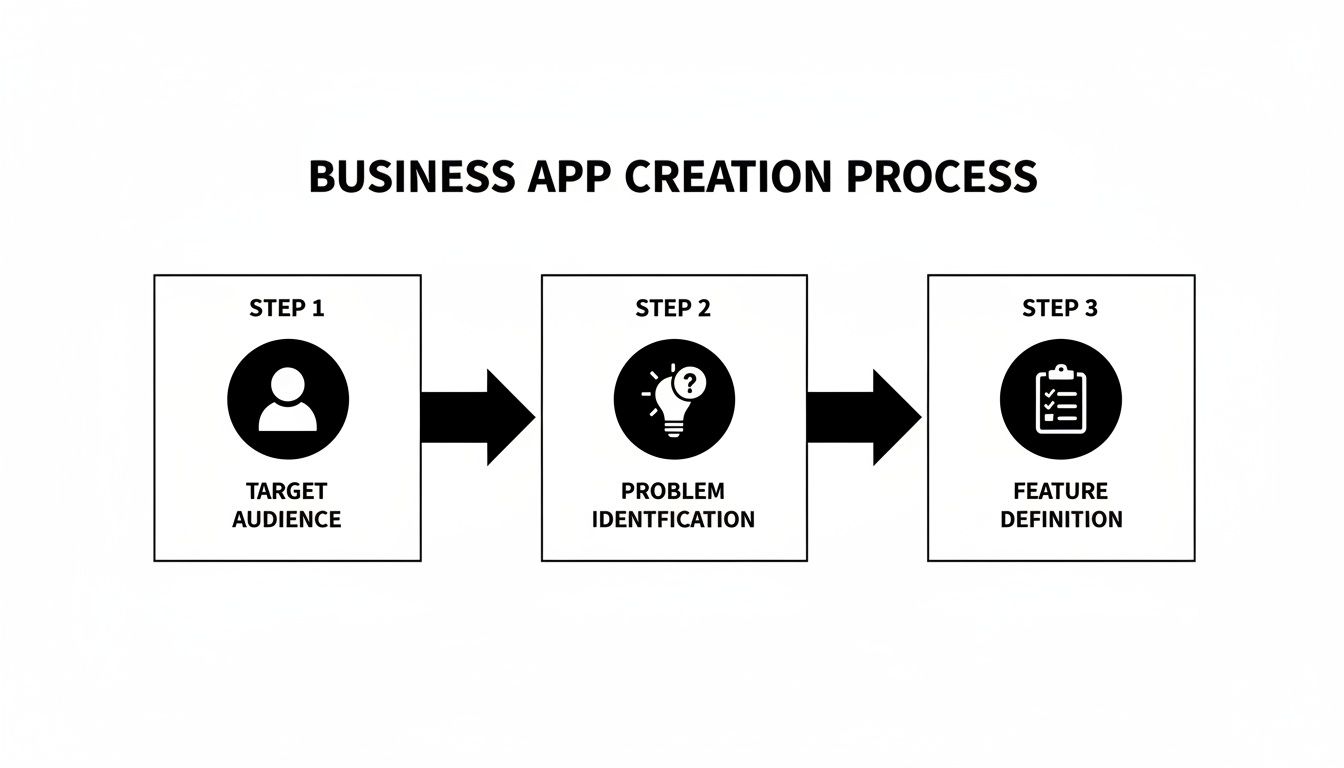
As the diagram shows, a great app is born from a deep understanding of your users, the specific problem you're solving for them, and the core features needed to do that job well.
This shift toward efficiency isn't just a hunch; it's a massive industry trend. The market for tools that speed up development is exploding. The low-code development market, currently valued at $28.75 billion, is on track to hit a staggering $264 billion by 2032. This tells you everything you need to know about the demand for building great applications faster.
Even with the perfect tech stack, building an app from the ground up is a massive effort. This is where pre-built, production-ready templates from a place like gluestack market completely change the game. These aren't just pretty UI kits; they are fully functional, thoughtfully architected app starters.
Starting with a template can slash your initial development time and costs by up to 90%. You're not just buying code; you're buying a massive head start that lets you focus on your unique business logic instead of reinventing the wheel.
If you're still weighing your options, getting clear on the differences between a cross-platform web app and a true native one is a great first step. We break it all down in our guide on https://market.gluestack.io/blog/progressive-web-application-vs-native.
To make the choice even clearer, let’s look at how these two approaches stack up side-by-side.
| Factor | Native Development (Swift/Kotlin) | React Native Template (gluestack market) |
|---|---|---|
| Development Time | High (building two separate apps) | Low (single codebase, pre-built features) |
| Upfront Cost | Very High (two dev teams or double the time) | Low (one-time template purchase) |
| Team Size | Larger (requires iOS & Android specialists) | Smaller (JavaScript/React Native developers) |
| Time to Market | Slow | Fast (weeks instead of months) |
| Performance | Highest possible, direct access to device APIs | Near-native performance, excellent for most apps |
| Maintenance | High (managing two codebases, two update cycles) | Low (one codebase to maintain and update) |
The table really highlights the trade-offs. While native development offers the absolute peak of performance, a high-quality React Native template provides an incredible balance of speed, cost-efficiency, and a fantastic user experience that’s perfect for the vast majority of business applications.
Picking a template isn't just about finding one that looks cool. You need to be strategic to make sure it aligns with your long-term vision. This is a critical decision, much like other foundational choices such as choosing your first customer loyalty software.
Here’s a simple framework I use to guide this decision:
By thinking through these points, you can choose a foundation that doesn't just get you to launch faster, but also gives you a stable, scalable base to build on for years to come.
Alright, you've picked out a production-ready React Native template. Now for the fun part: turning that solid foundation into an app that feels like it’s truly yours.
This isn't just about swapping out a logo or changing a few colors. We're talking about infusing your brand's DNA into every screen and tailoring the user experience to hit your specific goals.
First, we need to get your workshop ready. That means setting up your local development environment, cloning the template’s source code, and installing all the bits and pieces it needs to run. Once that's done, you can fire it up on a simulator and a real device to see it in action.
First things first, let's get that template code onto your machine. A simple git clone command pointed at the repository you got after purchase usually does the trick.
Once the files are local, jump into the project directory and run npm install or yarn install. This command is your best friend—it reads the package.json file and pulls down all the libraries and tools the template depends on, like Expo, React Native, and TypeScript.
With everything installed, it’s time to launch the app. Most modern templates built with Expo make this dead simple. Just run a single command, typically npx expo start, and the Metro Bundler will pop up. It gives you a QR code that you can scan with the Expo Go app on your iPhone or Android to see your app running instantly.
You can also run it directly on a simulator on your computer:
i in the terminal to open the app in the iOS Simulator. You'll need a Mac with Xcode installed for this.a to launch it in the Android Emulator, which requires having Android Studio set up.Seeing the template spring to life on a screen for the first time is a great feeling. It’s the moment you know everything is set up correctly and you have a live canvas to start molding.
This is where you make the app undeniably yours. Any decent template won't have styles hardcoded. Instead, it’ll use a utility-first CSS framework like NativeWind, which is basically Tailwind CSS built for React Native. It makes branding changes fast, consistent, and surprisingly powerful.
The heart of your branding work will be the tailwind.config.js file. Think of it as your app's command center for all things visual.
For example, you can extend the default theme to include your brand’s specific color palette. It looks something like this:
// tailwind.config.js module.exports = { theme: { extend: { colors: { 'brand-primary': '#4F46E5', 'brand-secondary': '#10B981', 'neutral-light': '#F3F4F6', }, }, }, // ...other configs }
Once you define brand-primary here, you can use a class like bg-brand-primary anywhere in your app to apply your main brand color. Need to tweak your branding down the line? Change it once in this file, and the update cascades everywhere. The same goes for fonts, spacing, and logos.
The
tailwind.config.jsfile is your app's brand style guide, but in code. Centralizing all your visual rules here ensures every button, header, and card automatically follows your brand guidelines. This approach saves countless hours of painful, manual styling.
Now that the app looks the part, it's time to make it work like your business. High-quality templates always have a logical and intuitive file structure. Components, screens, navigation, and helper functions are usually organized into their own neat folders.
Take a few minutes to poke around in the src or app directory. You’ll probably find a structure like this:
LoginScreen.tsx, ProfileScreen.tsx, or Dashboard.tsx.To get started, pick a screen. The login screen is always a good first target. Open up LoginScreen.tsx and look at the code. You'll see pre-built components for email/password inputs and a login button. Your job is to wire these up to your actual business logic, whether that's an authentication service like Firebase or your own backend API.
This is the real workflow when building an app this way: you adapt the template's structure to your needs, swapping out placeholder logic for your functional code. If you're curious about what makes for a good starting point, we have a great overview of the ideal React Native app template that covers the key features to look for.
By tackling one screen at a time, you'll methodically transform the template into a fully functional app that’s a perfect fit for your business.
Okay, so you've tweaked the UI, and your app is looking sharp. It’s got your brand's vibe down and feels right in your hands. But a pretty face only gets you so far. A beautiful app without functionality is just an empty shell. Now it's time to build the engine—the core features and business logic that actually solve your users' problems.
We're about to move past the aesthetics and build the app's brain. This means connecting those polished screens to the backend services that handle everything from user accounts to real-time data. It's about making things happen when a user taps a button.
Your app needs a single source of truth—a place where all the important stuff like user data, product info, or content lives. This might be a custom backend you've already built or a Backend-as-a-Service (BaaS) platform like Firebase or Supabase. The good news is that high-quality React Native templates are built for this, often coming with placeholder functions just waiting for you to plug in your data source.
The most common way to talk to a backend is through API calls. Think of an API (Application Programming Interface) as a waiter. Your app (the customer) makes a request ("I'll have the user's profile info, please"), and the API (the waiter) takes that order to the backend (the kitchen), which prepares the data and sends it back.
To make this happen, you'll typically use a library like axios or the built-in fetch API. Let's walk through a real-world scenario for a fitness app:
ProfileScreen.tsx file in your template's code.useEffect hook with a placeholder function like fetchUserData(). This is where the magic happens.axios.get('/api/user/profile'), pointing to your own backend endpoint.useState hook to store it. This updates the screen and displays the user’s name, workout history, and personal goals.Here's a pro tip from someone who's learned the hard way: centralize your API logic. Don't scatter
fetchcalls all over your components. Create a dedicatedservicesorapifolder with specific files for each part of your backend (e.g.,authService.js,profileService.js). Your future self will thank you when it's time to make updates.
User authentication isn't optional; it's the front door to your app. It secures user data and makes personalized experiences possible. Most premium templates from the gluestack market already have the login, sign-up, and password reset screens built, but it's your job to wire them up to a real authentication service.
Firebase Authentication is a fantastic and incredibly popular choice for this. It handles all the tricky, sensitive stuff—like password hashing and managing session tokens—so you don't have to build it from scratch.
Imagine you're working on the SignUpScreen.tsx file from your template:
createUserWithEmailAndPassword(auth, email, password).Just like that, you've turned a static screen into a secure, working entry point for your users.
No app is an island. To build a truly great user experience, you'll almost certainly need to pull in some specialized third-party services. These are ready-made solutions that handle complex jobs, saving you hundreds of hours of development time.
Here are a few common ones you'll probably need:
react-native-maps library lets you embed interactive maps from Google or Apple directly into your app. You can show a user's location, plot directions, and add custom pins.For each of these, the process is pretty similar: install a software development kit (SDK), configure it with your unique API keys, and start using its components and functions in your code.
Artificial intelligence isn't just a buzzword anymore; it's a practical tool for building smarter, more helpful apps. It's a massive trend for a reason: 63% of mobile developers are now adding AI features to improve the user experience. The market for AI in mobile apps is exploding and is projected to hit $221.9 billion by 2034. If you want to stay competitive, you need to be thinking about AI. You can find more mobile app development statistics on cmarix.com.
Here are a few powerful ways to bring AI into your business app:
By thoughtfully weaving these features and services into your template, you’re doing more than just adding code. You're giving your app a personality and a purpose, transforming it from a generic blueprint into a powerful tool that's ready to deliver real value.
Alright, you've built out the core features and customized the UI. Your app is looking sharp on your local machine. Now comes the moment of truth: getting it out of your development environment and into the hands of real users.
This final stretch is where so many projects stumble. It’s easy to get excited and rush to the finish line, but this transition from a local build to a live product is absolutely critical. Mess this up, and all that great development work can go to waste. A buggy, broken launch is one of the fastest ways to kill an app before it even has a chance.
Before you even think about the app stores, you have to try and break your app. Seriously. First impressions are everything, and a user who downloads a buggy app is unlikely to give you a second chance. A thorough testing plan is your best defense.
The key is to attack it from multiple angles. You can't just rely on one method; you need a mix of hands-on manual testing and automated checks to cover all your bases. This is how you find everything from show-stopping crashes to those small, annoying UI glitches that ruin the user experience.
Start by mapping out a manual testing plan. This isn't just about tapping around on your own phone—you need to be methodical.
Manual testing is irreplaceable for getting a feel for the user experience, but automated tests are what will save your sanity in the long run. Tools like Jest can be set up to run your test suite automatically every time you push new code, catching regressions before they become a nightmare to fix.
Once you're confident your app is stable, it's time to prep for submission to the big leagues: the Apple App Store and the Google Play Store. Each has its own playbook, and you need to follow their rules to a T.
First things first, get your developer accounts set up. This can take a bit of time, especially with Apple, so don't leave it until the last minute.
With your accounts ready, you can start building out your app listings. Think of this as your digital storefront—it needs to be compelling. You’ll need to prepare high-quality screenshots, a sharp app icon, a persuasive description, and a clear privacy policy.
To get your app into the stores, you need a "production build." This is a special, highly optimized version of your app, stripped of all development tools and packaged for public release. This used to be a notoriously painful process, but Expo Application Services (EAS) makes it almost trivial.
With a single command,
eas build --platform all, you can let EAS handle the entire build process for both iOS and Android in the cloud. It takes care of all the messy stuff like code signing, optimizations, and configurations, saving you from a world of technical pain.
Once EAS works its magic, you'll get two files: an .ipa for iOS and an .aab for Android. You upload these directly to App Store Connect and the Google Play Console, respectively, and hit the "submit for review" button.
The review can take anywhere from a few hours to a few days. Don't be surprised if your app gets rejected for a minor issue—it happens to everyone. Just be ready to fix whatever feedback the review team gives you and resubmit.
Finally, remember that launching isn't the end; it's the beginning. A truly successful app needs constant love: ongoing maintenance, updates with new features, and a process for listening to your users. Planning for this post-launch life is a huge part of building a business app that actually lasts.
Diving into app development for the first time? It's natural to have questions, especially when you're trying to figure out the best way to spend your time and money. Here are some of the most common things business owners and founders ask when they're thinking about using a template to build their app.
Let's talk numbers. Building an app from the ground up can be a massive financial drain, easily running from $50,000 to over $500,000. It's a tough pill to swallow for most startups.
A premium React Native template, on the other hand, completely changes the game. You're looking at a one-time cost of a few hundred to a few thousand dollars. Your main expense then becomes the developer's time to customize it, wire it up to your backend, and handle ongoing maintenance. This approach can slash your initial development costs by a staggering 70-90%, making it the smartest way to get your MVP out the door.
You're not paying a dev team to reinvent the wheel by building login screens or profile pages from scratch. Instead, you're investing your capital where it matters most: tailoring a rock-solid foundation to solve your specific business problem.
Absolutely. In fact, templates are a non-technical founder's secret weapon. One of the hardest parts of building software is translating an idea from your head into a developer's hands. Templates bridge that gap.
Instead of trying to describe an abstract concept, you can hand a developer a working, interactive prototype and say, "Make it do this." This instantly brings a level of clarity that saves countless hours of back-and-forth, leading to more accurate quotes and realistic project timelines. You'll still need a technical partner to handle the custom code and backend logic, but the template does all the initial heavy lifting.
This is a great question. Technology moves fast, and you want to make sure your app doesn't get left behind. Reputable marketplaces provide ongoing updates to keep their templates compatible with the latest versions of React Native, Expo, and other essential tools.
When a new version is released, you'll usually get a notification and access to the updated source code. You will need a developer to help merge these updates into your customized app, but it's a far cry from maintaining an entire custom-built codebase on your own. Before you commit, always double-check the seller's update policy and what kind of support they offer.
Ready to stop building from scratch and start shipping? Head over to the gluestack market and explore our production-ready React Native templates. Give your business the head start it deserves. Find your perfect app template today!

Feb 23, 2026
4 min read
Discover powerful mobile app monetization strategies to boost your revenue. Our guide covers IAPs, ads, and subscriptions for React Native apps and beyond.

Feb 22, 2026
4 min read
A clear guide to app development cost estimation. Learn what drives costs, see budget examples, and discover strategies to build your app for less.

Feb 21, 2026
4 min read
Discover how to promote mobile application effectively with proven ASO, paid campaigns, and retention strategies.

Feb 15, 2026
4 min read
Discover how to create a prototype of a website with a practical, step-by-step guide. Explore tools, testing methods, and tips to bring your idea to life.

Feb 14, 2026
4 min read
Confused about mockups vs wireframes? Learn the key differences, when to use each, and how to streamline your React Native app development workflow.

Feb 13, 2026
4 min read
Discover how mobile apps templates accelerate development. Learn to choose, customize, and deploy high-quality React Native templates for your next project.

Feb 12, 2026
4 min read
Explore mobile application interface design with practical tips, core principles, and platform-aware workflows to craft apps users love.

Feb 10, 2026
4 min read
Learn mobile first design principles to craft fast, accessible apps that delight users. Practical tips, examples, and testing strategies.

Feb 08, 2026
4 min read
Explore the progressive web app vs native debate with our in-depth guide. We compare performance, cost, and UX to help you make the right strategic choice.

Feb 07, 2026
4 min read
Discover how React Native templates can accelerate your app development. This guide explores choosing, customizing, and deploying templates for faster launches.

Feb 05, 2026
4 min read
Discover the key differences between expo vs react native, including workflow, builds, and performance to help you pick the right path for your app.

Feb 03, 2026
4 min read
Master image with text overlay in React Native with responsive, accessible patterns. Learn expo setup, NativeWind styling, and gluestack-ui examples.

Feb 03, 2026
4 min read
Discover cross platform app development with proven strategies to build faster for iOS, Android, and the web using a single, unified codebase.

Feb 01, 2026
4 min read
Learn how to make an app for my business quickly with template-based steps from planning to launch, plus tips to scale and optimize.

Jan 31, 2026
4 min read
Ready to build an app? This guide shares practical strategies for validating your idea, choosing a tech stack, and navigating the App Store launch.

Jan 30, 2026
4 min read
Master responsive design for mobile apps with this guide on fluid layouts, breakpoints, and React Native. Build UIs that adapt perfectly to any screen.

Jan 25, 2026
4 min read
Learn how to design an Android app that stands out. This guide covers UX research, wireframing, Material Design, and the developer handoff process.

Jan 24, 2026
4 min read
Explore ui design web essentials: a complete guide to principles, responsive patterns, and workflows for intuitive, engaging web interfaces.

Jan 23, 2026
4 min read
Discover 10 essential mobile app design best practices for building exceptional cross-platform apps. Actionable tips for UI, UX, navigation, and performance.

Jan 21, 2026
4 min read
Discover how to debug React Native apps effectively. This guide covers Flipper, React DevTools, and native code troubleshooting for faster development cycles.

Jan 19, 2026
4 min read
A complete guide to mobile app development for startups. Learn how to validate your idea, build an MVP, and launch a successful app faster and more affordably.

Jan 18, 2026
4 min read
Discover how to choose the right React website template to accelerate your project. Our guide covers everything from quality checklists to deployment.

Jan 17, 2026
4 min read
Discover how to choose, customize, and deploy a React Native app template. This guide provides practical steps for launching production-ready apps faster.

Jan 16, 2026
4 min read
Discover how mobile application templates accelerate development. This guide covers how to choose, customize, and launch your app with the right foundation.

Jan 13, 2026
4 min read
Start your journey in mobile app development for beginners. This guide breaks down how to build your first cross-platform app with React Native and Expo.

Jan 12, 2026
4 min read
Explore the best react native ui libraries and compare features, performance, and ease of use to pick the right toolkit for your app.

Jan 11, 2026
4 min read
Launch your own ride-hailing service with our guide to building a production-ready Uber app clone. Learn MVP strategy, tech stacks, and backend integration.

Jan 10, 2026
4 min read
Master modern cash app design with this guide. Learn the UI/UX, security, and React Native strategies needed to build a fintech app that users trust and love.

Jan 09, 2026
4 min read
Learn how to build a personal finance dashboard with React Native. A practical guide for developers on UI design, data architecture, and production readiness.

Jan 08, 2026
4 min read
A practical guide to building a cross-platform event check in app with React Native. Learn to implement QR scanning, offline sync, and deployment.

Jan 07, 2026
4 min read
Master linear gradient React Native components with our complete guide. Learn practical techniques for Expo, bare RN, and NativeWind to build stunning UIs.

Jan 06, 2026
4 min read
Learn how to change application name in your React Native & Expo projects. This guide covers display names, package IDs, and app store listings.

Jan 05, 2026
4 min read
Discover how to monetize mobile apps with our founder's guide. Learn proven React Native strategies for ads, IAPs, and subscriptions to maximize your revenue.

Jan 04, 2026
4 min read
A practical guide on how to create a website app with a single codebase. Learn to build for web, iOS, and Android using React Native, Expo, and TypeScript.

Jan 03, 2026
4 min read
Learn how to create an app for your business with this definitive guide. Discover practical strategies for validation, development, and launch that work.

Jan 02, 2026
4 min read
Learn how to create a wireframe for a website with this practical guide. Move from initial sketches to developer-ready designs that get built right.

Jan 01, 2026
4 min read
Deciding on progressive web application vs native? This guide offers a deep comparison of performance, cost, UX, and use cases to help you choose wisely.

Dec 31, 2025
4 min read
Discover 10 mobile app security best practices for React Native. Learn to secure data, APIs, and code with actionable tips and examples for 2025.

Dec 30, 2025
4 min read
Unlock the real React Native app development cost. Our guide breaks down pricing by feature, team, and complexity to help you budget with confidence.

Dec 29, 2025
4 min read
A practical guide to master your React Native debug workflow. Learn to use Flipper, React DevTools, and Hermes to solve bugs in Expo and bare RN apps.

Dec 28, 2025
4 min read
The ultimate React Native tutorial for beginners. Learn to build beautiful cross-platform apps using a modern stack like Expo, TypeScript, and gluestack-ui.

Dec 27, 2025
4 min read
A practical guide on how to build a mobile app. Learn to go from concept to a market-ready app using templates, React Native, and proven development strategies.

Dec 26, 2025
4 min read
Discover interface design for websites with actionable tips on layout, responsiveness, and usability to boost conversions.

Dec 25, 2025
4 min read
Discover designs for apps that blend minimal aesthetics with personalization, and learn to build user-centric interfaces that boost engagement.

Dec 24, 2025
4 min read
Learn graphical interface design - essentials for mastering core principles, modern workflows, and cross-platform strategies to build intuitive, engaging UIs.

Dec 23, 2025
4 min read
Discover how high fi wireframes bridge the gap between ideas and code. Learn a practical workflow for creating, testing, and handing off effective UI designs.

Dec 22, 2025
4 min read
Discover mobile app interface design with practical principles, accessibility, and workflows that boost user engagement.

Dec 21, 2025
4 min read
Explore the top 10 UI UX design trends for 2025. Get expert insights and practical React Native tips to build next-gen cross-platform apps that stand out.

Dec 20, 2025
4 min read
Discover how mobile app templates accelerate development from idea to launch. Learn to select, customize, and deploy templates for a faster time to market.

Dec 18, 2025
4 min read
Explore the best react native ui libraries to accelerate mobile development with performance, theming, and accessibility. Expert tips inside.

Dec 16, 2025
4 min read
Master React Native PDF handling. Learn to generate, view, and share PDFs with practical code examples, library comparisons, and performance tips.

Dec 15, 2025
4 min read
A practical guide to choosing the right React Native component library. Learn how to evaluate options, avoid common pitfalls, and build apps faster.

Dec 14, 2025
4 min read
Find the perfect React Native UI library for your project. This guide compares top libraries, selection criteria, and customization strategies.

Dec 13, 2025
4 min read
Learn how to change app name in React Native and Expo. Our guide covers display names, bundle IDs, and store listings for iOS and Android projects.

Dec 12, 2025
4 min read
Discover the best React Native component library for your next project. We compare top libraries on performance, customization, and real-world use cases.

Dec 11, 2025
4 min read
Discover how to choose the right React Native UI kit. This guide covers top kits, selection criteria, and customization to accelerate your app development.

Dec 10, 2025
4 min read
Explore our in-depth guide to find the best React Native UI library. We compare top contenders to help you choose the right fit for your project.

Dec 09, 2025
4 min read
Discover a practical approach to building apps with React Native. This guide covers setup, UI, state management, and testing to help you ship great apps.

Dec 08, 2025
4 min read
android login with facebook: Learn to set up the Facebook SDK, manage tokens, and implement secure authentication across native Android, cross-platform apps.

Dec 07, 2025
4 min read
Master the alert in React Native. Learn to handle platform differences, build custom modals, and apply best practices for a seamless user experience.

Dec 06, 2025
4 min read
keyboardavoidingview react native: Master keyboard handling with KeyboardAvoidingView across iOS, Android, Expo, and TypeScript.

Dec 05, 2025
4 min read
A practical guide to implementing a React Native PDF viewer. Learn to compare libraries, handle native setup, and troubleshoot common issues with real code.

Dec 04, 2025
4 min read
how to validate startup idea: learn proven methods like customer interviews, MVPs, and metrics to confirm market fit.

Dec 03, 2025
4 min read
how to make app like uber: Learn core features, tech stack, development steps, testing, and launch tips.

Dec 02, 2025
4 min read
Build a rock-solid React Native setup. This guide covers Expo vs. Bare workflows, TypeScript, pnpm monorepos, NativeWind, and deployment strategies.

Dec 01, 2025
4 min read
A practical guide to Stripe React Native integration. Learn to set up your server, build payment UIs, handle webhooks, and launch secure mobile payments.

Nov 30, 2025
4 min read
Learn how to master push notifications in React Native. This guide covers setup, best practices, and advanced techniques for engaging your users.

Nov 29, 2025
4 min read
Build powerful location-based apps with our practical guide to react native with google maps. Get setup guides, pro tips, and best practices for iOS & Android.

Nov 28, 2025
4 min read
Explore deep linking react native with a practical guide to configuring URL schemes, universal links, navigation, and testing for Expo and bare apps.

Nov 28, 2025
4 min read
A practical guide to building a scalable React Native design system. Learn to implement tokens, theming, and tools like NativeWind and gluestack-ui.

Nov 26, 2025
4 min read
Learn why react native expo templates speed up your projects with ready-made patterns and practical tips.

Nov 25, 2025
4 min read
Discover how to improve developer productivity with actionable strategies for workflow, tooling, and culture. A practical guide for software engineering teams.

Nov 24, 2025
4 min read
Discover the best cross platform app development tools. Compare top frameworks like Flutter and React Native to build and ship apps faster.

Nov 23, 2025
4 min read
This Expo React Native tutorial provides a hands-on guide to building cross-platform apps. Learn setup, styling with NativeWind, navigation, and deployment.

Nov 22, 2025
4 min read
Build beautiful UIs faster with this guide to Tailwind CSS React Native. Learn setup, styling, and advanced techniques with NativeWind for mobile apps.

Nov 21, 2025
4 min read
Explore our curated list of 7 top-tier React Native app examples. Discover production-ready templates and resources to build your next app faster.

Mar 19, 2025
4 min read
gluestack market offers React Native UI templates to accelerate development. Get customizable, production-ready React Native app templates and Ui kit, some free. Build faster & smarter today!


