Feb 03, 2026

4 min read


Let's break down what cross-platform app development really means. At its core, it’s the practice of writing your code one time and having it run on multiple operating systems—think iOS, Android, and even the web. Instead of building entirely separate apps for each platform, you create a single, unified codebase that works everywhere. It’s a game-changer for saving time and money.

Imagine you're a home builder who needs to construct identical houses in three completely different climates: arctic, desert, and tropical. The old-school way would mean drawing three separate blueprints, hiring three specialized crews, and sourcing three unique sets of materials. This is exactly like native app development, where you build one app for iOS with Swift and another for Android with Kotlin. Each one is a separate project with its own team, budget, and timeline.
Cross-platform development flips that model on its head. It’s like having a single, brilliant blueprint and a versatile toolkit that lets one team build a house that adapts perfectly to any environment. You write your app's main logic and user interface once, using a shared language like JavaScript or Dart. A framework then steps in and acts as a translator, compiling that single codebase into an app that runs beautifully on both iPhones and Android devices.
The whole idea is "write once, run anywhere." This isn't just a catchy phrase; it's a massive strategic advantage. By unifying the development process, companies get a huge boost in efficiency and can get their product in front of more users, faster. What started as a niche concept is now a dominant force in the industry—some of the biggest apps you use every day, like Instagram and Airbnb, were built this way.
The upsides are pretty hard to ignore:
This whole evolution is powered by incredibly potent frameworks like React Native and Flutter. These tools give developers the building blocks and APIs they need to create UIs that feel genuinely native, closing the gap between a shared codebase and a platform-specific user experience.
If you want a complete picture of the entire app development journey, from planning to launch, this guide on the 8 steps to mobile application development success is a fantastic resource.
The goal of cross-platform development isn't just about reusing code. It’s about creating a consistent, high-quality experience for all users, no matter what device they're on, without doing the same work twice.
Modern toolkits take this even further. For example, solutions from the gluestack ecosystem are like development accelerators. They provide pre-built, production-ready templates and UI kits, so you don't have to build fundamental things like login flows or settings screens from scratch. This helps teams get from a raw idea to a polished app in a fraction of the time.
Picking a framework is one of the biggest calls you'll make when you decide to go cross-platform. Think of it like choosing the engine for a car. Your choice will dictate its speed, efficiency, and how it handles—not to mention what kind of tools your mechanics (aka, your developers) will need. This isn’t just a tech decision; it's a strategic one that shapes your team’s workflow, project timeline, and even your long-term business goals.
The scene is mostly dominated by two heavyweights, React Native and Flutter, but others like .NET MAUI and Kotlin Multiplatform are making a strong case for themselves. To make the right call, you have to look past the marketing hype and dig into what really matters for your project: raw performance, the learning curve for your team, community support, and the whole ecosystem of tools and libraries.
Born at Meta, React Native lets developers build mobile apps using JavaScript and the ever-popular React library. This is its secret sauce. If your team already lives and breathes web development—especially React—they can jump into mobile development without missing a beat. It's a massive advantage that lets you tap into existing talent and a huge, mature ecosystem.
So, how does it work? React Native uses what's called a JavaScript "bridge" to talk to the native UI components of the phone's operating system. This means the buttons, sliders, and text fields in your app are the actual native widgets that iOS and Android users are already used to. The result is a look and feel that’s genuinely authentic.
Flutter, Google's creation, plays a completely different game. It uses a language called Dart and, instead of bridging to native components, it renders its own UI from the ground up using a high-performance graphics engine called Skia. In short, Flutter brings its own set of gorgeous, fully customizable widgets to the screen.
This approach gives developers pixel-perfect control over every single part of the user interface. Your app will look and feel exactly the same on every device, period. This often translates to buttery-smooth animations and incredible performance, especially for apps with complex, graphics-heavy UIs.
Deciding between these two giants usually boils down to your project's specific needs and your team's existing skill set. There's no single "best" choice, but one will likely be a better fit for you.
Let's break down the key differences.
| Feature | React Native | Flutter |
|---|---|---|
| Primary Language | JavaScript/TypeScript | Dart |
| UI Rendering | Bridges to Native UI Components | Renders its own UI with Skia |
| Performance | Very good, near-native | Excellent, especially for complex UI |
| Learning Curve | Low for web developers (JS/React) | Moderate (requires learning Dart) |
| Developer Pool | Very large due to JavaScript's ubiquity | Growing rapidly, but smaller than JS |
| Ecosystem | Mature, vast library of packages | Robust and expanding quickly |
The numbers back this up. Today, hybrid and cross-platform frameworks power a staggering 40.8% of all mobile apps, and that figure is growing. Within that space, Flutter is currently the crowd favorite, with a 46% market share among developers. React Native isn't far behind, holding a strong 32%.
While React Native and Flutter steal most of the spotlight, a few other frameworks are absolutely worth a look, especially for certain use cases.
The best framework is the one that empowers your team to build and ship a high-quality product efficiently. Align your choice with your team's existing skills, the complexity of your UI, and your long-term maintenance strategy.
At the end of the day, this is a strategic decision that will set the course for your project. Take a hard look at your team's strengths. If you have a squad of React wizards, React Native is a no-brainer. If you're starting with a clean slate and your top priorities are pixel-perfect UI consistency and silky-smooth performance, Flutter is an outstanding choice.
For a deeper look at all the options, check out our guide on the best cross-platform app development tools for a complete breakdown of the ecosystem.
The idea of a single codebase is the holy grail for many development teams—a "write once, run anywhere" solution that promises to solve all our problems. And while cross-platform app development brings some massive wins to the table, it's not a magic wand. Like any major strategic decision, it's a game of tradeoffs. Getting a clear picture of both sides of the coin is the only way to make a smart call for your product and your business.
At its core, a single codebase is an engine for pure efficiency. When you write your code just once and ship it to both iOS and Android, you're not just saving time; you're fundamentally changing your development timeline. We’ve seen this firsthand. One project manager at Kahua even reported shipping a full production app five times faster than they ever could have with a traditional native approach. That’s a huge deal.
That kind of speed has a direct impact on the bottom line. Instead of hiring, managing, and paying for two separate native dev teams, you're investing in one unified squad. That means fewer salaries to pay, less administrative overhead, and a much leaner budget. It's an incredibly compelling model, whether you're a scrappy startup or a big company looking to be more nimble.
The benefits don't stop once you launch, either. Post-launch life gets a lot simpler when you’re only wrangling one codebase. Bug fixes, feature updates, and routine maintenance can all be pushed out simultaneously to everyone, no matter what phone they're using.
This streamlined process naturally leads to a more consistent user experience. Your app will look, feel, and function the same way on an iPhone as it does on a Pixel, which is huge for brand identity and user trust. When you boil it down, the advantages are pretty clear:
Of course, a single codebase isn't a perfect solution for every single project. One of the most common concerns you'll hear is about performance. While modern frameworks are incredibly fast and deliver a near-native feel for most apps, they can sometimes hit their limits with really demanding, graphically-intense applications like high-end 3D games or complex AR experiences.
The reason for this is that cross-platform frameworks add a thin layer of abstraction between your code and the device's native hardware. For the vast majority of apps out there—think e-commerce, social media, productivity, and business tools—this difference is completely invisible to the user. But if your app's success hinges on wringing every last drop of performance out of the hardware, native might still be the way to go.
Another thing to keep in mind is access to the absolute latest-and-greatest OS features. When Apple or Google drops a shiny new API in their annual OS update, native developers can jump on it immediately. The cross-platform world might have a slight lag as the community and core teams work to build in support for that new functionality.
Choosing a cross-platform strategy isn't about finding a perfect solution, but the right solution. It requires balancing the immense gains in efficiency against the specific, high-performance needs of your application.
Finally, you’ll still have to manage a little bit of platform-specific code. While you can often share 90-95% of your code, there will almost always be small tweaks required to handle the unique quirks and conventions of iOS and Android. A well-architected project can manage this gracefully, but it does require a bit of planning and discipline.
This decision tree gives you a good idea of how a team's existing skills can point them toward the right framework.
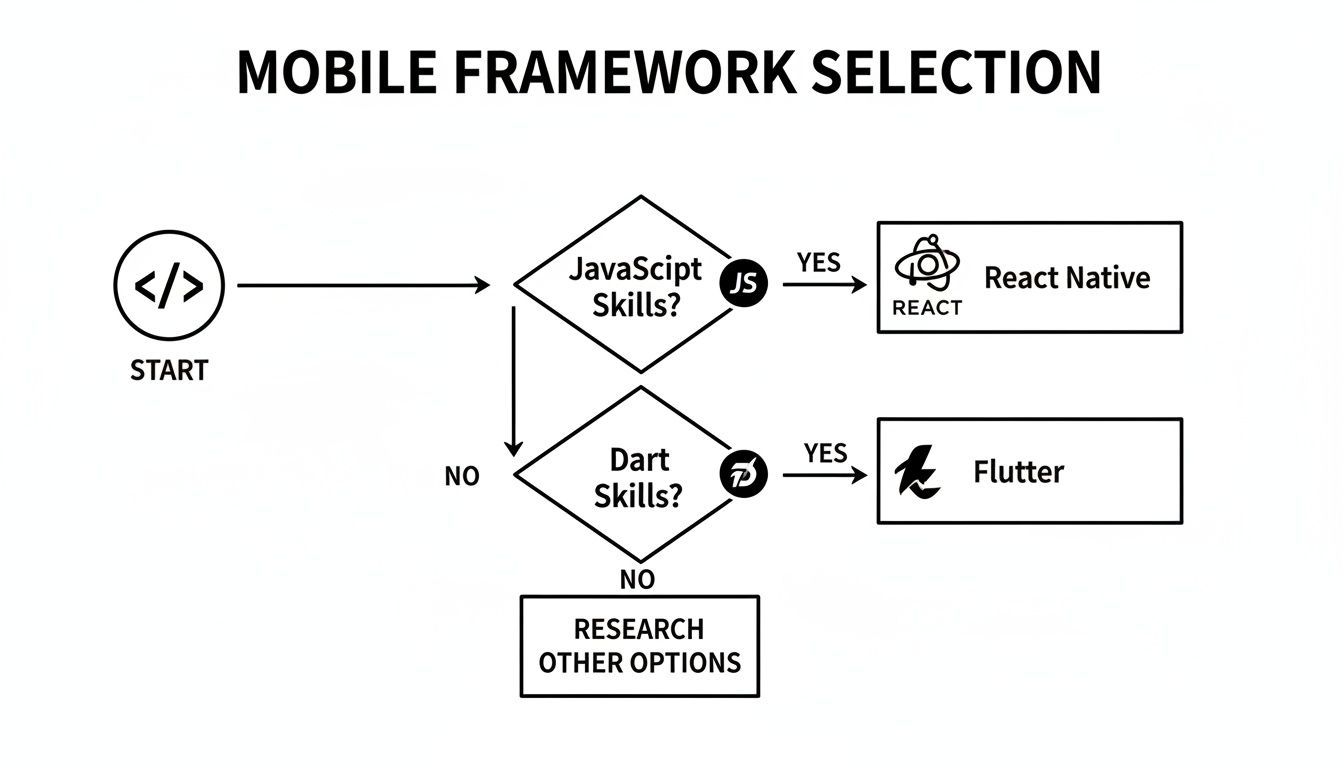
As you can see, your team's current expertise is often the most direct path to choosing the right tech stack. In the end, it all comes down to weighing the undeniable benefits of speed and cost-savings against the potential for performance ceilings and the need to manage those minor platform differences.

A successful cross-platform app is built on a solid foundation. You can write clean, functional code, but the real secret to an app that’s scalable, easy to maintain, and genuinely fast lies in its architecture. Without a smart structure, even the best code devolves into a tangled mess, leading to nasty bugs, painfully slow updates, and a user experience that just feels broken.
Think of your app's architecture as the blueprint for a skyscraper. You wouldn't just start welding beams together without a detailed plan, right? The same logic applies here. A well-designed architecture ensures every part of your app has a clear job and that different layers can talk to each other efficiently without getting tangled up. This is how you max out code sharing without sacrificing speed or quality.
The big goal here is to draw a clean line between the "brains" of your app and its "face." This idea, what we call separation of concerns, is absolutely vital in cross-platform app development.
At the core of any great architecture is the split between your business logic and the user interface (UI). Your business logic is the secret sauce—it's the rules, data crunching, and workflows that make your app do its thing, like calculating a user's fitness goals or processing a payment. This logic needs to be completely independent of how it looks on a screen.
When you isolate this core logic, you essentially create a portable engine that couldn't care less if it's running on iOS, Android, or a web browser. The UI layer, which is all the visual stuff like buttons, screens, and animations, just becomes a "view" that presents this logic to the user. This approach makes your app incredibly flexible and way easier to test and maintain down the road.
This separation pays off in a few huge ways:
A clean architecture ensures your app's core functionality remains stable and predictable, even as the user interface evolves to meet the design standards of different operating systems.
Okay, so you can share most of your code. But what happens when you need to tap into a specific device feature? Say, accessing an iPhone's Face ID sensor or a unique Android camera mode. This is where you need to talk directly to the native operating system, and for that, we use native bridges (or "channels," as they're called in Flutter).
Think of a native bridge as a tiny, platform-specific translator. It's a small piece of code that lets your shared JavaScript or Dart codebase communicate with the native device APIs. This is how your cross-platform app gets to access powerful, hardware-specific features, just like a true native app would.
You might need a native bridge to:
Building these bridges does require a little bit of native dev knowledge (like Swift for iOS or Kotlin for Android), but it gives you the best of both worlds. You get a highly reusable codebase with the power to access any native feature you need. This strategic use of native code is what blows past the limitations of older cross-platform tools.
Finally, every interactive app needs to manage its state—that's all the data that changes as a user taps, swipes, and types. This covers everything from what's in a shopping cart to whether a user is logged in. In a cross-platform app, your state management system has to be rock-solid and completely platform-agnostic.
This is where popular libraries like Redux, MobX, or Riverpod (for Flutter) come in. They provide a centralized "store" for your app's state. Any part of your UI can "subscribe" to changes in this store, and whenever the data updates, the UI automatically re-renders to show the new information.
This approach keeps your app's state consistent and predictable on every platform. It stops data from getting out of sync and makes tracking down bugs in complex user flows a whole lot simpler. A well-oiled state management system is the final piece of the architectural puzzle, making sure your app stays stable and performant as it grows.
A solid architecture is your blueprint, but let's be real—building every single component from the ground up is a painfully slow and expensive way to launch an app. Why would you spend weeks engineering foundational features like authentication flows, navigation, or settings screens when you can start with a pro-built, production-ready base?
This is where UI kits and templates become your secret weapon in cross-platform app development.
Instead of starting from zero, these tools let you start much closer to the finish line. They're essentially pre-built, fully functional app starters that handle the universal, time-sucking tasks common to almost every project. This isn’t about cutting corners; it’s a strategic move to pour your most valuable resource—developer time—into what actually matters: your app's unique features and core business logic.
Think of it like building a custom car. You could mine the ore, smelt the steel, and forge every single bolt yourself. Or, you could grab a high-performance chassis and engine built by experts and focus all your energy on designing the custom body, slick interior, and groundbreaking tech that makes your car one-of-a-kind.
UI kits and templates are that professionally engineered chassis. They shave weeks, or even months, off your development timeline, which is a massive deal. For startups and lean product teams, that kind of speed can be the difference between capturing a market and watching a competitor get there first.
Let’s be clear: high-quality templates deliver way more than just a nice-looking user interface. They are complete, architecturally sound applications built with best practices baked in from day one.
Using a production-ready template means you're not just saving time on UI work. You're inheriting a clean, scalable, and accessible codebase that has already solved a ton of complex engineering challenges for you.
This pays off in a few critical ways that go way beyond aesthetics:
Imagine you’re building a new fitness tracking app. Instead of burning your first month coding user sign-up, login, and profile management screens, you could use a fitness app template. That starter would hand you all that functionality on day one. Your team could immediately jump into the fun stuff—building the custom workout logging feature or integrating with wearable device APIs.
Likewise, a finance app template might come with pre-built screens for connecting bank accounts, visualizing spending charts, and setting budgets. This frees up your team to focus their brainpower on developing a proprietary algorithm for investment suggestions instead of reinventing the wheel on basic UI.
If you're building with React Native, you can find a React Native UI kit that provides dozens of copy-paste-ready screens, from e-commerce product pages to social media feeds. By using these powerful tools, you completely change your development process. You shift from building commodity features to creating genuine innovation, delivering a much better product to your users in a fraction of the time.
Writing code once is the dream, but making sure it actually runs flawlessly everywhere? That takes a real strategy for testing and deployment. While a single codebase is a massive time-saver, it also means a single bug can wreak havoc across your entire user base on both iOS and Android.
This is why developing a multi-platform testing mindset isn't just a good idea—it's absolutely essential for a successful launch. Your game plan should be a smart mix of automated checks and some good old-fashioned, hands-on validation. Think of automation as your first line of defense, catching nasty regressions and functional errors before they ever see the light of day.
A solid testing pyramid is your best friend here. You start at the bottom with unit tests, which are perfect for verifying the smallest, most isolated pieces of your logic. From there, you build up to integration tests to make sure all those little pieces play nicely together.
At the very top, you have end-to-end (E2E) tests. Using powerful tools like Detox or Appium, you can simulate real user journeys—tapping, swiping, and navigating—across the entire app on both iOS and Android simulators. This layered approach helps you pinpoint bugs early and with incredible precision.
And when you do hit a snag, you'll need to know how to fix it. For a deeper dive, our guide on how to debug a React Native app is packed with practical tips for squashing bugs during development.
Look, automation is a powerhouse, but it can't catch everything. Emulators are fantastic, but they just can't replicate the quirks of real hardware, spotty network conditions, or random user interruptions like an incoming phone call.
There's simply no substitute for testing on a wide range of physical iOS and Android devices. This is where you find the subtle UI glitches, performance hiccups, and weird platform-specific bugs that automated scripts will always miss.
Getting your hands on real devices helps you validate the stuff that truly matters to your users:
Alright, your app has been tested, polished, and is ready for the world. Now comes the deployment. The Apple App Store and Google Play Store each have their own unique hoops you need to jump through, from submission requirements to review processes. You'll be busy preparing app metadata, screenshots, privacy policies, and tweaking store listings for each platform.
This final step used to be a massive headache, but modern tools have made it so much easier. Services like Expo Application Services (EAS), for instance, can automate the entire build and submission workflow. With just a few commands, EAS can build your app binaries in the cloud for both platforms and even handle uploading them to App Store Connect and the Google Play Console.
What used to be a multi-day ordeal can now be a streamlined, repeatable process.
When you're digging into cross-platform app development, a few questions always seem to pop up. Let's tackle some of the most common ones we hear from developers and product owners to clear the air.
For the vast majority of apps out there—think e-commerce, social media, and productivity tools—modern frameworks like React Native and Flutter deliver performance that’s practically indistinguishable from native. They’re more than powerful enough to create a buttery-smooth user experience.
But let's be real. If you're building something graphically intense, like a high-end 3D game or a complex video editor, going fully native might still be your best bet. That’s where you need to squeeze every last drop of power out of the device.
Absolutely. This is a common myth that needs busting. Modern cross-platform frameworks have robust ways—often called 'bridges' or 'channels'—to tap directly into native device features.
There are extensive libraries and APIs available that let your app use the camera, GPS, accelerometer, and contacts, just like a fully native app would.
The real magic of modern cross-platform development isn’t just about writing code once; it’s about achieving massive code reuse while still maintaining a deep, meaningful connection to native device capabilities.
If your app is well-architected, seeing 90-95% code sharing between iOS and Android is totally normal. That number might dip a little if you’re also targeting the web, mostly due to UI tweaks needed for different screen sizes and interactions.
So, what makes up that last 5-10%? It's usually stuff like:
Ready to stop wrestling with boilerplate and start building? gluestack market has a whole collection of production-ready templates and UI kits designed to launch your cross-platform project. Skip the setup and jump straight to building your app's core features. Check out the marketplace and see for yourself.

Feb 23, 2026
4 min read
Discover powerful mobile app monetization strategies to boost your revenue. Our guide covers IAPs, ads, and subscriptions for React Native apps and beyond.

Feb 22, 2026
4 min read
A clear guide to app development cost estimation. Learn what drives costs, see budget examples, and discover strategies to build your app for less.

Feb 21, 2026
4 min read
Discover how to promote mobile application effectively with proven ASO, paid campaigns, and retention strategies.

Feb 15, 2026
4 min read
Discover how to create a prototype of a website with a practical, step-by-step guide. Explore tools, testing methods, and tips to bring your idea to life.

Feb 14, 2026
4 min read
Confused about mockups vs wireframes? Learn the key differences, when to use each, and how to streamline your React Native app development workflow.

Feb 13, 2026
4 min read
Discover how mobile apps templates accelerate development. Learn to choose, customize, and deploy high-quality React Native templates for your next project.

Feb 12, 2026
4 min read
Explore mobile application interface design with practical tips, core principles, and platform-aware workflows to craft apps users love.

Feb 10, 2026
4 min read
Learn mobile first design principles to craft fast, accessible apps that delight users. Practical tips, examples, and testing strategies.

Feb 08, 2026
4 min read
Explore the progressive web app vs native debate with our in-depth guide. We compare performance, cost, and UX to help you make the right strategic choice.

Feb 07, 2026
4 min read
Discover how React Native templates can accelerate your app development. This guide explores choosing, customizing, and deploying templates for faster launches.

Feb 05, 2026
4 min read
Discover the key differences between expo vs react native, including workflow, builds, and performance to help you pick the right path for your app.

Feb 03, 2026
4 min read
Master image with text overlay in React Native with responsive, accessible patterns. Learn expo setup, NativeWind styling, and gluestack-ui examples.

Feb 01, 2026
4 min read
Learn how to make an app for my business quickly with template-based steps from planning to launch, plus tips to scale and optimize.

Jan 31, 2026
4 min read
Ready to build an app? This guide shares practical strategies for validating your idea, choosing a tech stack, and navigating the App Store launch.

Jan 30, 2026
4 min read
Master responsive design for mobile apps with this guide on fluid layouts, breakpoints, and React Native. Build UIs that adapt perfectly to any screen.

Jan 25, 2026
4 min read
Learn how to design an Android app that stands out. This guide covers UX research, wireframing, Material Design, and the developer handoff process.

Jan 24, 2026
4 min read
Explore ui design web essentials: a complete guide to principles, responsive patterns, and workflows for intuitive, engaging web interfaces.

Jan 23, 2026
4 min read
Discover 10 essential mobile app design best practices for building exceptional cross-platform apps. Actionable tips for UI, UX, navigation, and performance.

Jan 21, 2026
4 min read
Discover how to debug React Native apps effectively. This guide covers Flipper, React DevTools, and native code troubleshooting for faster development cycles.

Jan 20, 2026
4 min read
Learn how to create app for your business with a practical, modern approach. Plan, customize, and launch with proven steps.

Jan 19, 2026
4 min read
A complete guide to mobile app development for startups. Learn how to validate your idea, build an MVP, and launch a successful app faster and more affordably.

Jan 18, 2026
4 min read
Discover how to choose the right React website template to accelerate your project. Our guide covers everything from quality checklists to deployment.

Jan 17, 2026
4 min read
Discover how to choose, customize, and deploy a React Native app template. This guide provides practical steps for launching production-ready apps faster.

Jan 16, 2026
4 min read
Discover how mobile application templates accelerate development. This guide covers how to choose, customize, and launch your app with the right foundation.

Jan 13, 2026
4 min read
Start your journey in mobile app development for beginners. This guide breaks down how to build your first cross-platform app with React Native and Expo.

Jan 12, 2026
4 min read
Explore the best react native ui libraries and compare features, performance, and ease of use to pick the right toolkit for your app.

Jan 11, 2026
4 min read
Launch your own ride-hailing service with our guide to building a production-ready Uber app clone. Learn MVP strategy, tech stacks, and backend integration.

Jan 10, 2026
4 min read
Master modern cash app design with this guide. Learn the UI/UX, security, and React Native strategies needed to build a fintech app that users trust and love.

Jan 09, 2026
4 min read
Learn how to build a personal finance dashboard with React Native. A practical guide for developers on UI design, data architecture, and production readiness.

Jan 08, 2026
4 min read
A practical guide to building a cross-platform event check in app with React Native. Learn to implement QR scanning, offline sync, and deployment.

Jan 07, 2026
4 min read
Master linear gradient React Native components with our complete guide. Learn practical techniques for Expo, bare RN, and NativeWind to build stunning UIs.

Jan 06, 2026
4 min read
Learn how to change application name in your React Native & Expo projects. This guide covers display names, package IDs, and app store listings.

Jan 05, 2026
4 min read
Discover how to monetize mobile apps with our founder's guide. Learn proven React Native strategies for ads, IAPs, and subscriptions to maximize your revenue.

Jan 04, 2026
4 min read
A practical guide on how to create a website app with a single codebase. Learn to build for web, iOS, and Android using React Native, Expo, and TypeScript.

Jan 03, 2026
4 min read
Learn how to create an app for your business with this definitive guide. Discover practical strategies for validation, development, and launch that work.

Jan 02, 2026
4 min read
Learn how to create a wireframe for a website with this practical guide. Move from initial sketches to developer-ready designs that get built right.

Jan 01, 2026
4 min read
Deciding on progressive web application vs native? This guide offers a deep comparison of performance, cost, UX, and use cases to help you choose wisely.

Dec 31, 2025
4 min read
Discover 10 mobile app security best practices for React Native. Learn to secure data, APIs, and code with actionable tips and examples for 2025.

Dec 30, 2025
4 min read
Unlock the real React Native app development cost. Our guide breaks down pricing by feature, team, and complexity to help you budget with confidence.

Dec 29, 2025
4 min read
A practical guide to master your React Native debug workflow. Learn to use Flipper, React DevTools, and Hermes to solve bugs in Expo and bare RN apps.

Dec 28, 2025
4 min read
The ultimate React Native tutorial for beginners. Learn to build beautiful cross-platform apps using a modern stack like Expo, TypeScript, and gluestack-ui.

Dec 27, 2025
4 min read
A practical guide on how to build a mobile app. Learn to go from concept to a market-ready app using templates, React Native, and proven development strategies.

Dec 26, 2025
4 min read
Discover interface design for websites with actionable tips on layout, responsiveness, and usability to boost conversions.

Dec 25, 2025
4 min read
Discover designs for apps that blend minimal aesthetics with personalization, and learn to build user-centric interfaces that boost engagement.

Dec 24, 2025
4 min read
Learn graphical interface design - essentials for mastering core principles, modern workflows, and cross-platform strategies to build intuitive, engaging UIs.

Dec 23, 2025
4 min read
Discover how high fi wireframes bridge the gap between ideas and code. Learn a practical workflow for creating, testing, and handing off effective UI designs.

Dec 22, 2025
4 min read
Discover mobile app interface design with practical principles, accessibility, and workflows that boost user engagement.

Dec 21, 2025
4 min read
Explore the top 10 UI UX design trends for 2025. Get expert insights and practical React Native tips to build next-gen cross-platform apps that stand out.

Dec 20, 2025
4 min read
Discover how mobile app templates accelerate development from idea to launch. Learn to select, customize, and deploy templates for a faster time to market.

Dec 18, 2025
4 min read
Explore the best react native ui libraries to accelerate mobile development with performance, theming, and accessibility. Expert tips inside.

Dec 16, 2025
4 min read
Master React Native PDF handling. Learn to generate, view, and share PDFs with practical code examples, library comparisons, and performance tips.

Dec 15, 2025
4 min read
A practical guide to choosing the right React Native component library. Learn how to evaluate options, avoid common pitfalls, and build apps faster.

Dec 14, 2025
4 min read
Find the perfect React Native UI library for your project. This guide compares top libraries, selection criteria, and customization strategies.

Dec 13, 2025
4 min read
Learn how to change app name in React Native and Expo. Our guide covers display names, bundle IDs, and store listings for iOS and Android projects.

Dec 12, 2025
4 min read
Discover the best React Native component library for your next project. We compare top libraries on performance, customization, and real-world use cases.

Dec 11, 2025
4 min read
Discover how to choose the right React Native UI kit. This guide covers top kits, selection criteria, and customization to accelerate your app development.

Dec 10, 2025
4 min read
Explore our in-depth guide to find the best React Native UI library. We compare top contenders to help you choose the right fit for your project.

Dec 09, 2025
4 min read
Discover a practical approach to building apps with React Native. This guide covers setup, UI, state management, and testing to help you ship great apps.

Dec 08, 2025
4 min read
android login with facebook: Learn to set up the Facebook SDK, manage tokens, and implement secure authentication across native Android, cross-platform apps.

Dec 07, 2025
4 min read
Master the alert in React Native. Learn to handle platform differences, build custom modals, and apply best practices for a seamless user experience.

Dec 06, 2025
4 min read
keyboardavoidingview react native: Master keyboard handling with KeyboardAvoidingView across iOS, Android, Expo, and TypeScript.

Dec 05, 2025
4 min read
A practical guide to implementing a React Native PDF viewer. Learn to compare libraries, handle native setup, and troubleshoot common issues with real code.

Dec 04, 2025
4 min read
how to validate startup idea: learn proven methods like customer interviews, MVPs, and metrics to confirm market fit.

Dec 03, 2025
4 min read
how to make app like uber: Learn core features, tech stack, development steps, testing, and launch tips.

Dec 02, 2025
4 min read
Build a rock-solid React Native setup. This guide covers Expo vs. Bare workflows, TypeScript, pnpm monorepos, NativeWind, and deployment strategies.

Dec 01, 2025
4 min read
A practical guide to Stripe React Native integration. Learn to set up your server, build payment UIs, handle webhooks, and launch secure mobile payments.

Nov 30, 2025
4 min read
Learn how to master push notifications in React Native. This guide covers setup, best practices, and advanced techniques for engaging your users.

Nov 29, 2025
4 min read
Build powerful location-based apps with our practical guide to react native with google maps. Get setup guides, pro tips, and best practices for iOS & Android.

Nov 28, 2025
4 min read
Explore deep linking react native with a practical guide to configuring URL schemes, universal links, navigation, and testing for Expo and bare apps.

Nov 28, 2025
4 min read
A practical guide to building a scalable React Native design system. Learn to implement tokens, theming, and tools like NativeWind and gluestack-ui.

Nov 26, 2025
4 min read
Learn why react native expo templates speed up your projects with ready-made patterns and practical tips.

Nov 25, 2025
4 min read
Discover how to improve developer productivity with actionable strategies for workflow, tooling, and culture. A practical guide for software engineering teams.

Nov 24, 2025
4 min read
Discover the best cross platform app development tools. Compare top frameworks like Flutter and React Native to build and ship apps faster.

Nov 23, 2025
4 min read
This Expo React Native tutorial provides a hands-on guide to building cross-platform apps. Learn setup, styling with NativeWind, navigation, and deployment.

Nov 22, 2025
4 min read
Build beautiful UIs faster with this guide to Tailwind CSS React Native. Learn setup, styling, and advanced techniques with NativeWind for mobile apps.

Nov 21, 2025
4 min read
Explore our curated list of 7 top-tier React Native app examples. Discover production-ready templates and resources to build your next app faster.

Mar 19, 2025
4 min read
gluestack market offers React Native UI templates to accelerate development. Get customizable, production-ready React Native app templates and Ui kit, some free. Build faster & smarter today!


