Dec 27, 2025

4 min read


Building a mobile app really boils down to four key stages: choose a modern cross-platform framework, grab a pre-built template, customize it with your unique features, and then push it to the app stores. This whole approach, especially with tools like React Native and Expo, lets you sidestep months of grinding out foundational code. You get to jump straight to the fun part: innovation and getting your idea to market fast.
Diving into the mobile app world can feel like a massive undertaking, but the right strategy changes everything. These days, success isn't just about a brilliant idea; it’s about speed, quality, and making sure your app works flawlessly on both iOS and Android from day one.
This guide is your modern blueprint for building a mobile app the smart way. We're going to lean into a cross-platform strategy using React Native, Expo, and ready-made templates from gluestack market. Think of it as a roadmap that helps you skip the boilerplate and focus your energy on what makes your product special.
Let's be real: the mobile landscape is packed. The wild west days of explosive growth are gone, replaced by a mature market where user experience is king. Sure, global app downloads shot up from 140 billion in 2016 to over 218 billion by 2020, but today's numbers tell a different story. It's the polished, high-performing apps that actually win and keep users.
This competitive arena is also incredibly lucrative. Mobile app revenue is projected to hit a staggering $935 billion in 2024, a massive leap from $475.90 billion in 2022.
This is exactly why cross-platform tools have become a game-changer for most teams. Building two separate native apps for iOS and Android is just too slow and expensive. A single, unified codebase means you can develop faster, handle maintenance easier, and deliver a consistent, high-quality experience to everyone, no matter their device.
A solid blueprint doesn't just list technical steps; it lines up your development strategy with what’s actually happening in the market. Speed, cross-platform reach, and a laser focus on your core value—those are the pillars of a successful launch.
Before you write a single line of code, you need to get your tools in order. For most developers and small teams trying to build quickly without cutting corners, using established frameworks and UI kits is the smartest move you can make.
First things first, though: make sure your idea is solid. There’s nothing worse than building something nobody wants. We’ve put together a guide on how to validate your startup idea that’s a must-read before you commit any serious resources.
Here's a quick look at the stack we'll be using throughout this guide. It's a powerful, modern combination that's become the go-to for countless successful apps.
| Technology | Role in Your Project | Key Advantage |
|---|---|---|
| React Native | The core framework for building your app with JavaScript and React. | Write your code once and deploy it on both iOS and Android, saving immense time. |
| Expo | A platform that simplifies React Native development and deployment. | Handles the messy native configuration, so you can focus on building features. |
| TypeScript | A superset of JavaScript that adds static typing. | Catches errors early, improves code quality, and makes your app easier to maintain. |
| gluestack UI | A universal, themeable UI library for React & React Native. | Provides accessible, production-ready components that work seamlessly everywhere. |
| gluestack market | A marketplace for pre-built, customizable app templates. | Gives you a massive head start, cutting down development time by hundreds of hours. |
This toolkit is designed for one thing: efficiency. It lets you build, test, and ship beautiful, functional apps faster than ever.
As you map out your plan, you might also think about bringing in some outside help. Checking out the Top 7 Mobile App Development Agencies & Platforms can give you a great feel for the professional landscape. But for now, this guide is all about giving you the tools and the knowledge to build it yourself, with the right foundation from the get-go.
The success of your app often comes down to the foundation you build on. Starting with a blank file means months of boilerplate work just to get to square one. A much smarter approach is to use a template, which can get you 80% of the way to a finished product right out of the gate. This first decision is huge—it directly impacts your speed, budget, and overall flexibility.
The gluestack market is packed with production-ready templates built with React Native, Expo, and TypeScript. This isn't about taking a shortcut; it's about being strategic. When you use high-quality, pre-built code, you free up your most valuable asset—time—to nail the unique features that will actually make your app a success.
Deciding whether to go it alone with a template or hire an agency is a major fork in the road.
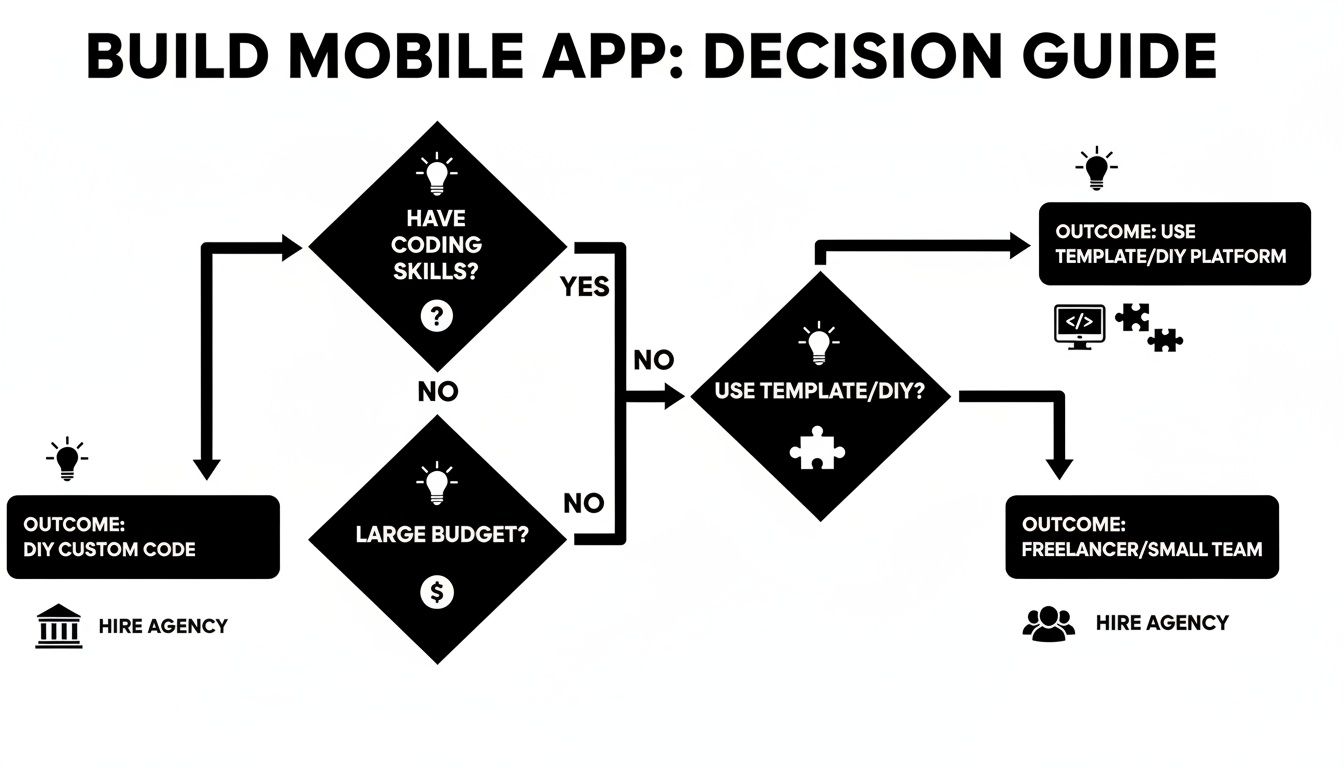
As you can see, the path from idea to launch often depends on your resources and skills. For many developers and entrepreneurs, templates offer a powerful middle ground.
When you start browsing templates, you’ll quickly notice two main types: domain-specific starters and general UI kits. They each solve different problems, and picking the right one is all about your project goals.
gluestack-ui pro, is more like a massive box of LEGOs. It's a comprehensive library of individual screens and components that gives you the building blocks for just about any app you can imagine.Let's walk through a real-world scenario. Say you want to build a new meditation and mindfulness app. You have a killer idea for guided audio sessions, but you still need all the standard stuff: user login, a settings page, a subscription screen, and a library to browse content.
So, do you grab a specialized "Wellness App" template or go with the more flexible gluestack-ui pro kit? This is a common crossroads for developers. Here’s a little framework to help you decide.
| Consideration | Domain-Specific Template (e.g., Fitness App) | General UI Kit (e.g., gluestack-ui pro) |
|---|---|---|
| Speed to MVP | Fastest. The core app is already built. You're just customizing and adding your unique flavor. | Moderate. You have all the pieces, but you need to assemble them into a cohesive user flow. |
| Customization | More constrained. The design and logic are pre-defined, which can be tough to change if your vision shifts. | Highly flexible. You have complete creative freedom to combine screens and components however you want. |
| Learning Curve | Lower. You’re learning one specific app’s architecture, not a whole component system from scratch. | Higher. You need to understand how to compose different screens and manage the app's navigation. |
| Long-Term Scalability | Good. Perfect for a focused product, but might feel restrictive if you pivot to a totally new feature set later. | Excellent. The kit can adapt to any new direction your app takes, making it ideal for ambitious, evolving projects. |
For our meditation app example, a domain-specific template is almost certainly the right move. It would provide the necessary screens and user flows right away, letting you focus on integrating your unique audio content. Just think—the pre-built subscription logic alone could save you weeks of development time.
My two cents: If you can find a template that closely matches your app's core purpose, it will almost always be the faster, more efficient path. A UI kit is the way to go when your idea doesn't fit a standard mold or if you know you'll be making big pivots down the road.
This decision really boils down to balancing speed with flexibility. To see what's out there, check out this curated collection of high-quality mobile app templates. Choosing wisely here sets you up for a much smoother journey to launch.
Alright, you’ve got a solid template as your foundation. Now the real fun begins. This is where you breathe life into the project, transforming a well-structured but generic starting point into your app—something that screams your brand and delivers that unique magic you envisioned.
Think of it this way: the template handled all the boilerplate. You get to skip the tedious work of building login screens from scratch and jump straight into what actually matters to your users. This process really breaks down into two parts: overhauling the visuals and then injecting the custom functionality that nobody else has.
Every template from gluestack market comes baked-in with NativeWind, which is a game-changer. It essentially brings the power and convenience of Tailwind CSS into the React Native world. If you've ever touched web development, this will feel incredibly intuitive. No more digging through messy stylesheets; you’re just applying simple, readable utility classes directly to your components.
Let’s say you picked a fitness app template. By default, it uses a generic blue, but your brand is all about a vibrant green and dark charcoal. Making that change is a breeze.
config/theme.ts. Here, you can swap out the primary, secondary, and accent colors for your own brand palette. Changing primary: 'blue' to primary: 'emerald' can repaint the entire app in a single move.className="p-2" to className="p-4". To bump up a heading’s font size, you’d add className="text-2xl font-bold". It’s that direct.This utility-first approach is incredibly efficient. To get a better sense of how these tools fit together, check out our guide on the top React Native UI libraries. It gives some great context on why this stack is so effective for modern app development.
Now we get to the best part: building something that doesn't come in the box. This is how your app stops being a template and starts being a unique product. The template gives you the skeleton; you provide the heart.
Let's stick with our fitness app. The template already handles user profiles and workout logging, but your "killer feature" is streaming high-quality workout videos from a professional service. That means you'll need to pull in data from a third-party API.
A great template doesn't limit your creativity; it liberates it. By handling the 80% of standard features every app needs, it gives you the time and stable foundation to perfect the 20% that will make your app a success.
Here's how you might tackle that, from a high level:
.env)—never hardcode them.interface to describe the video data you expect. This helps catch bugs before they happen. You might define a WorkoutVideo type with properties like id, title, thumbnailUrl, and videoUrl.axios or the built-in fetch API. This function’s job is to call the video provider’s endpoint, grab the list of videos, and return it as a clean array of WorkoutVideo objects.VideoLibraryScreen. It will call your new service function, save the video data to its state, and then use a FlatList component to render a beautiful, scrollable list of videos for your users.This whole process shows why starting with a template is so powerful. You're standing on the shoulders of a production-ready foundation, allowing you to focus your energy on the custom logic that actually makes your app valuable. You're not just assembling parts; you're building a unique experience.
After all, with the mobile app economy already hitting $935 billion in 2024, smart development and monetization are everything. Using a quality template frees you up to focus on those vital, revenue-generating features instead of getting lost in the weeds of basic setup. You can find more insights on this booming market in this comprehensive app statistics report.
A brilliant app idea is worthless if the final product is a buggy mess. Now that you've got your template customized and the core features are in place, it’s time to switch gears from building to breaking. This is where we get serious about quality, putting the app through its paces to ensure it delivers a smooth, professional experience from the second it hits the stores.

This isn't just about catching crashes. It's about polishing every interaction and getting all your ducks in a row for the app stores. A killer launch paves the way for great reviews and solid initial downloads.
Working with Expo and React Native gives you a massive advantage—you can test across platforms without needing a closet full of devices. The trick is to layer your approach, starting broad with simulators and then narrowing your focus to real-world hardware.
Your first line of defense is right inside your development environment. Fire up the iOS simulator (via Xcode) and the Android emulator (via Android Studio). These are perfect for catching obvious layout bugs and functional issues super quickly. You can instantly see how your UI holds up on different screen sizes, from a tiny iPhone SE to a massive Android tablet.
Once you’ve squashed the low-hanging fruit, you need to get the app onto a physical device. This is where Expo Go becomes your best friend. Just scan a QR code, and you’re running a live development build on your own iPhone or Android. It’s absolutely essential for testing native features like the camera or push notifications that simulators just can't handle properly.
Pro Tip: Never assume your app is perfect on both platforms just because you're using React Native. I've seen it a hundred times. Spend real time hunting for those subtle UI differences—a button that looks great on iOS but is a few pixels off on Android, or a font that renders weirdly. These tiny details are what separate a professional app from an amateur one.
Before you can even dream of hitting that "submit" button, you have to prep all the marketing materials the app stores demand. This is your app's storefront, and first impressions count for everything. Don't rush this part. A weak icon or a confusing description can kill your launch before it even gets started.
Here’s what you absolutely need to nail:
Think of these assets as your most important marketing tools, because they are.
Okay, testing is done and your assets look amazing. Now it’s time to create the actual files you'll upload to the Apple App Store (.ipa) and Google Play Store (.apk or .aab). This used to be an absolute nightmare, but Expo Application Services (EAS) has completely changed the game.
EAS is a cloud service that handles the entire native build process for you. Seriously. No more needing a dedicated Mac to build for iOS or wrestling with complex Android configurations. You just hand your Expo project over, and EAS does the rest.
It’s incredibly simple to get going:
eas.json file. This file tells EAS how to build your app for different environments like development or production.eas build --platform all—starts the build process in the cloud for both iOS and Android at the same time.When it's finished, EAS gives you the final files, all signed and ready to go. This service is a genuine time-saver and removes one of the biggest headaches for anyone learning how to build a mobile app.
You’ve built, customized, and thoroughly tested your app. Now for the moment of truth: getting it into the hands of real users. This is where you face the gatekeepers of the mobile world—the Apple App Store and the Google Play Store.
Successfully launching your app is a huge milestone, but it's really just the starting line. The real work of growing a successful app kicks off the moment it goes live.
Getting your app on the stores isn’t as simple as uploading a file. It’s a full-on application process. Both Apple and Google have strict guidelines to ensure quality, security, and a consistent user experience across their platforms. Getting this wrong can lead to frustrating rejections and delays that sap your momentum.
You'll need more than just your app's code. Be ready to provide a whole package of assets, including your app icon, a series of compelling screenshots, a detailed description, and a well-researched list of keywords for App Store Optimization (ASO).
Interestingly, most rejections have nothing to do with bugs in your code. They usually come down to metadata slip-ups and policy violations. Here are the top offenders I see time and time again:
Apple, in particular, has notoriously high standards. Their human-led review process can take a few days, and they will poke into every corner of your app. Google's review is generally faster and more automated, but they won't hesitate to pull your app later if it's found to violate their policies.
Congratulations, your app is live! Take a moment to celebrate—you've earned it. But don't rest for too long, because the next phase is already beginning. A great mobile app is a living product, one that has to evolve based on user feedback and shifts in the market.
Cross-platform development is completely changing how teams build apps, with React Native leading the charge. Already, about 33% of mobile developers are using these kinds of frameworks. The app stores are incredibly crowded—with 2.87 million apps on Google Play and 1.96 million on the App Store—but the good news is that the rate of new publications is slowing down. This signals a market shift toward higher quality and faster entry, which is exactly where templates shine.
The launch isn't the finish line; it's the starting gun. The initial user feedback you receive is gold. It will tell you exactly what to fix, what to improve, and what to build next.
Your focus should immediately shift to monitoring and iteration. Keep a close eye on your analytics to see how people are actually using the app. Where do they spend the most time? At what point do they close it? That data, combined with direct user reviews, becomes the roadmap for your first update.
Once your app is out there and you start seeing some traction, you'll want to think about making money from it. It's a good idea to explore some proven monetization strategies for apps to turn your growing user base into a sustainable business.
This is also where using gluestack market templates gives you a serious long-term advantage. These templates aren't just a one-time launchpad; they get ongoing updates to ensure they stay compatible with the latest versions of React Native, Expo, and all the underlying libraries. This means you inherit a foundation that stays current, letting you focus on building out your unique features instead of constantly wrestling with dependency maintenance. Your app stays secure and performs well, which is absolutely essential for long-term growth and keeping your users happy.
Jumping into mobile app development always kicks up a few key questions. It doesn't matter if you're a veteran developer or a founder with a vision—getting these things sorted out early on can save you from some serious headaches later. Let's dig into the big ones we hear most often.
Getting these details right isn't just about ticking boxes. They're the practical realities that can make or break your project. Nailing down the specifics of templates, backend integrations, and licensing means you can build with confidence on a solid foundation.
This is usually the first question out of the gate, and for good reason. The short answer is: you need a solid grasp of React and React Native. While templates from gluestack market give you a massive head start by handling the tricky setup, UI, and navigation, they're meant to accelerate your work, not eliminate it entirely. They aren't no-code platforms.
Think of it this way: the template is like a professionally built car chassis, complete with a powerful engine and a fully wired dashboard. Your job is to paint it, connect the final components, and fine-tune the engine for peak performance. You'll still be writing code, but it's the fun stuff:
You don't need to be a coding wizard, but a comfortable understanding of JavaScript/TypeScript and React fundamentals is key to really making the template your own.
The real beauty of a template is that it frees you up to focus your coding energy on your app's unique value, not on building another login screen from scratch. You get to skip the boilerplate and jump straight to the creative, impactful work.
Absolutely. In fact, we designed them that way. Every template on gluestack market is completely backend-agnostic. They are entirely focused on the frontend—the user interface and experience—which means they don't care where your data comes from.
This gives you total freedom to connect to whatever API you need. The templates are built to handle any of these common scenarios:
The template is the clean, interactive "face" of your app; you bring the "brains" and data that power it all from behind the scenes.
Figuring out licensing is crucial for using the template correctly and keeping your project on the right side of the law. We've structured our licenses to fit different scenarios, from a personal side project to a full-blown commercial product.
Here’s a quick rundown of the license types you’ll see. You should always read the specific terms for any template you download, but this will give you the general idea.
| License Type | Best For... | Can the Final App Be Sold? |
|---|---|---|
| Personal | A portfolio piece or an internal company tool. | No |
| Commercial | A single app that you'll charge money for. | Yes, for one end product. |
| Extended | Agencies building apps for multiple clients. | Yes, for multiple products. |
Picking the right license from the get-go just makes life easier. The Personal license is perfect if you're just learning or building something for yourself. But the moment your app is going to make money—either through sales, subscriptions, or as a paid project for a client—you'll need to grab a Commercial license or higher.
Ready to stop building from scratch and start innovating? gluestack market has a huge collection of production-ready React Native templates to help you launch your app faster than you thought possible. Find the perfect foundation for your project.

Feb 23, 2026
4 min read
Discover powerful mobile app monetization strategies to boost your revenue. Our guide covers IAPs, ads, and subscriptions for React Native apps and beyond.

Feb 22, 2026
4 min read
A clear guide to app development cost estimation. Learn what drives costs, see budget examples, and discover strategies to build your app for less.

Feb 21, 2026
4 min read
Discover how to promote mobile application effectively with proven ASO, paid campaigns, and retention strategies.

Feb 15, 2026
4 min read
Discover how to create a prototype of a website with a practical, step-by-step guide. Explore tools, testing methods, and tips to bring your idea to life.

Feb 14, 2026
4 min read
Confused about mockups vs wireframes? Learn the key differences, when to use each, and how to streamline your React Native app development workflow.

Feb 13, 2026
4 min read
Discover how mobile apps templates accelerate development. Learn to choose, customize, and deploy high-quality React Native templates for your next project.

Feb 12, 2026
4 min read
Explore mobile application interface design with practical tips, core principles, and platform-aware workflows to craft apps users love.

Feb 10, 2026
4 min read
Learn mobile first design principles to craft fast, accessible apps that delight users. Practical tips, examples, and testing strategies.

Feb 08, 2026
4 min read
Explore the progressive web app vs native debate with our in-depth guide. We compare performance, cost, and UX to help you make the right strategic choice.

Feb 07, 2026
4 min read
Discover how React Native templates can accelerate your app development. This guide explores choosing, customizing, and deploying templates for faster launches.

Feb 05, 2026
4 min read
Discover the key differences between expo vs react native, including workflow, builds, and performance to help you pick the right path for your app.

Feb 03, 2026
4 min read
Master image with text overlay in React Native with responsive, accessible patterns. Learn expo setup, NativeWind styling, and gluestack-ui examples.

Feb 03, 2026
4 min read
Discover cross platform app development with proven strategies to build faster for iOS, Android, and the web using a single, unified codebase.

Feb 01, 2026
4 min read
Learn how to make an app for my business quickly with template-based steps from planning to launch, plus tips to scale and optimize.

Jan 31, 2026
4 min read
Ready to build an app? This guide shares practical strategies for validating your idea, choosing a tech stack, and navigating the App Store launch.

Jan 30, 2026
4 min read
Master responsive design for mobile apps with this guide on fluid layouts, breakpoints, and React Native. Build UIs that adapt perfectly to any screen.

Jan 25, 2026
4 min read
Learn how to design an Android app that stands out. This guide covers UX research, wireframing, Material Design, and the developer handoff process.

Jan 24, 2026
4 min read
Explore ui design web essentials: a complete guide to principles, responsive patterns, and workflows for intuitive, engaging web interfaces.

Jan 23, 2026
4 min read
Discover 10 essential mobile app design best practices for building exceptional cross-platform apps. Actionable tips for UI, UX, navigation, and performance.

Jan 21, 2026
4 min read
Discover how to debug React Native apps effectively. This guide covers Flipper, React DevTools, and native code troubleshooting for faster development cycles.

Jan 20, 2026
4 min read
Learn how to create app for your business with a practical, modern approach. Plan, customize, and launch with proven steps.

Jan 19, 2026
4 min read
A complete guide to mobile app development for startups. Learn how to validate your idea, build an MVP, and launch a successful app faster and more affordably.

Jan 18, 2026
4 min read
Discover how to choose the right React website template to accelerate your project. Our guide covers everything from quality checklists to deployment.

Jan 17, 2026
4 min read
Discover how to choose, customize, and deploy a React Native app template. This guide provides practical steps for launching production-ready apps faster.

Jan 16, 2026
4 min read
Discover how mobile application templates accelerate development. This guide covers how to choose, customize, and launch your app with the right foundation.

Jan 13, 2026
4 min read
Start your journey in mobile app development for beginners. This guide breaks down how to build your first cross-platform app with React Native and Expo.

Jan 12, 2026
4 min read
Explore the best react native ui libraries and compare features, performance, and ease of use to pick the right toolkit for your app.

Jan 11, 2026
4 min read
Launch your own ride-hailing service with our guide to building a production-ready Uber app clone. Learn MVP strategy, tech stacks, and backend integration.

Jan 10, 2026
4 min read
Master modern cash app design with this guide. Learn the UI/UX, security, and React Native strategies needed to build a fintech app that users trust and love.

Jan 09, 2026
4 min read
Learn how to build a personal finance dashboard with React Native. A practical guide for developers on UI design, data architecture, and production readiness.

Jan 08, 2026
4 min read
A practical guide to building a cross-platform event check in app with React Native. Learn to implement QR scanning, offline sync, and deployment.

Jan 07, 2026
4 min read
Master linear gradient React Native components with our complete guide. Learn practical techniques for Expo, bare RN, and NativeWind to build stunning UIs.

Jan 06, 2026
4 min read
Learn how to change application name in your React Native & Expo projects. This guide covers display names, package IDs, and app store listings.

Jan 05, 2026
4 min read
Discover how to monetize mobile apps with our founder's guide. Learn proven React Native strategies for ads, IAPs, and subscriptions to maximize your revenue.

Jan 04, 2026
4 min read
A practical guide on how to create a website app with a single codebase. Learn to build for web, iOS, and Android using React Native, Expo, and TypeScript.

Jan 03, 2026
4 min read
Learn how to create an app for your business with this definitive guide. Discover practical strategies for validation, development, and launch that work.

Jan 02, 2026
4 min read
Learn how to create a wireframe for a website with this practical guide. Move from initial sketches to developer-ready designs that get built right.

Jan 01, 2026
4 min read
Deciding on progressive web application vs native? This guide offers a deep comparison of performance, cost, UX, and use cases to help you choose wisely.

Dec 31, 2025
4 min read
Discover 10 mobile app security best practices for React Native. Learn to secure data, APIs, and code with actionable tips and examples for 2025.

Dec 30, 2025
4 min read
Unlock the real React Native app development cost. Our guide breaks down pricing by feature, team, and complexity to help you budget with confidence.

Dec 29, 2025
4 min read
A practical guide to master your React Native debug workflow. Learn to use Flipper, React DevTools, and Hermes to solve bugs in Expo and bare RN apps.

Dec 28, 2025
4 min read
The ultimate React Native tutorial for beginners. Learn to build beautiful cross-platform apps using a modern stack like Expo, TypeScript, and gluestack-ui.

Dec 26, 2025
4 min read
Discover interface design for websites with actionable tips on layout, responsiveness, and usability to boost conversions.

Dec 25, 2025
4 min read
Discover designs for apps that blend minimal aesthetics with personalization, and learn to build user-centric interfaces that boost engagement.

Dec 24, 2025
4 min read
Learn graphical interface design - essentials for mastering core principles, modern workflows, and cross-platform strategies to build intuitive, engaging UIs.

Dec 23, 2025
4 min read
Discover how high fi wireframes bridge the gap between ideas and code. Learn a practical workflow for creating, testing, and handing off effective UI designs.

Dec 22, 2025
4 min read
Discover mobile app interface design with practical principles, accessibility, and workflows that boost user engagement.

Dec 21, 2025
4 min read
Explore the top 10 UI UX design trends for 2025. Get expert insights and practical React Native tips to build next-gen cross-platform apps that stand out.

Dec 20, 2025
4 min read
Discover how mobile app templates accelerate development from idea to launch. Learn to select, customize, and deploy templates for a faster time to market.

Dec 18, 2025
4 min read
Explore the best react native ui libraries to accelerate mobile development with performance, theming, and accessibility. Expert tips inside.

Dec 16, 2025
4 min read
Master React Native PDF handling. Learn to generate, view, and share PDFs with practical code examples, library comparisons, and performance tips.

Dec 15, 2025
4 min read
A practical guide to choosing the right React Native component library. Learn how to evaluate options, avoid common pitfalls, and build apps faster.

Dec 14, 2025
4 min read
Find the perfect React Native UI library for your project. This guide compares top libraries, selection criteria, and customization strategies.

Dec 13, 2025
4 min read
Learn how to change app name in React Native and Expo. Our guide covers display names, bundle IDs, and store listings for iOS and Android projects.

Dec 12, 2025
4 min read
Discover the best React Native component library for your next project. We compare top libraries on performance, customization, and real-world use cases.

Dec 11, 2025
4 min read
Discover how to choose the right React Native UI kit. This guide covers top kits, selection criteria, and customization to accelerate your app development.

Dec 10, 2025
4 min read
Explore our in-depth guide to find the best React Native UI library. We compare top contenders to help you choose the right fit for your project.

Dec 09, 2025
4 min read
Discover a practical approach to building apps with React Native. This guide covers setup, UI, state management, and testing to help you ship great apps.

Dec 08, 2025
4 min read
android login with facebook: Learn to set up the Facebook SDK, manage tokens, and implement secure authentication across native Android, cross-platform apps.

Dec 07, 2025
4 min read
Master the alert in React Native. Learn to handle platform differences, build custom modals, and apply best practices for a seamless user experience.

Dec 06, 2025
4 min read
keyboardavoidingview react native: Master keyboard handling with KeyboardAvoidingView across iOS, Android, Expo, and TypeScript.

Dec 05, 2025
4 min read
A practical guide to implementing a React Native PDF viewer. Learn to compare libraries, handle native setup, and troubleshoot common issues with real code.

Dec 04, 2025
4 min read
how to validate startup idea: learn proven methods like customer interviews, MVPs, and metrics to confirm market fit.

Dec 03, 2025
4 min read
how to make app like uber: Learn core features, tech stack, development steps, testing, and launch tips.

Dec 02, 2025
4 min read
Build a rock-solid React Native setup. This guide covers Expo vs. Bare workflows, TypeScript, pnpm monorepos, NativeWind, and deployment strategies.

Dec 01, 2025
4 min read
A practical guide to Stripe React Native integration. Learn to set up your server, build payment UIs, handle webhooks, and launch secure mobile payments.

Nov 30, 2025
4 min read
Learn how to master push notifications in React Native. This guide covers setup, best practices, and advanced techniques for engaging your users.

Nov 29, 2025
4 min read
Build powerful location-based apps with our practical guide to react native with google maps. Get setup guides, pro tips, and best practices for iOS & Android.

Nov 28, 2025
4 min read
Explore deep linking react native with a practical guide to configuring URL schemes, universal links, navigation, and testing for Expo and bare apps.

Nov 28, 2025
4 min read
A practical guide to building a scalable React Native design system. Learn to implement tokens, theming, and tools like NativeWind and gluestack-ui.

Nov 26, 2025
4 min read
Learn why react native expo templates speed up your projects with ready-made patterns and practical tips.

Nov 25, 2025
4 min read
Discover how to improve developer productivity with actionable strategies for workflow, tooling, and culture. A practical guide for software engineering teams.

Nov 24, 2025
4 min read
Discover the best cross platform app development tools. Compare top frameworks like Flutter and React Native to build and ship apps faster.

Nov 23, 2025
4 min read
This Expo React Native tutorial provides a hands-on guide to building cross-platform apps. Learn setup, styling with NativeWind, navigation, and deployment.

Nov 22, 2025
4 min read
Build beautiful UIs faster with this guide to Tailwind CSS React Native. Learn setup, styling, and advanced techniques with NativeWind for mobile apps.

Nov 21, 2025
4 min read
Explore our curated list of 7 top-tier React Native app examples. Discover production-ready templates and resources to build your next app faster.

Mar 19, 2025
4 min read
gluestack market offers React Native UI templates to accelerate development. Get customizable, production-ready React Native app templates and Ui kit, some free. Build faster & smarter today!


