Jan 16, 2026

4 min read

Think of a mobile application template as the high-performance chassis of a race car. It gives you a rock-solid, expertly engineered foundation, letting you skip the tedious metal forging and jump straight to designing the sleek body, tuning the engine, and adding the features that will make your car a winner.
This is exactly what templates do for app development. They provide a pre-built codebase with the essential structure, UI components, and core features already in place, which dramatically speeds things up for solo creators, startups, and agencies alike.
Let's use another analogy. Imagine you want to build a house. You could start by digging the foundation, framing every wall, and running all the electrical wiring from scratch. Or, you could start with a high-quality, pre-fabricated structure that has all that foundational work done for you.
A mobile application template is that pre-fab house. It’s a production-ready starting point, complete with working code, design elements, and essential functionality already built in.
This saves you from the mind-numbing repetition of building common features from the ground up. Instead of coding user authentication, navigation menus, or settings screens for the hundredth time, you can pour all that saved energy into what truly makes your app unique.
The best templates today aren’t just slapped together; they're built on powerful, modern technologies that guarantee great performance and a smooth user experience. Two of the biggest players you'll see are React Native and Expo.
This powerful duo creates a development environment that’s both incredibly efficient and surprisingly accessible. It empowers even small teams or solo devs to build high-quality, cross-platform apps that can compete with the big guys.
A mobile application template is more than just a shortcut; it's a strategic asset that provides a competitive edge. By handling the boilerplate, it allows creators to innovate on core business logic and user experience, which is the key to standing out.
And standing out is more important than ever. The global mobile app market is projected to skyrocket to USD 1,230.23 billion by 2035, growing at a blistering pace of 14.04% CAGR. With nearly 4.69 billion smartphone users out there, templates are a critical tool for getting your app to market quickly in a fiercely competitive space. You can discover more insights from this mobile application market research.
So, let’s break down exactly who gets the biggest boost from using a pre-built template.
This table neatly sums up the core advantages for different kinds of builders, from individual developers to full-scale agencies.
| Benefit | For Indie Devs | For Startups | For Agencies |
|---|---|---|---|
| Speed to Market | Launch personal projects or MVPs in weeks, not months. | Get to market fast to test ideas and beat competitors. | Deliver high-quality client projects on tight deadlines. |
| Cost Savings | Avoid the high cost of hiring a large team or outsourcing. | Reduce initial burn rate and extend your financial runway. | Increase project profitability and take on more clients. |
| Focus on Value | Concentrate on the unique features that make your app special. | Innovate on the core business logic, not boilerplate code. | Spend more time on client strategy and UX refinement. |
| Reduced Risk | Start with a battle-tested, stable, and reliable foundation. | Minimize technical debt and build on a production-ready codebase. | Ensure consistent quality and reliability across all projects. |
Ultimately, templates aren't just for beginners. They're powerful force multipliers for anyone looking to build and launch a production-ready application without constantly reinventing the wheel. They help you get from a great idea to a fully functional app in the hands of users, faster than ever before.
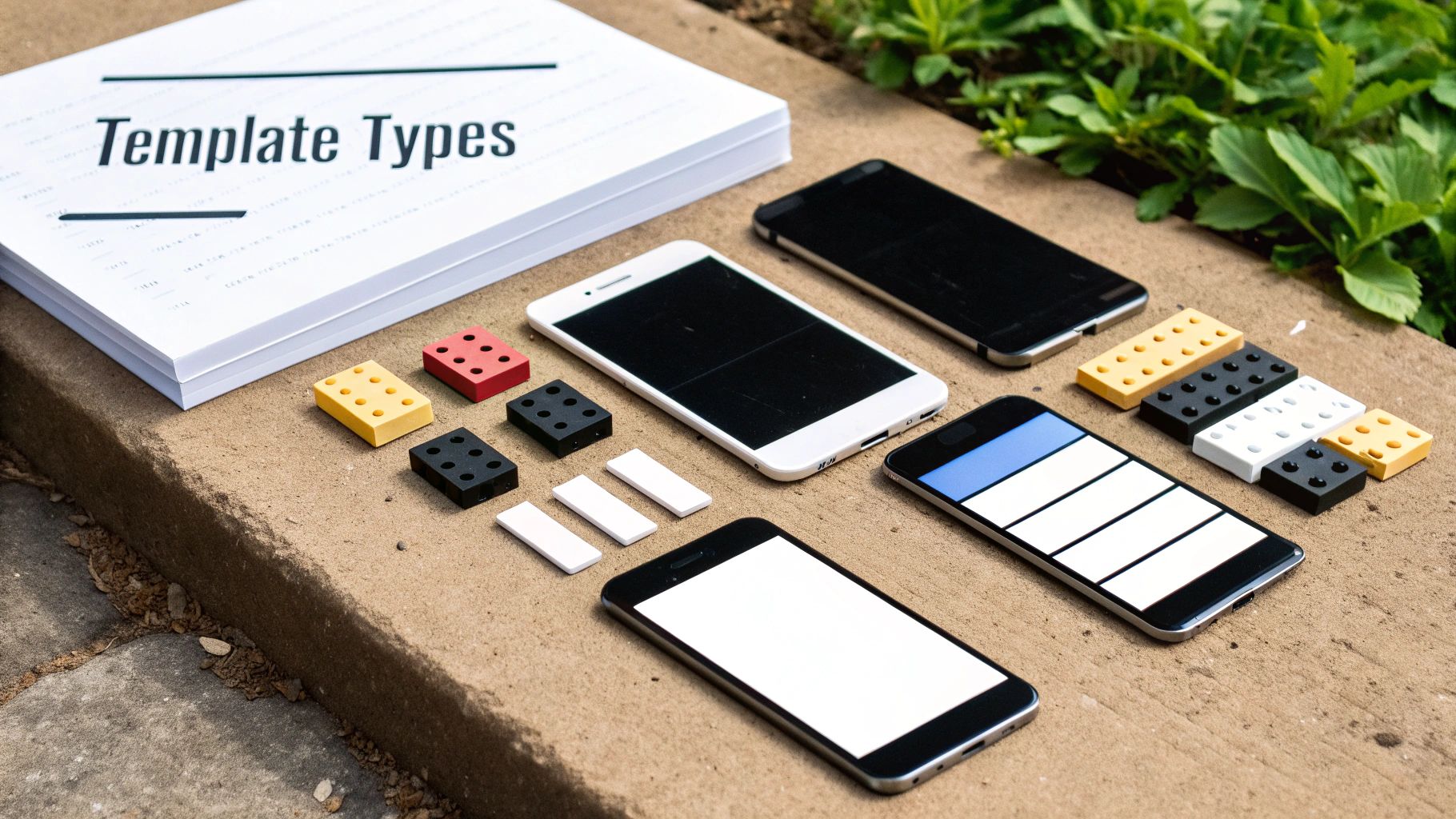
The world of mobile app templates is surprisingly deep, and it's easy to get lost if you don't know the landscape. Think of it like this: you wouldn't buy a pre-built house frame if all you needed were some high-quality bricks. It's all about picking the right tool for the job.
Not all templates are created equal. Each type offers a different starting point, from a box of parts to a nearly finished product. Let's break down the main categories so you can figure out what makes the most sense for your project.
Imagine opening a professional LEGO set, perfectly organized with every piece you could possibly need. That's a UI Kit. It’s a complete library of individual, pre-styled components—buttons, form fields, navigation bars, cards, you name it.
You get all the visual elements to build a gorgeous, consistent interface, but you’re the one who has to put them together. This gives you total creative freedom while saving you from the soul-crushing work of designing every tiny detail from scratch.
A UI Kit is your best bet when:
Essentially, it's a massive head start on your app's look and feel without locking you into any specific architecture.
Now, let's go from a box of LEGOs to a fully prefabricated home. A Full App Template (often called an app starter) is a nearly complete application. It comes with both the front-end UI and often a basic backend structure, with core features and navigation already wired up.
Think of a fitness app template that already includes user profiles, workout logging, and progress tracking. Or a finance app with pre-built dashboards and transaction lists. All the essential plumbing is in place; you just need to move in, paint the walls, and make it your own.
These templates are incredible accelerators because they solve the same problems every app in a certain niche faces. Instead of building a social media feed from the ground up, you start with one that already works, freeing you up to focus on the unique features that will actually make your app stand out.
For example, a dating app starter might handle the matching and chat functionality, while a streaming template could come with a video player and content carousels ready to go. This approach can literally shave months off your development time. If you're building for a specific industry, checking out specialized React Native Expo templates can give you an insane advantage.
A Screen Library sits in a sweet spot right between a UI Kit and a full template. Imagine it as a catalog of professionally designed, fully functional rooms you can drop into your existing house project. You don't get the whole house, but you can instantly add a state-of-the-art kitchen or a complete master bathroom.
These libraries offer entire screens or complete user flows, like:
Screen libraries are perfect when your project is already underway, but you need to add a complex, standard feature without building it from scratch. You can just plug it into your existing codebase and save hundreds of hours on those common-but-critical user journeys.
Picking a mobile app template isn't just a technical choice—it's a strategic move that sets the tone for your entire development journey. It's about more than just saving a bit of time; it’s about getting a massive head start with expert-level code, thoughtful design, and best practices baked right in from day one. But like any big decision, it comes with its own set of considerations you need to weigh to make the right call for your project.
Let's get into the powerful advantages you gain and the potential tradeoffs to keep on your radar.
The most obvious win here is a massive boost in speed. Think about it. Instead of burning months building foundational pieces like user authentication, navigation, and settings screens, you start day one with a functional, production-ready base. This frees you up to pour your limited time and resources into what actually matters: your app's unique features and core value.
That speed translates directly into serious cost savings. When you slash development hours, you lower your burn rate, which is a game-changer for startups racing to get an MVP to market. For agencies, it means delivering projects faster, which leads to happier clients and better profitability.
But it’s not just about speed and cost. A high-quality template gives you so much more:
This cross-platform power is a huge deal. The market for tools that let you build from a single codebase is projected to explode, hitting USD 480.58 billion by 2030. Templates from gluestack market, built with tools like Expo and NativeWind, can cut development time by a staggering 40-70% by getting rid of the need to build separately for iOS and Android. You can dig into the full report on the mobile application development market to see the trends for yourself.
While the benefits are pretty compelling, you have to go in with your eyes open. No solution is a silver bullet for every single scenario, and knowing the potential challenges is what separates a smart decision from a frustrating one.
First up is the initial learning curve. Every template has its own architecture, file structure, and specific dependencies. You’ll need to put in some time upfront to really understand how all the pieces fit together before you can start customizing it effectively. It might feel like a brief slowdown right at the start, but it's what lets you hit top speed later.
A template is a powerful accelerator, but it's not a magic button. You still need to be the pilot. The template gives you a jet engine, but you have to learn the controls to steer it where you want to go.
Another key trade-off can be rigidity and constraints. If your app needs a truly unique, off-the-wall feature that the template was never designed for, you might find yourself fighting its structure instead of working with it. Customization is always on the table, but if you have to bend the template too far, you might have been better off starting from a simpler foundation.
Finally, you’re placing a bet on the template's quality and long-term maintenance. A poorly coded or abandoned template can quickly become a technical nightmare, loaded with bugs and security holes. This is exactly why choosing a reputable source with a proven track record of updates and solid support isn't just a "nice-to-have"—it's non-negotiable.
Let's be real: not all mobile application templates are created equal.
Choosing the right one is like pouring a solid concrete foundation for a skyscraper. It gives you a stable, reliable base to build upon. But picking the wrong one? That’s like building on sand. It’s only a matter of time before cracks start to show, and your project becomes a tangled mess of technical debt that slows you down to a crawl.
So, how do you tell the difference? It comes down to looking past the flashy screenshots and digging into what really matters. This is your field guide to making a smart investment that will pay off for the entire life of your app.
This flowchart gives you a simple decision-making framework to start with, helping you figure out if a template is even the right path for your project.
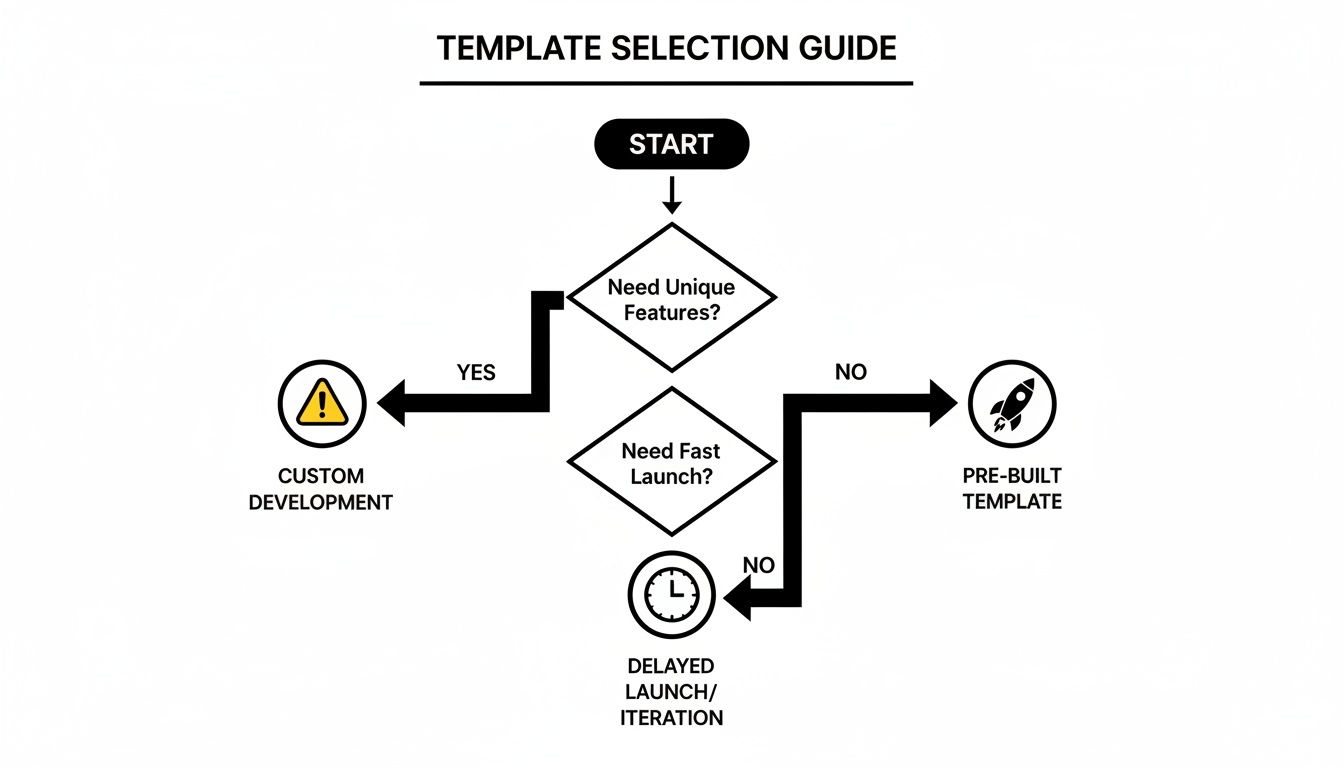
As the chart shows, if your app idea hinges on highly unique, non-standard features, a template might just hold you back. But if you need to get to market fast, it’s probably your best bet.
The heart of any template is its code. A clean, well-organized codebase is a dream to work with, making every customization feel intuitive. A messy one is a nightmare waiting to happen.
Here’s what to look for:
A truly high-quality codebase is practically self-documenting. The structure and naming conventions should be so clear that another developer can jump in and understand the logic without needing a separate manual. That kind of clarity is the ultimate sign of professional craftsmanship.
To help you with your evaluation, I've put together a quick checklist. Use this to systematically review any template you're considering.
| Evaluation Criteria | What to Look For | Red Flags to Avoid |
|---|---|---|
| Codebase Quality | Clean, modular structure; modern tech like TypeScript; clear naming conventions. | Messy, unorganized files; outdated dependencies; "spaghetti code." |
| Documentation | Comprehensive setup guide, architecture overview, and customization examples. | Missing or minimal docs; instructions that don't work; broken links. |
| Developer Support | Active support channels (email, Discord); regular, documented updates. | No clear way to get help; last update was over a year ago; ignored bug reports. |
| Performance | Smooth animations; fast load times on both iOS and Android; minimal app size. | Laggy UI; noticeable delays on one platform; excessive dependencies. |
| Accessibility (a11y) | Proper screen reader labels; support for dynamic font sizes; good color contrast. | Hardcoded text sizes; unlabeled interactive elements; poor contrast ratios. |
| Licensing Terms | Clear, understandable license that matches your commercial or personal use case. | Vague or restrictive terms; license that prohibits monetization if that's your goal. |
Running a template through this checklist before committing will save you from countless headaches later on.
Even the best code can be a mystery without clear instructions. Think of documentation as the instruction manual that comes with your new foundation—it’s not a "nice-to-have," it's essential.
A solid set of docs should cover:
Beyond the docs, check for a human element. Is there a reliable support channel, like an active Discord community or a dedicated support email? Knowing you can get help when you’re stuck is priceless. Regular updates are just as critical, as they ensure the template stays secure and compatible with the latest OS versions.
One of the biggest draws of React Native is shipping to both iOS and Android from a single codebase. But you need to verify that the template actually delivers a truly native feel on both platforms. The UI should adapt gracefully, and performance needs to be buttery smooth everywhere.
On top of that, accessibility (a11y) should be a top priority. A quality template will have accessibility baked in from the start, with proper labels for screen readers and support for dynamic font sizes. This isn't just about compliance—it's about building an inclusive app that everyone can use. If you want to go deeper on this, check out our guide on creating a stunning https://market.gluestack.io/blog/react-native-ui-kit.
Last but definitely not least, don't just skim the licensing agreement. This is the legal document that dictates exactly how you can use, modify, and distribute the template. You'll typically see options like a "Personal" license for non-commercial projects and a "Commercial" or "Extended" license for apps you plan to sell.
Read the terms carefully before you buy. Make sure they align perfectly with your business goals. Choosing the wrong license can lead to serious legal and financial trouble down the road. It also helps to be familiar with broader industry standards; exploring resources on responsive website templates and customization principles can give you a better feel for how these assets are typically licensed and used.
Alright, you've done the hard work and picked out a fantastic mobile application template. So, what’s next? How do you take this solid-but-generic foundation and shape it into the unique app you’ve been dreaming of? This is where the real fun starts.
Let’s walk through a real-world scenario. Imagine you just bought a fitness tracking template. It's got the essentials covered: user profiles, workout logging, and a dashboard. Our mission is to transform it into "FitPulse," a sleek app with a distinct brand identity and a brand-new "Weekly Challenge" feature.
This isn’t about rebuilding from scratch. It’s about making smart, strategic changes to turn a flexible starting point into something that is truly yours.
First thing's first: you have to get the template running on your own machine. Any decent template will come with clear instructions, but the basic drill is usually the same—clone the code, install the dependencies, and fire it up.
For our "FitPulse" app, the process would look something like this:
npm install or yarn install. This command is crucial—it pulls in all the necessary packages the template depends on, like React Native, Expo, and any UI libraries.npx expo start. This kicks off the development server, letting you open the app on your phone with the Expo Go app or in a simulator on your computer.With the default template up and running, you have a baseline. Now, the real customization can begin.
This is where your app starts to feel like yours. Most modern templates are built with theming in mind, which makes changing colors, fonts, and spacing across the entire app a breeze, all without needing to edit individual components one by one.
For "FitPulse," we’ll ditch the generic blue theme for a vibrant green and dark gray palette. If the template uses a utility-first CSS framework like NativeWind, this is incredibly straightforward. You simply find the tailwind.config.js file and redefine the primary color palette.
A well-structured template separates style from logic. This means you can change the entire look and feel of the application by editing a single configuration file, and the changes will cascade through every button, card, and header.
After sorting out the global theme, we can get more granular. Maybe the dashboard cards are a bit too square for the "FitPulse" vibe. We can just jump into the DashboardCard component file and tweak its styling classes to add some nice rounded corners or a subtle drop shadow. It's this mix of global theming and component-level control that gives you total command over the UI.
A template gives you the core, but the real magic is in the unique features you add. For "FitPulse," that’s our "Weekly Challenge" feature. This means we'll need a new screen where users can see and join challenges.
Here’s how that would break down:
WeeklyChallengeScreen.js, right inside the screens folder.This workflow really shows off the power of a component-based system. You aren't building from zero. You're piecing together new features using the polished, consistent building blocks the template already provides, which dramatically speeds up development.
After wrestling with all the variables in evaluating mobile application templates, one thing becomes crystal clear: where you get your template matters just as much as the code itself. Trying to find one that nails quality, documentation, support, and a modern tech stack can feel like an impossible task. This is the exact headache the gluestack market was built to cure.
Think of it less like an open-air flea market and more like a curated gallery for professional developers. It’s a dedicated hub for production-ready React Native templates built on a solid, modern foundation. Every single template is designed to sidestep the risks that come with unvetted or abandoned code, giving you a high-quality starting line right out of the gate.
Gluestack market is more than a random collection of code snippets; it's a complete ecosystem designed to get your project moving faster. The central promise here is quality assurance. Every template is built with a consistent, modern stack—Expo, TypeScript, NativeWind, and gluestack-ui—which means you get cross-platform consistency and a codebase that's actually enjoyable to work in.
This curated approach means you can skip the exhaustive evaluation process. Instead of spending hours wondering if a template is accessible or performs well, you can just trust that these best practices are already baked in. You can dive deeper into the philosophy behind our approach in our article, Introducing Gluestack Market, the One-Stop Hub for React Native UI Templates.
The marketplace is stocked with a wide spectrum of solutions to fit different project needs. You’ll find everything from super-specific app starters to massive screen libraries that handle all the common user flows you can think of.
This kind of variety is a massive advantage when speed is everything. With global app downloads soaring past 218 billion, starting with a production-ready template is a straight-up game-changer. It provides a reliable launchpad so developers can pour their energy into innovation, not reinventing the wheel. You can read the full mobile app market forecast to get a sense of just how big this opportunity is.
Gluestack market delivers more than just code; it’s a complete developer toolkit. Each purchase includes the full source files, detailed documentation, and flexible licensing to help you launch successful apps faster and with more confidence.
Ultimately, this ecosystem is designed to be a reliable partner in your development journey. It takes the guesswork and risk out of the equation, providing a solid, professional foundation so you can get back to what you do best: building an amazing product.
Even after seeing all the benefits, it's natural to have a few questions before jumping in. We get it. Let's tackle some of the most common ones we hear from developers and founders to clear things up and get you ready to build.
You bet. In fact, that's one of the main reasons they exist. But—and this is a big but—you absolutely have to check the licensing agreement before you hit "buy."
Most marketplaces will offer a few different options:
Always, always read the fine print. The last thing you want is a legal headache down the road because of a licensing mismatch.
A quality template is a launchpad, not a cage. You can and should customize almost everything—colors, fonts, user flows, you name it. The whole point is that you get a complete set of pre-built, professional-grade components so you're not reinventing the wheel for every single screen.
Think of it like a high-end architectural blueprint. The foundation is solid and the structural plans are sound, but you're free to choose the flooring, paint the walls any color you want, and even add a new wing. It’s designed to be changed.
This means you can plug in your own backend, call any third-party APIs you need, and build out entirely new features using the template's existing design system. Your ability to code is the only real ceiling here, not the template itself.
Yes, with a small asterisk. They are fantastic learning tools. You get to peek under the hood of a production-grade application and see how seasoned developers structure their code, manage state, and set up navigation. That kind of exposure is invaluable.
However, a template won't write the code for you. You'll still need a solid grasp of the basics—like React Native and JavaScript—to make any meaningful changes. A template is a massive accelerator; it’s not a substitute for knowing how to code.
Ready to stop building from scratch and start shipping faster? Explore production-ready gluestack market templates and find the perfect foundation for your next big idea. Discover our templates.

Feb 23, 2026
4 min read
Discover powerful mobile app monetization strategies to boost your revenue. Our guide covers IAPs, ads, and subscriptions for React Native apps and beyond.

Feb 22, 2026
4 min read
A clear guide to app development cost estimation. Learn what drives costs, see budget examples, and discover strategies to build your app for less.

Feb 21, 2026
4 min read
Discover how to promote mobile application effectively with proven ASO, paid campaigns, and retention strategies.

Feb 15, 2026
4 min read
Discover how to create a prototype of a website with a practical, step-by-step guide. Explore tools, testing methods, and tips to bring your idea to life.

Feb 14, 2026
4 min read
Confused about mockups vs wireframes? Learn the key differences, when to use each, and how to streamline your React Native app development workflow.

Feb 13, 2026
4 min read
Discover how mobile apps templates accelerate development. Learn to choose, customize, and deploy high-quality React Native templates for your next project.

Feb 12, 2026
4 min read
Explore mobile application interface design with practical tips, core principles, and platform-aware workflows to craft apps users love.

Feb 10, 2026
4 min read
Learn mobile first design principles to craft fast, accessible apps that delight users. Practical tips, examples, and testing strategies.

Feb 08, 2026
4 min read
Explore the progressive web app vs native debate with our in-depth guide. We compare performance, cost, and UX to help you make the right strategic choice.

Feb 07, 2026
4 min read
Discover how React Native templates can accelerate your app development. This guide explores choosing, customizing, and deploying templates for faster launches.

Feb 05, 2026
4 min read
Discover the key differences between expo vs react native, including workflow, builds, and performance to help you pick the right path for your app.

Feb 03, 2026
4 min read
Master image with text overlay in React Native with responsive, accessible patterns. Learn expo setup, NativeWind styling, and gluestack-ui examples.

Feb 03, 2026
4 min read
Discover cross platform app development with proven strategies to build faster for iOS, Android, and the web using a single, unified codebase.

Feb 01, 2026
4 min read
Learn how to make an app for my business quickly with template-based steps from planning to launch, plus tips to scale and optimize.

Jan 31, 2026
4 min read
Ready to build an app? This guide shares practical strategies for validating your idea, choosing a tech stack, and navigating the App Store launch.

Jan 30, 2026
4 min read
Master responsive design for mobile apps with this guide on fluid layouts, breakpoints, and React Native. Build UIs that adapt perfectly to any screen.

Jan 25, 2026
4 min read
Learn how to design an Android app that stands out. This guide covers UX research, wireframing, Material Design, and the developer handoff process.

Jan 24, 2026
4 min read
Explore ui design web essentials: a complete guide to principles, responsive patterns, and workflows for intuitive, engaging web interfaces.

Jan 23, 2026
4 min read
Discover 10 essential mobile app design best practices for building exceptional cross-platform apps. Actionable tips for UI, UX, navigation, and performance.

Jan 21, 2026
4 min read
Discover how to debug React Native apps effectively. This guide covers Flipper, React DevTools, and native code troubleshooting for faster development cycles.

Jan 20, 2026
4 min read
Learn how to create app for your business with a practical, modern approach. Plan, customize, and launch with proven steps.

Jan 19, 2026
4 min read
A complete guide to mobile app development for startups. Learn how to validate your idea, build an MVP, and launch a successful app faster and more affordably.

Jan 18, 2026
4 min read
Discover how to choose the right React website template to accelerate your project. Our guide covers everything from quality checklists to deployment.

Jan 17, 2026
4 min read
Discover how to choose, customize, and deploy a React Native app template. This guide provides practical steps for launching production-ready apps faster.

Jan 13, 2026
4 min read
Start your journey in mobile app development for beginners. This guide breaks down how to build your first cross-platform app with React Native and Expo.

Jan 12, 2026
4 min read
Explore the best react native ui libraries and compare features, performance, and ease of use to pick the right toolkit for your app.

Jan 11, 2026
4 min read
Launch your own ride-hailing service with our guide to building a production-ready Uber app clone. Learn MVP strategy, tech stacks, and backend integration.

Jan 10, 2026
4 min read
Master modern cash app design with this guide. Learn the UI/UX, security, and React Native strategies needed to build a fintech app that users trust and love.

Jan 09, 2026
4 min read
Learn how to build a personal finance dashboard with React Native. A practical guide for developers on UI design, data architecture, and production readiness.

Jan 08, 2026
4 min read
A practical guide to building a cross-platform event check in app with React Native. Learn to implement QR scanning, offline sync, and deployment.

Jan 07, 2026
4 min read
Master linear gradient React Native components with our complete guide. Learn practical techniques for Expo, bare RN, and NativeWind to build stunning UIs.

Jan 06, 2026
4 min read
Learn how to change application name in your React Native & Expo projects. This guide covers display names, package IDs, and app store listings.

Jan 05, 2026
4 min read
Discover how to monetize mobile apps with our founder's guide. Learn proven React Native strategies for ads, IAPs, and subscriptions to maximize your revenue.

Jan 04, 2026
4 min read
A practical guide on how to create a website app with a single codebase. Learn to build for web, iOS, and Android using React Native, Expo, and TypeScript.

Jan 03, 2026
4 min read
Learn how to create an app for your business with this definitive guide. Discover practical strategies for validation, development, and launch that work.

Jan 02, 2026
4 min read
Learn how to create a wireframe for a website with this practical guide. Move from initial sketches to developer-ready designs that get built right.

Jan 01, 2026
4 min read
Deciding on progressive web application vs native? This guide offers a deep comparison of performance, cost, UX, and use cases to help you choose wisely.

Dec 31, 2025
4 min read
Discover 10 mobile app security best practices for React Native. Learn to secure data, APIs, and code with actionable tips and examples for 2025.

Dec 30, 2025
4 min read
Unlock the real React Native app development cost. Our guide breaks down pricing by feature, team, and complexity to help you budget with confidence.

Dec 29, 2025
4 min read
A practical guide to master your React Native debug workflow. Learn to use Flipper, React DevTools, and Hermes to solve bugs in Expo and bare RN apps.

Dec 28, 2025
4 min read
The ultimate React Native tutorial for beginners. Learn to build beautiful cross-platform apps using a modern stack like Expo, TypeScript, and gluestack-ui.

Dec 27, 2025
4 min read
A practical guide on how to build a mobile app. Learn to go from concept to a market-ready app using templates, React Native, and proven development strategies.

Dec 26, 2025
4 min read
Discover interface design for websites with actionable tips on layout, responsiveness, and usability to boost conversions.

Dec 25, 2025
4 min read
Discover designs for apps that blend minimal aesthetics with personalization, and learn to build user-centric interfaces that boost engagement.

Dec 24, 2025
4 min read
Learn graphical interface design - essentials for mastering core principles, modern workflows, and cross-platform strategies to build intuitive, engaging UIs.

Dec 23, 2025
4 min read
Discover how high fi wireframes bridge the gap between ideas and code. Learn a practical workflow for creating, testing, and handing off effective UI designs.

Dec 22, 2025
4 min read
Discover mobile app interface design with practical principles, accessibility, and workflows that boost user engagement.

Dec 21, 2025
4 min read
Explore the top 10 UI UX design trends for 2025. Get expert insights and practical React Native tips to build next-gen cross-platform apps that stand out.

Dec 20, 2025
4 min read
Discover how mobile app templates accelerate development from idea to launch. Learn to select, customize, and deploy templates for a faster time to market.

Dec 18, 2025
4 min read
Explore the best react native ui libraries to accelerate mobile development with performance, theming, and accessibility. Expert tips inside.

Dec 16, 2025
4 min read
Master React Native PDF handling. Learn to generate, view, and share PDFs with practical code examples, library comparisons, and performance tips.

Dec 15, 2025
4 min read
A practical guide to choosing the right React Native component library. Learn how to evaluate options, avoid common pitfalls, and build apps faster.

Dec 14, 2025
4 min read
Find the perfect React Native UI library for your project. This guide compares top libraries, selection criteria, and customization strategies.

Dec 13, 2025
4 min read
Learn how to change app name in React Native and Expo. Our guide covers display names, bundle IDs, and store listings for iOS and Android projects.

Dec 12, 2025
4 min read
Discover the best React Native component library for your next project. We compare top libraries on performance, customization, and real-world use cases.

Dec 11, 2025
4 min read
Discover how to choose the right React Native UI kit. This guide covers top kits, selection criteria, and customization to accelerate your app development.

Dec 10, 2025
4 min read
Explore our in-depth guide to find the best React Native UI library. We compare top contenders to help you choose the right fit for your project.

Dec 09, 2025
4 min read
Discover a practical approach to building apps with React Native. This guide covers setup, UI, state management, and testing to help you ship great apps.

Dec 08, 2025
4 min read
android login with facebook: Learn to set up the Facebook SDK, manage tokens, and implement secure authentication across native Android, cross-platform apps.

Dec 07, 2025
4 min read
Master the alert in React Native. Learn to handle platform differences, build custom modals, and apply best practices for a seamless user experience.

Dec 06, 2025
4 min read
keyboardavoidingview react native: Master keyboard handling with KeyboardAvoidingView across iOS, Android, Expo, and TypeScript.

Dec 05, 2025
4 min read
A practical guide to implementing a React Native PDF viewer. Learn to compare libraries, handle native setup, and troubleshoot common issues with real code.

Dec 04, 2025
4 min read
how to validate startup idea: learn proven methods like customer interviews, MVPs, and metrics to confirm market fit.

Dec 03, 2025
4 min read
how to make app like uber: Learn core features, tech stack, development steps, testing, and launch tips.

Dec 02, 2025
4 min read
Build a rock-solid React Native setup. This guide covers Expo vs. Bare workflows, TypeScript, pnpm monorepos, NativeWind, and deployment strategies.

Dec 01, 2025
4 min read
A practical guide to Stripe React Native integration. Learn to set up your server, build payment UIs, handle webhooks, and launch secure mobile payments.

Nov 30, 2025
4 min read
Learn how to master push notifications in React Native. This guide covers setup, best practices, and advanced techniques for engaging your users.

Nov 29, 2025
4 min read
Build powerful location-based apps with our practical guide to react native with google maps. Get setup guides, pro tips, and best practices for iOS & Android.

Nov 28, 2025
4 min read
Explore deep linking react native with a practical guide to configuring URL schemes, universal links, navigation, and testing for Expo and bare apps.

Nov 28, 2025
4 min read
A practical guide to building a scalable React Native design system. Learn to implement tokens, theming, and tools like NativeWind and gluestack-ui.

Nov 26, 2025
4 min read
Learn why react native expo templates speed up your projects with ready-made patterns and practical tips.

Nov 25, 2025
4 min read
Discover how to improve developer productivity with actionable strategies for workflow, tooling, and culture. A practical guide for software engineering teams.

Nov 24, 2025
4 min read
Discover the best cross platform app development tools. Compare top frameworks like Flutter and React Native to build and ship apps faster.

Nov 23, 2025
4 min read
This Expo React Native tutorial provides a hands-on guide to building cross-platform apps. Learn setup, styling with NativeWind, navigation, and deployment.

Nov 22, 2025
4 min read
Build beautiful UIs faster with this guide to Tailwind CSS React Native. Learn setup, styling, and advanced techniques with NativeWind for mobile apps.

Nov 21, 2025
4 min read
Explore our curated list of 7 top-tier React Native app examples. Discover production-ready templates and resources to build your next app faster.

Mar 19, 2025
4 min read
gluestack market offers React Native UI templates to accelerate development. Get customizable, production-ready React Native app templates and Ui kit, some free. Build faster & smarter today!


