Feb 07, 2026

4 min read

React Native templates are essentially pre-built, production-ready starting points for mobile apps. They’re designed to slice huge chunks off your development time by providing the foundational code, UI components, and navigation right out of the box. This lets you skip the repetitive setup and jump straight into building the features that make your app special.
Every app project kicks off with the same old pressures: tight deadlines, even tighter budgets, and the need to ship something that looks and feels polished. The first few weeks can feel like a grind, spent on hundreds of hours of repetitive work—configuring the environment, setting up navigation, building standard login or profile screens, and just making sure the core architecture doesn't fall over.
This groundwork is absolutely critical, but let's be honest, it doesn't add a single unique thing to your app.
This is where React Native templates completely change the game. Imagine you're a chef. Starting a project from scratch is like having to first gather raw timber to build your own kitchen before you can even think about cooking. A template, on the other hand, is like walking into a professional kitchen with a perfectly organized mise en place. All the tedious prep work is done, letting you fire up the stove and start creating your signature dish right away.
In the app world, speed is everything. React Native templates are built to get your project off the ground in a matter of hours, not weeks or months. By giving you a tested and reliable foundation, they cut out the need to reinvent the wheel for common features.
This is a massive advantage in a booming industry. Cross-platform frameworks are already a huge time-saver, which is a big deal when you consider the mobile app market is expected to jump from $305.18 billion to a staggering $618.65 billion by 2031. With React Native being the framework of choice for 37.9% of developers, templates take that efficiency to the next level by bootstrapping entire user interfaces and workflows. You can see more about the future of cross-platform development on dogtownmedia.com.
Using a template frees up your energy to focus on what actually matters:
A good React Native template isn't about cutting corners. It's a strategic move to invest your most valuable resource—time—on innovation instead of boilerplate.
It's not just about speed. High-quality react native templates give you a foundation built on modern best practices. They often come pre-packaged with a smart tech stack, including tools like TypeScript for type safety, Expo for simplified builds, and proven styling solutions.
This means your app isn't just built fast—it's also maintainable, scalable, and ready for whatever comes next. You can check out our other articles to learn more about the best mobile app templates out there. Kicking off a project this way cuts down on technical debt from day one, setting you up for long-term success.
Jumping into the world of React Native templates can feel a bit like house hunting. You've got empty lots, pre-framed houses, and fully furnished model homes. Not every option is the right fit, and picking the right foundation is absolutely critical for your project's success.
This visual shows how templates offer a strategic shortcut compared to starting from scratch.
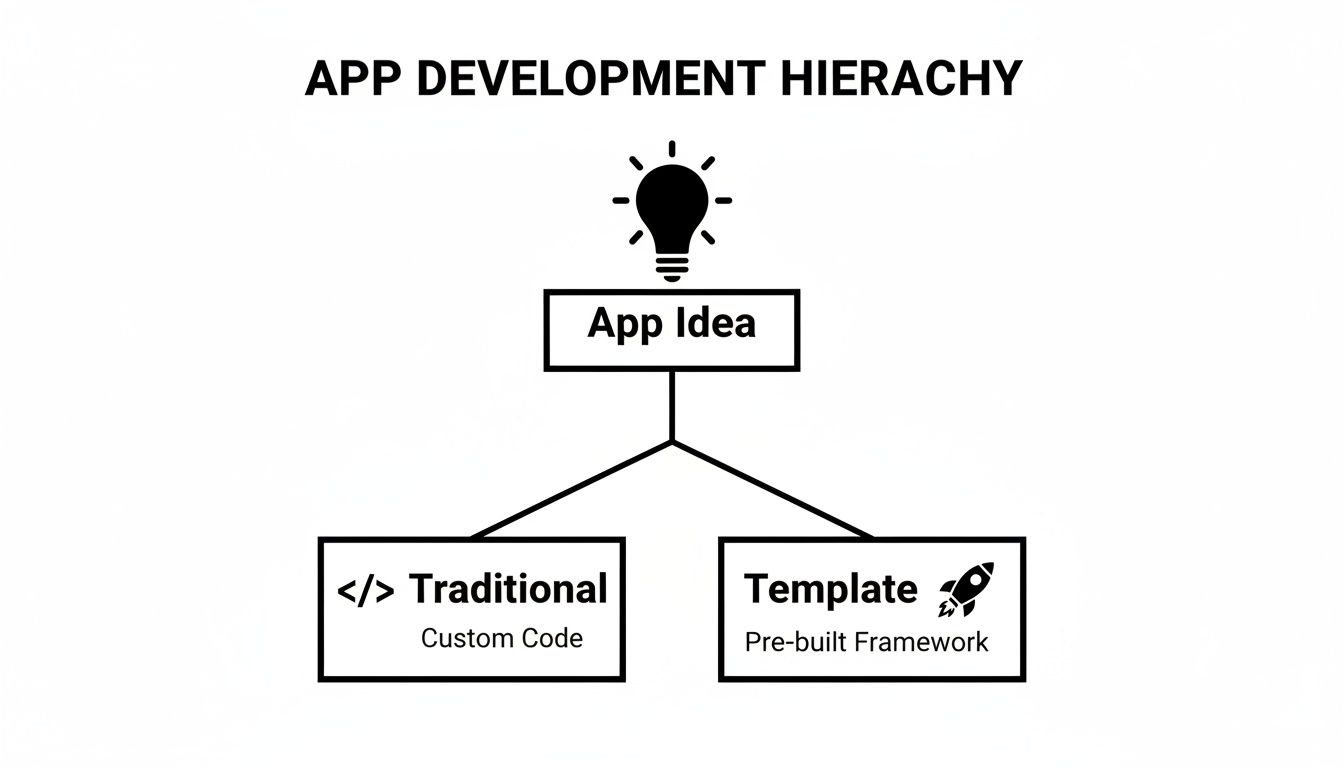
Both paths spring from the same place—your app idea—but the template route is all about getting you to a finished product faster. Let's break down the main categories so you can figure out which starting point makes the most sense for you.
To make sense of the options, it helps to see them side-by-side. Think of it as a spectrum: on one end, you have total freedom and high effort, and on the other, you have maximum speed with less architectural heavy lifting. This table breaks down the core differences.
| Template Type | Best For | Typical Inclusions | Customization Effort |
|---|---|---|---|
| Boilerplate | Seasoned devs who want complete architectural control for a highly custom project. | Basic file structure, build configurations, and essential library integrations. | High |
| Starter Kit | Startups and teams building an MVP who need a solid foundation without starting from zero. | Pre-configured navigation, state management (e.g., Redux), and authentication flows. | Medium |
| UI Kit | Teams focused on getting to market ASAP with a polished, professional design out of the box. | Everything in a starter kit, plus a full suite of pre-designed screens and components. | Low |
Ultimately, the right choice comes down to your priorities. Do you value raw speed, a solid architectural head start, or complete creative control?
First up, the boilerplate. This is the most minimal type of template you'll find. Think of it as buying a clean, empty plot of land. It gives you the bare essentials—a basic file structure, a configured build process, and maybe a few core libraries—but that's it. All the big architectural and design decisions are left entirely up to you.
Boilerplates are perfect for experienced developers who have a super-specific vision and want total control. If you're the kind of person who wants to build every wall and choose every fixture yourself without any pre-existing "opinions" in the code, a boilerplate is your best bet.
Moving up the spectrum, we have starter kits. If a boilerplate is an empty plot, a starter kit is a house with the foundational frame already built. It goes way beyond the bare minimum by providing a pre-configured architecture, often including navigation, state management (like Redux or Zustand), and a basic authentication flow.
This is where you really start to feel the power of React Native. As a leading cross-platform framework, it powers apps for giants like Meta, Instagram, and Walmart. Its ability to reuse up to 90% of code across iOS and Android is a game-changer for development costs, and starter kits just amplify that benefit.
Starter kits are ideal for developers and startups looking to fast-track their MVP. They handle all the common, repetitive setup, letting you focus your energy on building the unique features that actually define your app. For a deeper dive, check out our guide on how React Native Expo templates accelerate development.
Starter kits strike a powerful balance between structure and freedom. They give you a solid, opinionated architecture that can save weeks of setup time, but you still have complete control to design the user interface from the ground up.
Finally, we have the most comprehensive option: UI kits or full app templates. This is your fully furnished model home. It includes everything from the starter kit—architecture, navigation, authentication—plus a complete, professionally designed user interface with dozens of pre-built screens and components ready to go.
UI kits are the ultimate shortcut for teams that need to get to market as fast as humanly possible without sacrificing quality. You get a polished, production-ready app that you can simply re-brand and wire up with your own data and logic. It’s the fastest way from idea to App Store.
Picking the right React Native template isn't just about finding a design you like. It's about laying a solid foundation for your app—one that can save you hundreds of development hours and prevent some serious headaches down the road. A truly production-ready template is more than just a pretty face; it’s an engineered starting point for a scalable, maintainable, and successful application.
Think of it like buying a house. You wouldn't just look at the fresh paint and shiny countertops, right? You'd get an inspection to check the foundation, the plumbing, and the electrical. You need to do the same with a template—look under the hood to make sure it's built to last.
This checklist will walk you through the critical things to look for, so you can pick a template that not only gets you to launch faster but sets you up for long-term success.

The tech stack a template is built on will define your entire development experience. Get this wrong, and you could be stuck wrestling with performance issues, security vulnerabilities, or a codebase that’s a nightmare to update.
Look for React Native templates built with a modern, community-supported stack. This isn't about chasing trends; it's about making sure you get the latest features, performance boosts, and a huge ecosystem of compatible libraries to pull from.
Here’s what to check for:
A template built with modern tools like Expo and TypeScript is a huge quality signal. It tells you the creators are following best practices and care about the developer experience.
Once you've confirmed the stack is solid, it's time to actually look at the code. High-quality code is clean, logically organized, and easy to understand. Poorly written code, on the other hand, is a tangled mess that will fight you every step of the way.
If you can, get your hands on a demo or a code sample. You’re looking for a consistent coding style, a file structure that makes sense, and helpful comments where they’re needed. Just as important is the documentation that comes with it.
A great template shouldn't paint you into a corner. It should be a flexible starting point that you can easily mold to fit your brand and unique features. The whole point is to spend your time building what makes your app special, not fighting the template's structure.
A well-architected template is designed to be extended. It uses a component-based structure that makes it simple to tweak existing elements or drop in new ones without the whole thing falling apart. The styling system should also be centralized, letting you change the entire app's look and feel by editing just a few configuration files.
Think about these three things:
This is the last, but arguably most important, step. Before you commit, you absolutely have to understand the terms of use. The license dictates how you can legally use the template, especially if it's for a commercial project. Getting this wrong can lead to some very real legal trouble later.
Look for a crystal-clear explanation of the licensing terms.
Choosing a template with a clear commercial license and a promise of ongoing support is an investment in your project's future. It gives you peace of mind, knowing you have a reliable partner as you build and scale your app.
What really separates a good template from a great one? It all comes down to the tech stack. The tools baked into its foundation dictate how easy it is to customize, how it performs under pressure, and frankly, how much fun it is to work with. Choosing a template with a modern stack is like picking a car with a perfectly tuned engine and a top-of-the-line GPS—the whole journey is just smoother, faster, and way more predictable.
This is where high-quality react native templates truly show their value. They aren’t just pretty faces; they're thoughtfully engineered starting points. They bundle together powerful tools that streamline everything from styling components to managing state, letting you build with confidence right out of the gate.
Let's pull back the curtain on the key technologies that make a template developer-friendly and see how they can turn customization from a total chore into a creative flow.
Anyone who's been in the React Native trenches knows the pain of managing the native build process for iOS and Android. It can be a minefield of config files, dependency nightmares, and platform-specific headaches. This is exactly the problem Expo was built to solve.
Expo is a framework and platform that wraps around React Native, hiding a massive amount of that native complexity. For a developer grabbing a template, this is a game-changer.
A template built on Expo offers a much friendlier learning curve and a more efficient development cycle, making it a fantastic choice for teams of any size.
As an app gets bigger, a plain JavaScript codebase can start to feel like the Wild West. Without type-checking, simple typos or funky data structures can cause runtime errors that are a nightmare to hunt down. This is where TypeScript steps in as your new best friend.
TypeScript is basically JavaScript with superpowers—specifically, static types. Think of it as putting guardrails on your code. It checks your work as you type, catching potential mistakes before you even hit "run." The result is a more stable, predictable, and self-documenting codebase.
A template that includes TypeScript from the get-go is a huge green flag. It signals that it's built for production and ensures that as you add your own features, the code stays clean and maintainable.
For instance, when you go to customize a component from a TypeScript template, your editor will immediately tell you what properties (or "props") it needs. This instant feedback loop is a massive productivity boost and saves you the mental energy of trying to remember every little detail.
Styling in React Native has historically been a bit clunky, relying on inline style objects that can get long and repetitive. NativeWind completely flips the script by bringing the elegance of the massively popular Tailwind CSS framework into the mobile world.
Instead of writing big style objects, you use simple, descriptive utility classes right in your components. This approach makes styling faster, more intuitive, and keeps everything incredibly consistent.
Here’s a quick look at how these tools gel together when you're customizing:
title: string and onPress: () => void).bg-blue-500, p-4, and rounded-lg directly to the component, giving it a sharp, modern look in seconds.This is the kind of seamless workflow a modern tech stack unlocks. If you want to dive deeper, we have a whole guide on how to use Tailwind CSS in React Native.
Finally, a universal component library like gluestack-ui is the glue that holds it all together. It gives you a whole set of pre-built, accessible, and themeable components that work perfectly across iOS, Android, and web.
This is a huge accelerator. Instead of building every button, form, and modal from scratch, you get a production-ready suite of components that already play nicely with TypeScript and NativeWind. Customizing them is as easy as tweaking a central theme file, letting you re-skin the entire app to fit your brand in minutes.
Choosing a template is a huge step, but honestly, sifting through the endless options out there can feel like a project in itself. While a generic template gives you a starting point, a curated marketplace like gluestack market offers a completely different experience. It’s a focused, production-ready ecosystem built to kill the guesswork and slash your launch timeline.
Think of it this way: a generic template is like getting a box of building blocks. Gluestack market, on the other hand, is like being handed a detailed blueprint with all the specialized, pre-fabricated parts included. This approach lets your team skip the tedious foundational work and dive straight into what really matters—your app's unique features and core business logic.
One of the biggest hurdles in app development is translating a great idea into a functional, intuitive UI. Let's be real, a generic social media template won't get you very far if you're building a fintech or wellness app. This is where gluestack market really shines, offering domain-specific starter kits.
These aren't just themed UIs; they are complete application skeletons, already tailored for specific industries.
Starting with a codebase that already speaks the language of your industry can save you hundreds of hours in design and development.
Every template on gluestack market is built on a modern, robust tech stack designed to scale. You get full source code access, which means you're never locked into a black box—a critical factor for long-term success.
The shift toward this kind of development is happening fast. The market for low-code platforms is growing at a staggering 29.65% CAGR. React Native is a huge part of this movement; by late 2023, 35% of developers worldwide were using it, taking advantage of features like "hot reload" to speed up iteration by as much as 50%. You can read more about the growth of app development platforms here.
The whole philosophy behind gluestack market templates is that they should be the last 20% you need to build, not the first 80%. They come ready-made with Expo, TypeScript, and gluestack-ui, giving you a high-quality foundation from day one.
This commitment to quality doesn't stop at the code. The licensing is clear and flexible, with options from personal to enterprise use, so you can build a commercial product with confidence. On top of that, comprehensive documentation and optional support mean you’re never left stranded. It’s a complete ecosystem designed to get your app to launch, and to do it right.
Even with all the benefits laid out, I get it—jumping into a new development approach always brings up some questions. When you're looking at React Native templates, you’re not just picking a design. You’re adopting a workflow and a foundation for your entire project, so it's smart to wonder about scalability, how much you can customize, and whether a template even fits your skill level.
To help you make a confident, informed decision, I’ve pulled together the most common questions I hear from developers and product teams. Let’s cut through the noise with some clear, direct answers so you can move forward.
This is one of the first and most important questions people ask. The answer? A definitive yes. There's a common myth that templates are only for small side projects or simple prototypes. The reality is that a high-quality, production-ready template is engineered specifically for growth and complexity.
Think of it this way: you wouldn't build a skyscraper on a weak foundation. A premium React Native template gives you a robust architectural base, not a restrictive box. These templates are built from the ground up with clean code principles, modern state management, and a scalable file structure.
A well-chosen template doesn't limit your app's potential; it establishes a solid, scalable foundation. It’s designed to handle the demands of enterprise-grade applications, including complex features, heavy user loads, and future updates.
The key is to pick a template from a reputable source that obsesses over code quality and modern best practices. When you do that, you're not just getting a UI—you're getting a massive head start on building a durable, long-lasting application that can grow with your business.
Absolutely not. This is a critical point that trips a lot of people up. Modern React Native templates are built with customization at their core. The whole point is to give you a starting point, not a rigid, unchangeable final product. You have complete freedom to deconstruct, rebuild, and re-imagine every visual piece of the application.
This flexibility comes from the underlying tech stack. With tools like component libraries and styling utilities, you can easily stamp your brand's unique identity all over the app.
You’re never fighting against the original code. Instead, you're working with a well-organized system designed to be adapted.
The line between free and premium templates really comes down to one word: investment. Free templates can be fantastic for learning or small personal projects, but premium templates are an investment in speed, quality, and reliability for any serious commercial app. The value they deliver goes way beyond the initial design.
Premium templates usually offer a much more complete package. This often means a ton more pre-built screens, more complex features like full authentication flows, and a much cleaner code architecture. You're starting much, much closer to a finished product.
Here’s a quick breakdown of what you can generally expect:
| Feature | Free Templates | Premium Templates |
|---|---|---|
| Number of Screens | Limited (often 5-10 screens) | Extensive (often 50+ screens) |
| Documentation | Basic or non-existent | Comprehensive and detailed |
| Support | Community-based (if any) | Dedicated support channels |
| Updates | Infrequent or none | Regular updates and bug fixes |
At the end of the day, a premium template is a strategic business decision. The upfront cost is almost always justified by the hundreds of development hours saved, which means a faster time-to-market and a more polished, professional final product.
Templates are made to be accessible to a wide range of developers, from seasoned pros to people who are relatively new to the ecosystem. While a solid understanding of React and JavaScript is always helpful, you absolutely do not need to be a React Native guru to get going.
In fact, one of the biggest perks of using a template is that it lowers the barrier to entry. It handles all the complex and often frustrating initial setup—configuring the environment, wiring up navigation, structuring the project—that can easily slow down even experienced developers.
For beginners, a template is an incredible learning tool. By digging into a well-structured, production-grade codebase, you can absorb best practices for file organization, state management, and component design. For experienced devs, it’s all about efficiency. You get to skip the repetitive setup and jump straight into building the unique, high-value features that make your app stand out.
Ready to stop building from scratch and start launching faster? Explore the production-ready templates and UI kits at gluestack market. Find your perfect starting point and build a high-quality app in a fraction of the time. Get started at gluestack market.

Feb 23, 2026
4 min read
Discover powerful mobile app monetization strategies to boost your revenue. Our guide covers IAPs, ads, and subscriptions for React Native apps and beyond.

Feb 22, 2026
4 min read
A clear guide to app development cost estimation. Learn what drives costs, see budget examples, and discover strategies to build your app for less.

Feb 21, 2026
4 min read
Discover how to promote mobile application effectively with proven ASO, paid campaigns, and retention strategies.

Feb 15, 2026
4 min read
Discover how to create a prototype of a website with a practical, step-by-step guide. Explore tools, testing methods, and tips to bring your idea to life.

Feb 14, 2026
4 min read
Confused about mockups vs wireframes? Learn the key differences, when to use each, and how to streamline your React Native app development workflow.

Feb 13, 2026
4 min read
Discover how mobile apps templates accelerate development. Learn to choose, customize, and deploy high-quality React Native templates for your next project.

Feb 12, 2026
4 min read
Explore mobile application interface design with practical tips, core principles, and platform-aware workflows to craft apps users love.

Feb 10, 2026
4 min read
Learn mobile first design principles to craft fast, accessible apps that delight users. Practical tips, examples, and testing strategies.

Feb 08, 2026
4 min read
Explore the progressive web app vs native debate with our in-depth guide. We compare performance, cost, and UX to help you make the right strategic choice.

Feb 05, 2026
4 min read
Discover the key differences between expo vs react native, including workflow, builds, and performance to help you pick the right path for your app.

Feb 03, 2026
4 min read
Master image with text overlay in React Native with responsive, accessible patterns. Learn expo setup, NativeWind styling, and gluestack-ui examples.

Feb 03, 2026
4 min read
Discover cross platform app development with proven strategies to build faster for iOS, Android, and the web using a single, unified codebase.

Feb 01, 2026
4 min read
Learn how to make an app for my business quickly with template-based steps from planning to launch, plus tips to scale and optimize.

Jan 31, 2026
4 min read
Ready to build an app? This guide shares practical strategies for validating your idea, choosing a tech stack, and navigating the App Store launch.

Jan 30, 2026
4 min read
Master responsive design for mobile apps with this guide on fluid layouts, breakpoints, and React Native. Build UIs that adapt perfectly to any screen.

Jan 25, 2026
4 min read
Learn how to design an Android app that stands out. This guide covers UX research, wireframing, Material Design, and the developer handoff process.

Jan 24, 2026
4 min read
Explore ui design web essentials: a complete guide to principles, responsive patterns, and workflows for intuitive, engaging web interfaces.

Jan 23, 2026
4 min read
Discover 10 essential mobile app design best practices for building exceptional cross-platform apps. Actionable tips for UI, UX, navigation, and performance.

Jan 21, 2026
4 min read
Discover how to debug React Native apps effectively. This guide covers Flipper, React DevTools, and native code troubleshooting for faster development cycles.

Jan 20, 2026
4 min read
Learn how to create app for your business with a practical, modern approach. Plan, customize, and launch with proven steps.

Jan 19, 2026
4 min read
A complete guide to mobile app development for startups. Learn how to validate your idea, build an MVP, and launch a successful app faster and more affordably.

Jan 18, 2026
4 min read
Discover how to choose the right React website template to accelerate your project. Our guide covers everything from quality checklists to deployment.

Jan 17, 2026
4 min read
Discover how to choose, customize, and deploy a React Native app template. This guide provides practical steps for launching production-ready apps faster.

Jan 16, 2026
4 min read
Discover how mobile application templates accelerate development. This guide covers how to choose, customize, and launch your app with the right foundation.

Jan 13, 2026
4 min read
Start your journey in mobile app development for beginners. This guide breaks down how to build your first cross-platform app with React Native and Expo.

Jan 12, 2026
4 min read
Explore the best react native ui libraries and compare features, performance, and ease of use to pick the right toolkit for your app.

Jan 11, 2026
4 min read
Launch your own ride-hailing service with our guide to building a production-ready Uber app clone. Learn MVP strategy, tech stacks, and backend integration.

Jan 10, 2026
4 min read
Master modern cash app design with this guide. Learn the UI/UX, security, and React Native strategies needed to build a fintech app that users trust and love.

Jan 09, 2026
4 min read
Learn how to build a personal finance dashboard with React Native. A practical guide for developers on UI design, data architecture, and production readiness.

Jan 08, 2026
4 min read
A practical guide to building a cross-platform event check in app with React Native. Learn to implement QR scanning, offline sync, and deployment.

Jan 07, 2026
4 min read
Master linear gradient React Native components with our complete guide. Learn practical techniques for Expo, bare RN, and NativeWind to build stunning UIs.

Jan 06, 2026
4 min read
Learn how to change application name in your React Native & Expo projects. This guide covers display names, package IDs, and app store listings.

Jan 05, 2026
4 min read
Discover how to monetize mobile apps with our founder's guide. Learn proven React Native strategies for ads, IAPs, and subscriptions to maximize your revenue.

Jan 04, 2026
4 min read
A practical guide on how to create a website app with a single codebase. Learn to build for web, iOS, and Android using React Native, Expo, and TypeScript.

Jan 03, 2026
4 min read
Learn how to create an app for your business with this definitive guide. Discover practical strategies for validation, development, and launch that work.

Jan 02, 2026
4 min read
Learn how to create a wireframe for a website with this practical guide. Move from initial sketches to developer-ready designs that get built right.

Jan 01, 2026
4 min read
Deciding on progressive web application vs native? This guide offers a deep comparison of performance, cost, UX, and use cases to help you choose wisely.

Dec 31, 2025
4 min read
Discover 10 mobile app security best practices for React Native. Learn to secure data, APIs, and code with actionable tips and examples for 2025.

Dec 30, 2025
4 min read
Unlock the real React Native app development cost. Our guide breaks down pricing by feature, team, and complexity to help you budget with confidence.

Dec 29, 2025
4 min read
A practical guide to master your React Native debug workflow. Learn to use Flipper, React DevTools, and Hermes to solve bugs in Expo and bare RN apps.

Dec 28, 2025
4 min read
The ultimate React Native tutorial for beginners. Learn to build beautiful cross-platform apps using a modern stack like Expo, TypeScript, and gluestack-ui.

Dec 27, 2025
4 min read
A practical guide on how to build a mobile app. Learn to go from concept to a market-ready app using templates, React Native, and proven development strategies.

Dec 26, 2025
4 min read
Discover interface design for websites with actionable tips on layout, responsiveness, and usability to boost conversions.

Dec 25, 2025
4 min read
Discover designs for apps that blend minimal aesthetics with personalization, and learn to build user-centric interfaces that boost engagement.

Dec 24, 2025
4 min read
Learn graphical interface design - essentials for mastering core principles, modern workflows, and cross-platform strategies to build intuitive, engaging UIs.

Dec 23, 2025
4 min read
Discover how high fi wireframes bridge the gap between ideas and code. Learn a practical workflow for creating, testing, and handing off effective UI designs.

Dec 22, 2025
4 min read
Discover mobile app interface design with practical principles, accessibility, and workflows that boost user engagement.

Dec 21, 2025
4 min read
Explore the top 10 UI UX design trends for 2025. Get expert insights and practical React Native tips to build next-gen cross-platform apps that stand out.

Dec 20, 2025
4 min read
Discover how mobile app templates accelerate development from idea to launch. Learn to select, customize, and deploy templates for a faster time to market.

Dec 18, 2025
4 min read
Explore the best react native ui libraries to accelerate mobile development with performance, theming, and accessibility. Expert tips inside.

Dec 16, 2025
4 min read
Master React Native PDF handling. Learn to generate, view, and share PDFs with practical code examples, library comparisons, and performance tips.

Dec 15, 2025
4 min read
A practical guide to choosing the right React Native component library. Learn how to evaluate options, avoid common pitfalls, and build apps faster.

Dec 14, 2025
4 min read
Find the perfect React Native UI library for your project. This guide compares top libraries, selection criteria, and customization strategies.

Dec 13, 2025
4 min read
Learn how to change app name in React Native and Expo. Our guide covers display names, bundle IDs, and store listings for iOS and Android projects.

Dec 12, 2025
4 min read
Discover the best React Native component library for your next project. We compare top libraries on performance, customization, and real-world use cases.

Dec 11, 2025
4 min read
Discover how to choose the right React Native UI kit. This guide covers top kits, selection criteria, and customization to accelerate your app development.

Dec 10, 2025
4 min read
Explore our in-depth guide to find the best React Native UI library. We compare top contenders to help you choose the right fit for your project.

Dec 09, 2025
4 min read
Discover a practical approach to building apps with React Native. This guide covers setup, UI, state management, and testing to help you ship great apps.

Dec 08, 2025
4 min read
android login with facebook: Learn to set up the Facebook SDK, manage tokens, and implement secure authentication across native Android, cross-platform apps.

Dec 07, 2025
4 min read
Master the alert in React Native. Learn to handle platform differences, build custom modals, and apply best practices for a seamless user experience.

Dec 06, 2025
4 min read
keyboardavoidingview react native: Master keyboard handling with KeyboardAvoidingView across iOS, Android, Expo, and TypeScript.

Dec 05, 2025
4 min read
A practical guide to implementing a React Native PDF viewer. Learn to compare libraries, handle native setup, and troubleshoot common issues with real code.

Dec 04, 2025
4 min read
how to validate startup idea: learn proven methods like customer interviews, MVPs, and metrics to confirm market fit.

Dec 03, 2025
4 min read
how to make app like uber: Learn core features, tech stack, development steps, testing, and launch tips.

Dec 02, 2025
4 min read
Build a rock-solid React Native setup. This guide covers Expo vs. Bare workflows, TypeScript, pnpm monorepos, NativeWind, and deployment strategies.

Dec 01, 2025
4 min read
A practical guide to Stripe React Native integration. Learn to set up your server, build payment UIs, handle webhooks, and launch secure mobile payments.

Nov 30, 2025
4 min read
Learn how to master push notifications in React Native. This guide covers setup, best practices, and advanced techniques for engaging your users.

Nov 29, 2025
4 min read
Build powerful location-based apps with our practical guide to react native with google maps. Get setup guides, pro tips, and best practices for iOS & Android.

Nov 28, 2025
4 min read
Explore deep linking react native with a practical guide to configuring URL schemes, universal links, navigation, and testing for Expo and bare apps.

Nov 28, 2025
4 min read
A practical guide to building a scalable React Native design system. Learn to implement tokens, theming, and tools like NativeWind and gluestack-ui.

Nov 26, 2025
4 min read
Learn why react native expo templates speed up your projects with ready-made patterns and practical tips.

Nov 25, 2025
4 min read
Discover how to improve developer productivity with actionable strategies for workflow, tooling, and culture. A practical guide for software engineering teams.

Nov 24, 2025
4 min read
Discover the best cross platform app development tools. Compare top frameworks like Flutter and React Native to build and ship apps faster.

Nov 23, 2025
4 min read
This Expo React Native tutorial provides a hands-on guide to building cross-platform apps. Learn setup, styling with NativeWind, navigation, and deployment.

Nov 22, 2025
4 min read
Build beautiful UIs faster with this guide to Tailwind CSS React Native. Learn setup, styling, and advanced techniques with NativeWind for mobile apps.

Nov 21, 2025
4 min read
Explore our curated list of 7 top-tier React Native app examples. Discover production-ready templates and resources to build your next app faster.

Mar 19, 2025
4 min read
gluestack market offers React Native UI templates to accelerate development. Get customizable, production-ready React Native app templates and Ui kit, some free. Build faster & smarter today!


