Feb 08, 2026

4 min read

Choosing between a progressive web app and a native app isn't just a technical fork in the road—it's a massive strategic decision. The whole thing boils down to this: PWAs are all about maximizing reach and getting to market fast with a single web codebase. On the other hand, native apps are built for deep device integration and rock-solid performance by coding specifically for a given operating system.
The "best" path? It depends entirely on your project's ambitions, your budget, and the features you absolutely can't live without.

When development teams get down to brass tacks comparing a progressive web app to native development, they’re really weighing accessibility against pure capability. A PWA is basically a website that's been supercharged to look and feel just like a real app. It lives in a browser, gets picked up by search engines, and can be "installed" on a user's home screen without ever touching an app store. This approach lets you build once using the web technologies we all know—HTML, CSS, and JavaScript.
A native app is a different beast altogether. It's built from the ground up for a specific OS like iOS or Android, using platform-native languages like Swift or Kotlin. This direct line to the operating system is what gives a native app its power, granting it total access to the phone's hardware and features. The catch, of course, is that you're signing up for separate development projects and app store approvals for each platform you want to support.
The real question isn't "Which one is better?" It's "Which set of trade-offs makes the most sense for our business?" If speed to market and a tight budget are your primary drivers, PWAs often win. But if your app needs serious horsepower and complex features, native is usually the only way to go.
Before we get lost in the technical weeds, it helps to see the big picture. The table below gives you a high-level summary of the key differences to help you frame your thinking. It's a quick cheat sheet for the strategic trade-offs you'll be making.
| Criterion | Progressive Web App (PWA) | Native App |
|---|---|---|
| Development | Single codebase for all platforms (write once, run anywhere) | Separate codebases for iOS & Android (platform-specific) |
| Distribution | Just share a URL; no app store needed | Must go through the Apple App Store & Google Play |
| Installation | "Add to Home Screen" prompt from a browser | Requires a full download from an app store |
| Hardware Access | Limited access (camera, GPS, basic sensors) | Full, unrestricted access (Bluetooth, NFC, advanced sensors) |
| Cost & Time | Lower initial investment & much faster to launch | Higher upfront cost & a longer development cycle |
| Discoverability | Excellent—it's a website, so search engines can index it | Limited to app store searches (requires ASO) |
Ultimately, this matrix highlights the core tension: a PWA’s strength is its web-based flexibility and efficiency, while a native app’s power comes from being purpose-built for its environment.
Before we can really get into a PWA vs. native showdown, we need to get on the same page about what makes each one tick. They're built from fundamentally different DNA, not just in the code but in how they land in your users' hands and how they behave once they're there. Getting this foundation right is the key to making a smart call.
A Progressive Web App (PWA) is basically a website that’s been hitting the gym. It uses all the standard web stuff—HTML, CSS, and JavaScript—but a few key pieces of tech give it app-like superpowers, lifting it far beyond your average browser tab.
You'll find three critical components working together at the heart of every solid PWA.
When these pieces come together, you get a seamless, installable experience that lives on the web. And it's a model that's catching on fast. The Progressive Web Apps market is expected to explode, rocketing to USD 16.93 billion by 2032 at a blistering CAGR of 31.4%, as more and more businesses buy into their cross-platform efficiency.
Native apps, on the other hand, are built for a specific operating system. This creates a deep, powerful connection with the device itself but means you’ll be building separate apps for platforms like iOS and Android.
The core differentiator for native apps is their direct, unfiltered access to the device's operating system and hardware. This allows for unparalleled performance and capability that PWAs can't always match.
Developers use platform-specific languages and toolkits to make it happen:
How you get the app to users is also completely different. Unlike a PWA, which you just navigate to with a URL, native apps have to be submitted to app stores like the Apple App Store and Google Play Store. This gated ecosystem acts as a central hub for discovery but also brings review processes and strict platform rules into the mix. For teams trying to bridge this gap, checking out various cross-platform app development tools can offer a path to a unified codebase while still hitting native platforms.

When you get down to it, the progressive web app vs native decision really boils down to performance and capabilities. These aren't just technical specs on a sheet; they directly shape how your app feels, what it can do, and what your development roadmap will look like for years to come. It’s easy to frame it as a native app’s raw power versus a PWA’s web-based flexibility, but the real picture has a lot more color.
Getting these differences right is how you make a smart, strategic choice that actually fits your product goals and your team's resources. Let’s break down where these two paths really diverge.
When things get computationally heavy, native apps have a home-field advantage. Period. They're written in languages like Swift or Kotlin that compile down to code running directly on the device’s OS, giving you raw, unfiltered access to the CPU and GPU.
This direct line to the hardware is absolutely essential for apps that need high-fidelity graphics, buttery-smooth animations, or serious number-crunching. Think 3D games, AR experiences, or mobile video editors. For those use cases, there’s just no substitute for the responsive feel that native code delivers.
PWAs, on the other hand, live inside the browser. And while today’s JavaScript engines are ridiculously fast, there's still a layer of abstraction between your code and the metal. That can create just enough overhead to make them a poor fit for graphically intense or CPU-bound work. But let’s be clear: for the huge majority of business, e-commerce, and content-focused apps, PWA performance is more than enough—and often, your users won't be able to tell the difference.
Keeping users engaged often comes down to a consistent experience and talking to them at the right time. Both PWAs and native apps can send push notifications, a killer tool for re-engagement, but how they do it—and how well it works—is a different story.
Native apps have battle-tested, deeply integrated push notification systems on both iOS and Android. They just work, whether the app is running in the foreground or sitting dormant.
PWAs have great push notification support on Android, but the situation on iOS has been a long time coming and still has some catches. If a big chunk of your audience is on iPhones, this platform quirk is a massive factor to consider.
Key Differentiator: UI consistency is another huge point of friction. A native app is built with the platform's own UI building blocks, so it automatically looks and feels right at home on a user's device. A PWA’s interface is all HTML and CSS. That gives you incredible design freedom, but it also means your team has to put in the work to make it feel native on every platform.
An app that dies the second you lose Wi-Fi feels ancient. Here, the difference between PWAs and native apps is all about the depth of their offline skills.
PWAs Excel at Caching: Thanks to service workers, PWAs are masters of caching the important stuff—the app shell, static data, and content you’ve already seen. This lets them load in a flash and offer a solid baseline experience even when you're offline. It's a perfect setup for news sites or e-commerce catalogs where users can browse things they've previously loaded.
Native Apps for Full Offline Access: Native apps can go a step further by storing huge amounts of data locally using the device’s file system and robust databases like SQLite. This unlocks complex offline workflows, like editing a document, managing big datasets, or playing media files without any connection.
A PWA might let you read an article you already loaded, but a native app could let you write a whole new one offline and sync it up later. The choice hinges on whether you need simple content resilience or full-blown offline operational power.
This is probably the brightest line you can draw in the progressive web app vs native sand. Native apps get an all-access pass to every piece of hardware and every platform-specific API on the device.
We’re talking about advanced stuff like:
PWAs have slowly gained access to many of the basics, like geolocation, the camera, and the microphone. But they’re still on the outside looking in when it comes to the deeper, more sensitive hardware features. If your app’s killer feature involves talking to other hardware, native is almost always the only way to go.
To really see the trade-offs side-by-side, let's lay it all out.
This table gets into the nitty-gritty of what each platform can and can't do, giving developers a clearer picture of the technical realities.
| Feature/Capability | Progressive Web App (PWA) Support | Native App Support | Key Consideration for Development Teams |
|---|---|---|---|
| Push Notifications | Excellent on Android; limited/newer on iOS. | Robust and fully supported on both iOS and Android. | If iOS is a primary target, the reliability of native push notifications might be a deciding factor. |
| Offline Functionality | Strong caching via service workers for assets and API requests. | Full offline access, including local databases and file system. | Do you need to just show cached content, or does the user need to create/edit complex data offline? |
| Hardware Access (NFC, BTLE) | Limited to non-existent. | Full, unrestricted access to all device hardware. | If your app's core function relies on specific hardware (like IoT devices), native is non-negotiable. |
| UI/UX Consistency | Requires manual effort to match platform-specific design cues. | Uses native UI components for a familiar, platform-aligned feel. | PWAs offer more design freedom, but native apps feel "right" out of the box with less effort. |
| Background Processing | Very limited; tied to service worker lifecycle. | Extensive support for background tasks, fetching, and services. | For apps that need to do work in the background (like music players or trackers), native is superior. |
| Discoverability | SEO-friendly, shareable via URL, no app store. | Discovered via App Store Optimization (ASO). | A PWA's web-based discovery is a massive advantage for user acquisition through search and social. |
| Installation | "Add to Home Screen" prompt, no store download. | Requires download and installation from an app store. | The frictionless install of a PWA can significantly reduce user drop-off compared to an app store visit. |
Ultimately, the right choice is less about which technology is "better" and more about which set of trade-offs best serves your product's specific needs.
How do people actually find and install your app? This is a huge business question with massive strategic ripples.
A PWA is a website at heart. That means it’s indexable by Google, shareable with a simple link, and completely sidesteps the app store approval gauntlet. This is an enormous win for discoverability and lets you push updates instantly. You deploy a change, and every single user has it. Done.
Native apps, by contrast, are locked into the walled gardens of the Apple App Store and Google Play. Discovery here is all about App Store Optimization (ASO), not SEO. That ecosystem offers a trusted, central hub for downloads but also throws up roadblocks like review processes, delays on updates, and strict, sometimes arbitrary, platform rules.
This distribution model also hits the budget hard. Native apps require separate codebases for iOS (Swift/Objective-C) and Android (Kotlin/Java), which often means two teams and skyrocketing costs. Meanwhile, PWAs run on a single HTML, CSS, and JavaScript codebase that works everywhere. This efficiency means PWAs can cost 40-60% less to build and get to market 50-70% faster than native apps—a total game-changer for agencies and freelance developers. Read more on how PWAs compare to native apps.
Sooner or later, the PWA vs. native debate always comes down to time and money. It has to. Beyond all the talk about features and performance, your budget and timeline are what really shape the project. The path you choose here directly impacts your burn rate, who you need to hire, and how fast you can actually get your app in front of users.
Let's be blunt: going native means you're building two separate products. You aren't just building one app; you're building one for iOS and another for Android. That means you need specialized developers for each, which often leads to separate teams, parallel workstreams, and a whole lot more project management overhead.
PWAs flip that script entirely. They’re built from a single, unified codebase using the web technologies every developer knows: HTML, CSS, and JavaScript. One team can build one app that runs everywhere. This simple fact slashes complexity and streamlines the entire process, from the first line of code to launch day.
The first and most obvious financial hit comes from the initial build. When you go native, you’re funding two development projects at once.
That means paying for:
This dual-track approach can easily make native development twice as expensive as building a single PWA. For a startup trying to get an MVP out the door, that difference is a game-changer. The case for PWAs gets even stronger when you think about hiring—good web developers are simply more available and generally less expensive than specialized native engineers. We dig deeper into this in our guide on estimating React Native app development costs.
In this business, speed is everything. This is where the PWA model has a massive advantage. Native apps are stuck dealing with the review processes of the Apple App Store and Google Play Store. Submitting your app, waiting for approval, and fixing any rejections can easily add days—sometimes weeks—to your launch. And this isn't a one-time thing. Every single update goes through the same gatekeepers, slowing you down every time you want to ship a bug fix or a new feature.
PWAs just sidestep all of that. They’re web-based, so updates are instant.
Push a change to your server, and every single user has the latest version the next time they open it. That kind of agility lets you iterate incredibly fast, run A/B tests, and react to user feedback almost in real-time. It creates a much tighter, more responsive development loop.
The financial and time drains of a dual-codebase strategy don't end at launch. Long-term maintenance is a significant, ongoing cost. Every new feature, bug fix, or OS update from Apple or Google requires work on both the iOS and Android codebases. This sustained effort doubles the maintenance burden for the entire lifecycle of the product.
A PWA’s single codebase simplifies this dramatically. You update one set of code, and the changes are live for everyone, everywhere. This efficiency compounds over time, freeing up developer resources to focus on innovation rather than just keeping the lights on across multiple platforms. This economic advantage is a key reason PWAs are reshaping user engagement, with projections showing development costs plummeting by 35% with PWAs. You can learn more about these PWA vs native app trends.
Picking between a progressive web app and a native app isn't some abstract technical debate. It's a hard-nosed business decision that comes down to one thing: your goals. Once you move past the theoretical pros and cons and into real-world scenarios, it gets a lot clearer which path makes sense for your product, your audience, and your budget.
The right choice really depends on the experience you need to deliver and the market you want to own. Let's break down the signals that point you one way or the other, so you can put your development dollars where they'll have the most impact.
A PWA really shines when your top priorities are reaching the widest audience possible, shipping fast, and keeping costs down. Because it's web-based, it has a massive advantage in discoverability and gets rid of the friction of app store downloads.
You should seriously consider a PWA for these kinds of projects:
For any project where the main goal is delivering content or transactional features to a massive audience with as few barriers as possible, a PWA is the strategic move. It gives you the reach of the web with the feel of an app.
As flexible as PWAs are, some features just demand the raw horsepower and deep device integration you can only get from a native app. When performance is king and your core features need to talk directly to the hardware, going native is the only way forward. If you're looking at simpler ways to get on mobile, you can learn more about how to create an app from your website.
Here are a few situations where a native app is a must:
Alright, let's cut through the noise. You've seen the technical specs and business cases. Now it's time to make a decision that fits your project. Choosing between a PWA and a native app isn’t about picking the "best" technology—it's about asking the right questions to find the best path for your team and your users.
At its core, the decision boils down to one fundamental tradeoff: do you prioritize immediate, frictionless reach, or do you need deep, powerful access to the device itself? This flowchart really nails that core conflict.
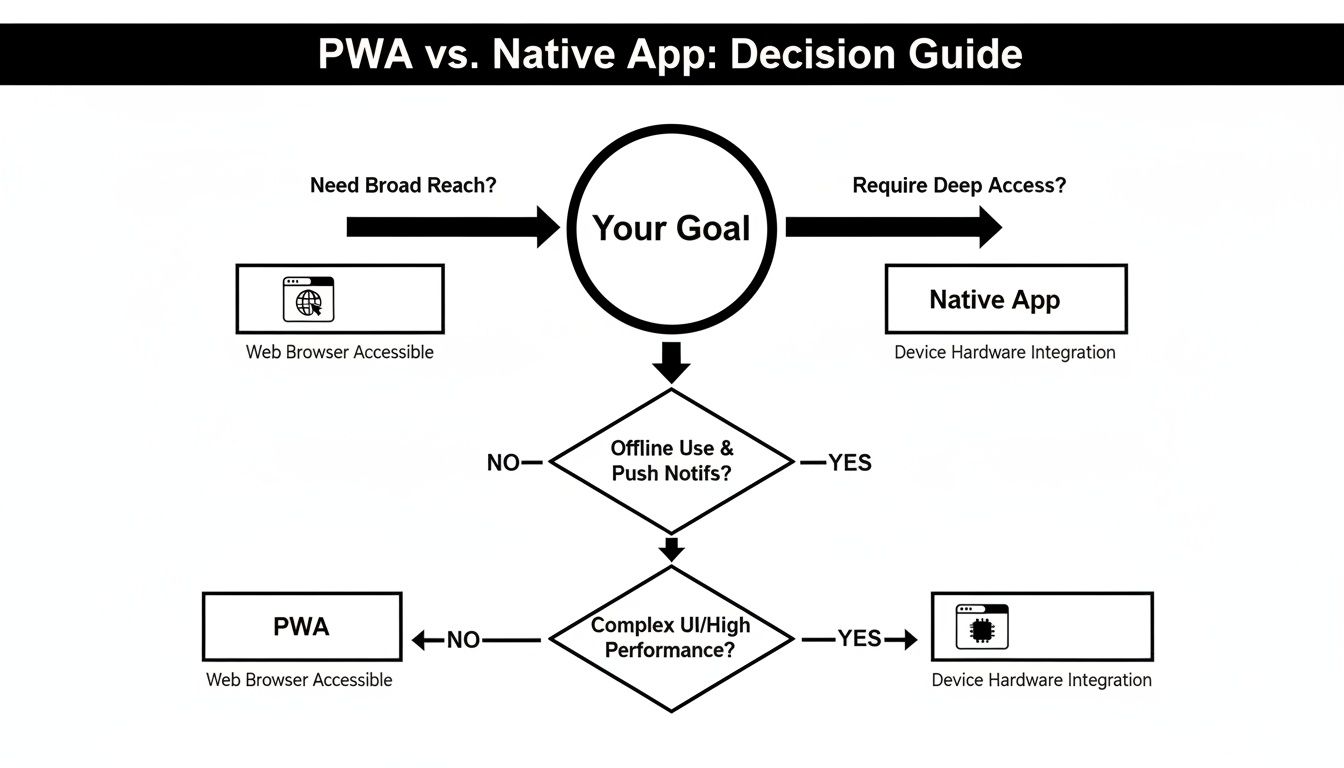
It’s pretty clear. If your main goal is to get in front of as many people as possible through search and social sharing with zero friction, a PWA is your go-to. But if your app’s magic relies on specific hardware features, you’ve got to go native.
Before you write a single line of code, get your stakeholders in a room and hash out these questions. Your answers will shape your entire mobile strategy and ensure your tech choice actually backs up your business goals.
What Hardware and APIs Can't You Live Without? Be brutally honest here. What specific hardware features are non-negotiable? Does your app’s core function depend on Bluetooth, NFC, fine-grained camera controls, or complex background tasks? If the answer is a firm "yes," a native app is pretty much your only option. A PWA can handle the basics like GPS and the camera, but it just can't dig as deep into the device's hardware.
How Will People Actually Find Your App? Think about your user acquisition funnel. Is it all about organic search, content marketing, and people sharing links? If so, the built-in SEO advantage of a PWA is a massive win. On the other hand, if you're planning to grind it out with App Store Optimization (ASO) and build credibility on the official marketplaces, then a native app is designed for that world.
Your user acquisition strategy isn't a separate thought—it's a direct result of your tech choice. A PWA lives and breathes on web-based discovery, while a native app's success is tied to its visibility in the app stores.
What’s Your Real-World Budget and Timeline? What are the hard limits on money and time? PWAs are hands-down faster and cheaper to build. We're talking 40-60% less in many cases because you’re working with a single codebase. If you’re a startup trying to get an MVP out the door yesterday or an agency on a tight client budget, the raw efficiency of a PWA is incredibly compelling.
Who's on Your Team? Take a look at your current developers. Is your team stacked with web devs who are wizards with React, JavaScript, and CSS? Building a PWA is a natural next step for them. Shifting to native means hunting down specialized Swift or Kotlin developers, a process that can burn both time and cash.
Once you've answered these questions, a clear direction should start to take shape. If you kept coming back to hardware needs and the desire for a slick, platform-specific experience, then the investment in native development makes perfect sense.
But if your priorities are speed, broad reach, and keeping costs in check—and you don't need that deep hardware access—a PWA is the smarter strategic move. For teams already working with React Native, this decision is even easier. You can often share components and logic between a web-based PWA and a future native app, giving you a flexible, phased approach to development.
When you're staring down the barrel of a new project, the PWA vs. native debate brings up some tough, practical questions. Let's tackle the ones that pop up most often and clear the air so you can make a final call.
For a huge chunk of apps out there—think e-commerce stores, news sites, and internal business tools—the answer is a resounding yes. A well-built PWA can feel so close to a native app that your users will never know the difference. It can often fill the role of a native app entirely.
But let's be real, it's not a silver bullet. If your app is going to be doing heavy lifting with graphics, needs to run complex processes in the background, or has to tap into very specific OS-level hardware like advanced Bluetooth features, native is still king. It all boils down to what your app absolutely must do.
Both can do push notifications, but the devil is in the details. Native apps have ironclad, super-reliable support on both iOS and Android. For user engagement, that's a massive win.
PWAs are fantastic on Android, where they can send notifications even if the user's browser isn't running. On the iOS side, things are getting better, but the functionality still isn't as mature as its native big brother. This is a huge deal if a big part of your audience is on iPhones.
Here's the bottom line: if your whole engagement strategy lives or dies by flawless push notifications on every single device, the native ecosystem is the more dependable, battle-tested choice right now—especially for getting in front of your iOS users.
Absolutely. This is actually a smart and popular strategy. You can use a "wrapper" like Capacitor or Android's Trusted Web Activity (TWA) to package your PWA and get it onto the app stores.
This approach gives you the best of both worlds. You get the quick development and easy discovery of the web upfront, and then you add an app store presence to the mix. For teams already in the React Native world, tools like Expo are a godsend, letting you share a ton of code between your web PWA and your native iOS/Android builds. It makes the jump from one to the other feel a lot less like a leap and more like a small step.
Ready to build your cross-platform app without starting from a blank screen? gluestack market has a massive collection of production-ready React Native templates and UI kits for iOS, Android, and web. Ship your next big idea way faster by checking out the templates at https://market.gluestack.io.

Feb 23, 2026
4 min read
Discover powerful mobile app monetization strategies to boost your revenue. Our guide covers IAPs, ads, and subscriptions for React Native apps and beyond.

Feb 22, 2026
4 min read
A clear guide to app development cost estimation. Learn what drives costs, see budget examples, and discover strategies to build your app for less.

Feb 21, 2026
4 min read
Discover how to promote mobile application effectively with proven ASO, paid campaigns, and retention strategies.

Feb 15, 2026
4 min read
Discover how to create a prototype of a website with a practical, step-by-step guide. Explore tools, testing methods, and tips to bring your idea to life.

Feb 14, 2026
4 min read
Confused about mockups vs wireframes? Learn the key differences, when to use each, and how to streamline your React Native app development workflow.

Feb 13, 2026
4 min read
Discover how mobile apps templates accelerate development. Learn to choose, customize, and deploy high-quality React Native templates for your next project.

Feb 12, 2026
4 min read
Explore mobile application interface design with practical tips, core principles, and platform-aware workflows to craft apps users love.

Feb 10, 2026
4 min read
Learn mobile first design principles to craft fast, accessible apps that delight users. Practical tips, examples, and testing strategies.

Feb 07, 2026
4 min read
Discover how React Native templates can accelerate your app development. This guide explores choosing, customizing, and deploying templates for faster launches.

Feb 05, 2026
4 min read
Discover the key differences between expo vs react native, including workflow, builds, and performance to help you pick the right path for your app.

Feb 03, 2026
4 min read
Master image with text overlay in React Native with responsive, accessible patterns. Learn expo setup, NativeWind styling, and gluestack-ui examples.

Feb 03, 2026
4 min read
Discover cross platform app development with proven strategies to build faster for iOS, Android, and the web using a single, unified codebase.

Feb 01, 2026
4 min read
Learn how to make an app for my business quickly with template-based steps from planning to launch, plus tips to scale and optimize.

Jan 31, 2026
4 min read
Ready to build an app? This guide shares practical strategies for validating your idea, choosing a tech stack, and navigating the App Store launch.

Jan 30, 2026
4 min read
Master responsive design for mobile apps with this guide on fluid layouts, breakpoints, and React Native. Build UIs that adapt perfectly to any screen.

Jan 25, 2026
4 min read
Learn how to design an Android app that stands out. This guide covers UX research, wireframing, Material Design, and the developer handoff process.

Jan 24, 2026
4 min read
Explore ui design web essentials: a complete guide to principles, responsive patterns, and workflows for intuitive, engaging web interfaces.

Jan 23, 2026
4 min read
Discover 10 essential mobile app design best practices for building exceptional cross-platform apps. Actionable tips for UI, UX, navigation, and performance.

Jan 21, 2026
4 min read
Discover how to debug React Native apps effectively. This guide covers Flipper, React DevTools, and native code troubleshooting for faster development cycles.

Jan 20, 2026
4 min read
Learn how to create app for your business with a practical, modern approach. Plan, customize, and launch with proven steps.

Jan 19, 2026
4 min read
A complete guide to mobile app development for startups. Learn how to validate your idea, build an MVP, and launch a successful app faster and more affordably.

Jan 18, 2026
4 min read
Discover how to choose the right React website template to accelerate your project. Our guide covers everything from quality checklists to deployment.

Jan 17, 2026
4 min read
Discover how to choose, customize, and deploy a React Native app template. This guide provides practical steps for launching production-ready apps faster.

Jan 16, 2026
4 min read
Discover how mobile application templates accelerate development. This guide covers how to choose, customize, and launch your app with the right foundation.

Jan 13, 2026
4 min read
Start your journey in mobile app development for beginners. This guide breaks down how to build your first cross-platform app with React Native and Expo.

Jan 12, 2026
4 min read
Explore the best react native ui libraries and compare features, performance, and ease of use to pick the right toolkit for your app.

Jan 11, 2026
4 min read
Launch your own ride-hailing service with our guide to building a production-ready Uber app clone. Learn MVP strategy, tech stacks, and backend integration.

Jan 10, 2026
4 min read
Master modern cash app design with this guide. Learn the UI/UX, security, and React Native strategies needed to build a fintech app that users trust and love.

Jan 09, 2026
4 min read
Learn how to build a personal finance dashboard with React Native. A practical guide for developers on UI design, data architecture, and production readiness.

Jan 08, 2026
4 min read
A practical guide to building a cross-platform event check in app with React Native. Learn to implement QR scanning, offline sync, and deployment.

Jan 07, 2026
4 min read
Master linear gradient React Native components with our complete guide. Learn practical techniques for Expo, bare RN, and NativeWind to build stunning UIs.

Jan 06, 2026
4 min read
Learn how to change application name in your React Native & Expo projects. This guide covers display names, package IDs, and app store listings.

Jan 05, 2026
4 min read
Discover how to monetize mobile apps with our founder's guide. Learn proven React Native strategies for ads, IAPs, and subscriptions to maximize your revenue.

Jan 04, 2026
4 min read
A practical guide on how to create a website app with a single codebase. Learn to build for web, iOS, and Android using React Native, Expo, and TypeScript.

Jan 03, 2026
4 min read
Learn how to create an app for your business with this definitive guide. Discover practical strategies for validation, development, and launch that work.

Jan 02, 2026
4 min read
Learn how to create a wireframe for a website with this practical guide. Move from initial sketches to developer-ready designs that get built right.

Jan 01, 2026
4 min read
Deciding on progressive web application vs native? This guide offers a deep comparison of performance, cost, UX, and use cases to help you choose wisely.

Dec 31, 2025
4 min read
Discover 10 mobile app security best practices for React Native. Learn to secure data, APIs, and code with actionable tips and examples for 2025.

Dec 30, 2025
4 min read
Unlock the real React Native app development cost. Our guide breaks down pricing by feature, team, and complexity to help you budget with confidence.

Dec 29, 2025
4 min read
A practical guide to master your React Native debug workflow. Learn to use Flipper, React DevTools, and Hermes to solve bugs in Expo and bare RN apps.

Dec 28, 2025
4 min read
The ultimate React Native tutorial for beginners. Learn to build beautiful cross-platform apps using a modern stack like Expo, TypeScript, and gluestack-ui.

Dec 27, 2025
4 min read
A practical guide on how to build a mobile app. Learn to go from concept to a market-ready app using templates, React Native, and proven development strategies.

Dec 26, 2025
4 min read
Discover interface design for websites with actionable tips on layout, responsiveness, and usability to boost conversions.

Dec 25, 2025
4 min read
Discover designs for apps that blend minimal aesthetics with personalization, and learn to build user-centric interfaces that boost engagement.

Dec 24, 2025
4 min read
Learn graphical interface design - essentials for mastering core principles, modern workflows, and cross-platform strategies to build intuitive, engaging UIs.

Dec 23, 2025
4 min read
Discover how high fi wireframes bridge the gap between ideas and code. Learn a practical workflow for creating, testing, and handing off effective UI designs.

Dec 22, 2025
4 min read
Discover mobile app interface design with practical principles, accessibility, and workflows that boost user engagement.

Dec 21, 2025
4 min read
Explore the top 10 UI UX design trends for 2025. Get expert insights and practical React Native tips to build next-gen cross-platform apps that stand out.

Dec 20, 2025
4 min read
Discover how mobile app templates accelerate development from idea to launch. Learn to select, customize, and deploy templates for a faster time to market.

Dec 18, 2025
4 min read
Explore the best react native ui libraries to accelerate mobile development with performance, theming, and accessibility. Expert tips inside.

Dec 16, 2025
4 min read
Master React Native PDF handling. Learn to generate, view, and share PDFs with practical code examples, library comparisons, and performance tips.

Dec 15, 2025
4 min read
A practical guide to choosing the right React Native component library. Learn how to evaluate options, avoid common pitfalls, and build apps faster.

Dec 14, 2025
4 min read
Find the perfect React Native UI library for your project. This guide compares top libraries, selection criteria, and customization strategies.

Dec 13, 2025
4 min read
Learn how to change app name in React Native and Expo. Our guide covers display names, bundle IDs, and store listings for iOS and Android projects.

Dec 12, 2025
4 min read
Discover the best React Native component library for your next project. We compare top libraries on performance, customization, and real-world use cases.

Dec 11, 2025
4 min read
Discover how to choose the right React Native UI kit. This guide covers top kits, selection criteria, and customization to accelerate your app development.

Dec 10, 2025
4 min read
Explore our in-depth guide to find the best React Native UI library. We compare top contenders to help you choose the right fit for your project.

Dec 09, 2025
4 min read
Discover a practical approach to building apps with React Native. This guide covers setup, UI, state management, and testing to help you ship great apps.

Dec 08, 2025
4 min read
android login with facebook: Learn to set up the Facebook SDK, manage tokens, and implement secure authentication across native Android, cross-platform apps.

Dec 07, 2025
4 min read
Master the alert in React Native. Learn to handle platform differences, build custom modals, and apply best practices for a seamless user experience.

Dec 06, 2025
4 min read
keyboardavoidingview react native: Master keyboard handling with KeyboardAvoidingView across iOS, Android, Expo, and TypeScript.

Dec 05, 2025
4 min read
A practical guide to implementing a React Native PDF viewer. Learn to compare libraries, handle native setup, and troubleshoot common issues with real code.

Dec 04, 2025
4 min read
how to validate startup idea: learn proven methods like customer interviews, MVPs, and metrics to confirm market fit.

Dec 03, 2025
4 min read
how to make app like uber: Learn core features, tech stack, development steps, testing, and launch tips.

Dec 02, 2025
4 min read
Build a rock-solid React Native setup. This guide covers Expo vs. Bare workflows, TypeScript, pnpm monorepos, NativeWind, and deployment strategies.

Dec 01, 2025
4 min read
A practical guide to Stripe React Native integration. Learn to set up your server, build payment UIs, handle webhooks, and launch secure mobile payments.

Nov 30, 2025
4 min read
Learn how to master push notifications in React Native. This guide covers setup, best practices, and advanced techniques for engaging your users.

Nov 29, 2025
4 min read
Build powerful location-based apps with our practical guide to react native with google maps. Get setup guides, pro tips, and best practices for iOS & Android.

Nov 28, 2025
4 min read
Explore deep linking react native with a practical guide to configuring URL schemes, universal links, navigation, and testing for Expo and bare apps.

Nov 28, 2025
4 min read
A practical guide to building a scalable React Native design system. Learn to implement tokens, theming, and tools like NativeWind and gluestack-ui.

Nov 26, 2025
4 min read
Learn why react native expo templates speed up your projects with ready-made patterns and practical tips.

Nov 25, 2025
4 min read
Discover how to improve developer productivity with actionable strategies for workflow, tooling, and culture. A practical guide for software engineering teams.

Nov 24, 2025
4 min read
Discover the best cross platform app development tools. Compare top frameworks like Flutter and React Native to build and ship apps faster.

Nov 23, 2025
4 min read
This Expo React Native tutorial provides a hands-on guide to building cross-platform apps. Learn setup, styling with NativeWind, navigation, and deployment.

Nov 22, 2025
4 min read
Build beautiful UIs faster with this guide to Tailwind CSS React Native. Learn setup, styling, and advanced techniques with NativeWind for mobile apps.

Nov 21, 2025
4 min read
Explore our curated list of 7 top-tier React Native app examples. Discover production-ready templates and resources to build your next app faster.

Mar 19, 2025
4 min read
gluestack market offers React Native UI templates to accelerate development. Get customizable, production-ready React Native app templates and Ui kit, some free. Build faster & smarter today!


