Jan 05, 2026

4 min read

Before you even think about writing a single line of code, you need to have a tough conversation with yourself: how is this app actually going to make money? Picking the right monetization model from day one is non-negotiable. It dictates everything from your app's design and user flow to its chances of survival.
The most common paths are in-app advertising, subscriptions, in-app purchases (IAPs), or a hybrid approach that pulls from a few different playbooks to keep the revenue flowing.
Making your app profitable starts with a strategic choice, not a technical one. Your monetization model is the engine of your business, and I’ve seen too many promising apps stall out because they picked the wrong one. The goal is to find that sweet spot where your app's purpose, your users' expectations, and how they see its value all click into place.
Think about it. A super-casual mobile game with a massive free user base can do great with a mix of unintrusive banner ads and maybe some rewarded videos for in-game perks. But a high-powered productivity tool for teams? That screams subscription model, where users happily pay a recurring fee for continuous access to features that make their work life easier.
The core function of your app is your first and best clue. You have to ask a simple question: am I providing a one-and-done benefit or an ongoing service?
This decision tree gives you a great visual for choosing between free, paid, and freemium based on your growth goals and how willing your audience is to open their wallets.
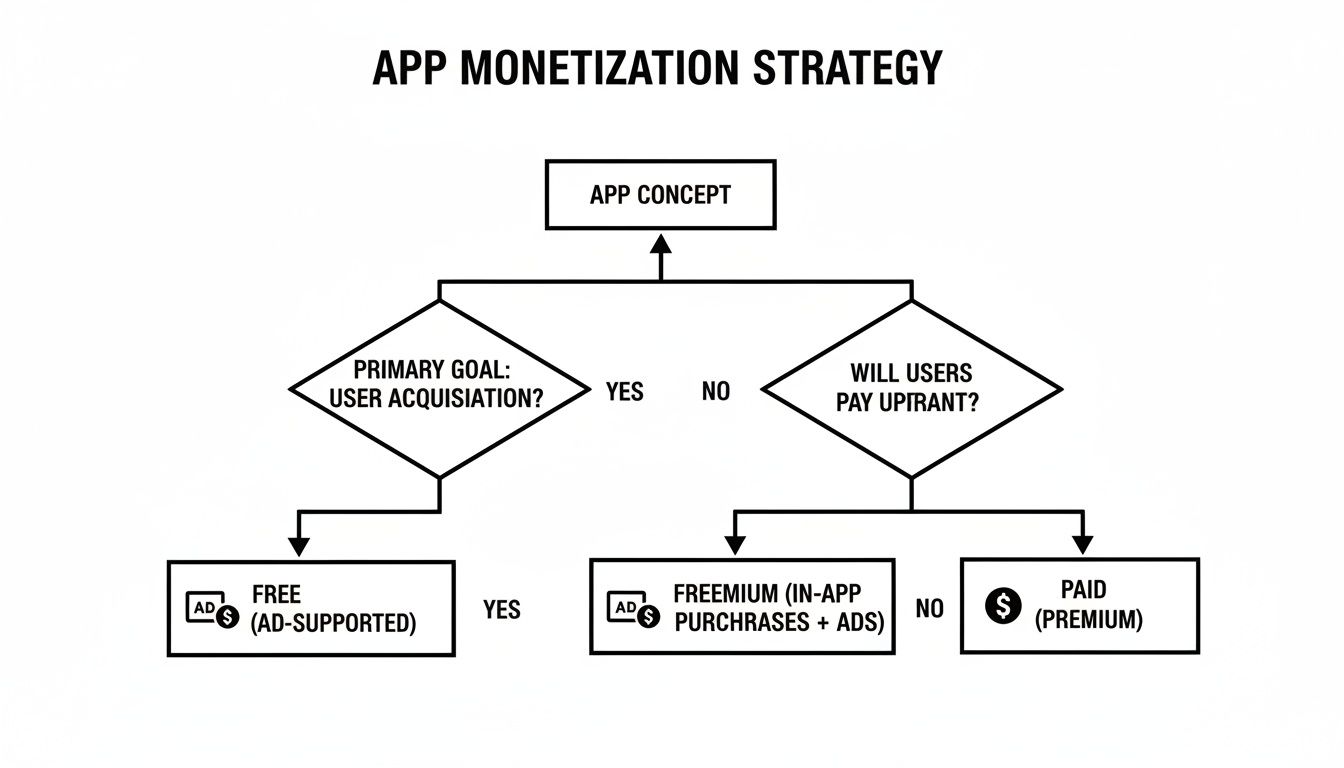
As the flowchart shows, your path really depends on whether you're chasing rapid user growth (which favors free models) or you need to generate revenue right out of the gate (which points toward paid models).
No matter how you slice it, the market data tells a clear story: freemium is king.
Global mobile app revenue is on track to hit a mind-boggling USD 613 billion. What’s wild is that a staggering 98% of that massive revenue comes from freemium apps. These are the apps that nail the balance of offering great core features for free while charging for premium upgrades, IAPs, or subscriptions.
For indie devs and startups, this is huge. It means you can grab a production-ready React Native template, like a fitness tracker or meditation app, and get to the monetization part way faster. You don't have to build the entire UI from scratch.
Just look at subscriptions—they pulled in USD 66.8 billion, with 73% of that coming from iOS users. It’s proof that a solid recurring revenue model is the key to long-term stability. You can dig into more of these mobile app stats over at CMARIX.
A successful freemium strategy isn't about hiding your best features behind a paywall. It's about making your free version so good that users can't imagine how much better the premium experience must be.
The freemium approach basically eliminates the barrier to entry, letting you build a big audience fast. Once people are hooked and see the value, you can strategically introduce upsells for premium features, creating a natural path for them to become paying customers. It's the best of both worlds: the scale of a free app with the revenue potential of a paid one.
Choosing the right model can feel overwhelming, so I've put together a quick comparison to break down the most common strategies. This table highlights their best use cases, revenue potential, and how they tend to impact the user experience, helping you find the right fit for your app.
| Model | Best For | Revenue Potential | User Experience Impact |
|---|---|---|---|
| In-App Advertising | Apps with massive, highly engaged user bases (e.g., social, news, casual games). | Moderate to High | Can be intrusive if not implemented well (e.g., pop-ups). Rewarded ads are generally well-received. |
| Freemium | The majority of apps. Great for building a user base first and monetizing engaged users later. | High | Excellent. Users try before they buy, but the line between free and paid features must be clear. |
| In-App Purchases (IAP) | Mobile games (cosmetics, currency), content apps (unlocking articles), and utility apps (extra features). | Variable to High | Generally positive. Users choose what to buy. Can feel predatory ("pay-to-win") if not balanced. |
| Subscriptions | Apps providing ongoing content or services (e.g., streaming, fitness, productivity, news). | High & Predictable | Strong. Creates loyal users, but the value proposition must be consistently high to prevent churn. |
| Paid (Premium) | Niche, high-value utility apps or games with a strong brand and clear one-time value. | Low to Moderate | Clean and ad-free, but the upfront cost is a major barrier to user acquisition. |
Ultimately, the best model depends entirely on your specific app and audience. Many of the most successful apps actually use a hybrid approach, like offering a subscription but also selling one-time purchase packs, or running a freemium model supported by non-intrusive ads. Don't be afraid to mix and match to find what works for you.
For a massive number of free apps out there, advertising isn't just one way to make money—it's the only way. But if you think you can just plaster banners all over your UI and call it a day, you're setting yourself up for a wave of uninstalls. The real art is weaving ads into your app so they generate revenue without completely wrecking the user experience.
And this isn't a small piece of the puzzle; advertising is the absolute engine of app monetization. It drives 60-65% of total mobile app revenue around the globe. With mobile ad spending hitting a staggering USD 360 billion, it's pretty clear that if you're a React Native dev building a free app for a wide audience, you'll need to get comfortable with ad SDKs.

Let's get one thing straight: not all ads are created equal. The format you choose is everything, and it needs to align perfectly with your app's flow and what your users expect. What works great in a game will feel totally out of place in a productivity tool.
Here’s a quick breakdown of the usual suspects:
Rewarded ads reframe the monetization dynamic from an interruption into an opportunity. When a user actively chooses to watch an ad to unlock content, you’re not just earning revenue; you're increasing engagement by giving them a way to progress.
The "where" and "when" you show an ad are just as critical as the ad format itself. A badly timed ad can shatter a user's focus and send them running for the exit.
Take a mobile game, for example. An interstitial ad that appears right in the middle of the action is a surefire way to get your app deleted. But show that same exact ad after the level is over? It feels like a natural pause. Or in a productivity app, offering a rewarded video to unlock an advanced export format is a brilliant way to show off the value of your premium features. Getting this right often involves testing different strategies to see what resonates, a point emphasized in this guide on 10 Facebook Advertising Best Practices to Scale Your ROAS.
For React Native teams, especially if you're in the Expo ecosystem, Google AdMob is the go-to starting point. The expo-ads-admob library makes the integration surprisingly painless, letting you get banner and full-screen ads running with very little boilerplate.
You’ll kick things off by installing the package and then plugging your AdMob app and ad unit IDs into your app.json file. After that, you can import components like AdMobBanner directly into your screens or use the AdMobInterstitial API to load and trigger ads at just the right moments.
Here’s a pro tip: don’t let your ad strategy exist in a vacuum. Pair it with other engagement tools. For instance, you could re-engage users who have watched a rewarded ad by sending them a targeted reminder later. Our guide on how to implement push notifications in React Native can show you how to build out that communication channel.
When you combine ads with smart notifications, you create a loop that keeps users coming back, which in turn creates more opportunities to monetize. It transforms a simple ad impression into a small part of a much larger, more effective user journey.
While ads are a solid way to monetize attention, subscriptions and in-app purchases (IAPs) are where you start monetizing direct value. This is your path to building predictable, recurring revenue and creating a loyal base of users who are happy to pay for premium features. For React Native teams, the road to getting this done has become surprisingly straightforward.
When you implement IAPs and subscriptions, you're fundamentally shifting from showing ads to selling a product directly inside your app. This could be a one-time purchase to unlock a feature forever (like removing ads), or a recurring subscription that provides ongoing access to exclusive content or services.

It requires a different mindset. Instead of obsessing over impressions, your goal is to clearly communicate the value of your premium offering so that users are actually excited to upgrade.
Before you touch a single line of code, you have to get your products configured in the app stores. This is a foundational step that many developers rush, only to create massive headaches for themselves down the line.
Honestly, getting these configurations right is crucial. Mismatched product IDs or incorrect pricing setups are classic sources of bugs that can bring your revenue stream to a screeching halt. Double-check everything.
Let's be real: managing subscriptions natively for both iOS and Android can be a total nightmare. You're stuck juggling separate SDKs, validating receipts on your server for two completely different platforms, and trying to make sense of analytics that don't speak to each other. This is exactly why a tool like RevenueCat is a lifesaver.
RevenueCat gives you a single, unified SDK that abstracts away the ugly complexities of the native StoreKit (iOS) and Google Play Billing libraries. You just interact with one clean API, and it handles the rest.
RevenueCat isn't just a technical wrapper; it's your subscription business's source of truth. It handles receipt validation, tracks subscriber status across platforms, and gives you powerful analytics on metrics like Monthly Recurring Revenue (MRR) and churn right out of the box.
For a small React Native team, this is a massive win. Instead of building and maintaining your own complex server-side validation logic, you can pour that energy into building the premium features people will actually pay for. It simplifies the entire subscriber lifecycle, from the initial purchase to renewals and cancellations. It also plays nicely with other payment processors; our guide on integrating Stripe with React Native offers a great look at how you can build out a robust payment infrastructure.
So, let's walk through a real-world scenario. Imagine you're adding a "Pro" subscription to your React Native app that unlocks a bunch of premium screens and features.
Here’s what that workflow would likely look like:
react-native-purchases) into your React Native project.purchasePackage() function. The SDK takes over from there, handling the entire native purchase flow on iOS or Android.This entitlement system is incredibly powerful. You’re no longer checking if a user bought a specific product ID; you’re checking if they have a certain level of access. This makes it dead simple to change your pricing or products later without having to ship a new version of your app. For example, you could introduce a "Pro Plus" tier down the road and simply grant the "Pro" entitlement to those users as well.
Having a monetization model is one thing, but getting users to actually pull the trigger and pay is a whole different ballgame. This is where your pricing strategy has to mesh perfectly with the user experience (UX). A clunky, confusing, or aggressive purchase flow will absolutely tank your revenue, no matter how awesome your premium features are.
The goal is to make the upgrade feel like a natural, valuable next step in the user’s journey, not a roadblock.
Think of your paywall as the most critical screen in this whole process. It's not just a payment form; it's your final sales pitch. It has one job: to instantly and clearly answer the user's biggest question, "What's in it for me?"
Forget generic lists of features. You need to be talking about benefits and outcomes. How will upgrading make their life better or help them achieve their goals?
Here are a few things that separate a weak paywall from a great one:
Ultimately, you're guiding the user toward a decision without being pushy. A well-designed paywall makes the upgrade feel like their smart choice.
One of the most powerful monetization techniques is hitting users with an upgrade offer at the exact moment they need a premium feature. This contextual approach is killer because it links the value directly to an immediate problem they're trying to solve.
Don’t just ask users to upgrade; show them why they should upgrade, right when it matters most. A contextual prompt converts far better than a random pop-up because it solves an immediate problem for the user.
Imagine a finance tracking app, maybe built from a sleek gluestack market template. A free user tries to add their fifth budget category, but the free plan caps them at four. Instead of a dead-end error message, the app displays a clean, non-intrusive prompt: "Unlock unlimited categories with Pro." That’s monetization at its best—it’s helpful, not annoying.
This same logic applies to pretty much any app:
When you align the upgrade offer with user intent, your paywall stops being a barrier and becomes a solution.
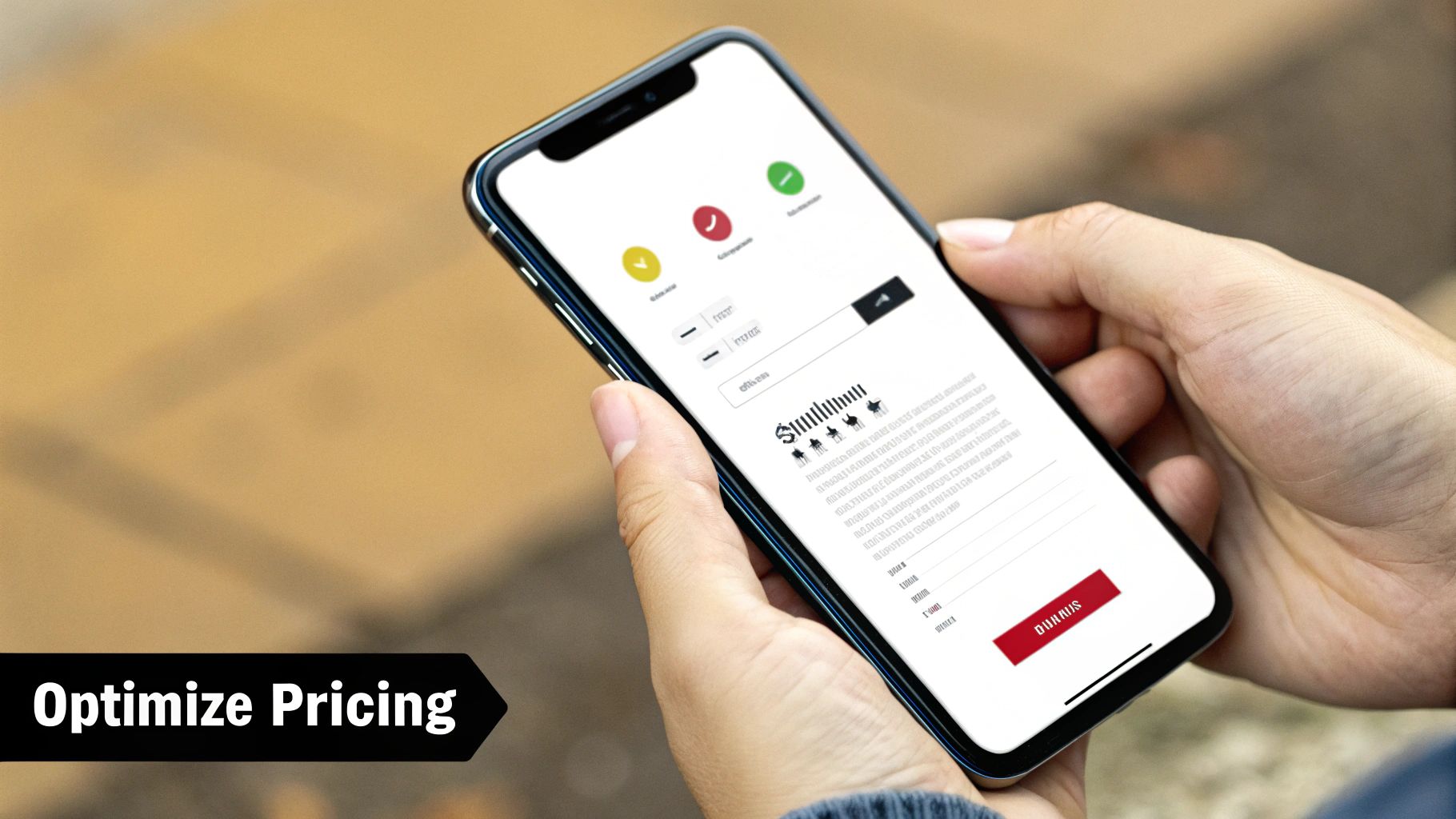
Your first guess at pricing is almost never your best one. You have to experiment. A/B testing different price points, trial lengths, and paywall designs is absolutely essential for figuring out what really resonates with your audience.
The results might surprise you. Sometimes, a slightly higher price actually increases perceived value and leads to more revenue. Other times, you might find that a 7-day trial converts way better than a 3-day trial.
Tools like Firebase Remote Config are perfect for this. They let you show different prices or paywall layouts to different user segments. By tracking the conversion rates for each variant, you can make data-driven decisions to dial in your pricing. This cycle of testing and iterating is what separates the good monetization strategies from the great ones.
Flipping the switch on your monetization model is a huge win, but it’s really just the starting line. Now the real work begins: turning that initial strategy into a revenue engine that actually lasts. This means getting obsessive about your data to see what’s working and locking down your legal compliance to build a business on solid ground.
Without the right metrics, you’re flying blind. Sure, you might see money coming in, but you won't know if your app's financial health is strong or if you're about to hit a wall. It’s the difference between guessing and truly knowing how to make your app profitable for the long haul.
To get a clear picture of your app's financial health, you have to look beyond vanity metrics like download counts. Instead, focus on the numbers that directly tie to revenue and user loyalty. These are the KPIs that actually matter.
Here are the non-negotiables:
You'll want to track these KPIs in an analytics platform like Firebase or Amplitude. These tools provide the insights needed to make smart calls, whether that's tweaking your subscription tiers or fine-tuning ad frequency. A big piece of this puzzle is also understanding metrics like ROAS in Digital Marketing, which tells you if your ad spend is actually profitable.
You can't talk about monetization today without talking about privacy. Users are savvier than ever about their data, and global regulations have teeth. Ignoring compliance isn’t just risky—it’s a fast track to destroying the trust you've worked so hard to build.
Transparency is your best friend here, especially if you're running an ad-supported app that depends on user data. You have to be crystal clear about what you collect and why. This isn't just good manners; it's a legal requirement.
Building a monetization strategy on a shaky legal foundation is like building a house on sand. Ensuring compliance with platform policies and privacy laws isn't a checkbox; it's the bedrock of a trustworthy and sustainable business.
Get intimately familiar with the developer policies for both Apple’s App Store and the Google Play Store. They have very specific rules about IAPs, subscriptions, and how you present pricing to users.
Beyond the app stores, you need to be up to speed on data privacy regulations:
Tackling these complexities is crucial. For a deeper dive into protecting both your app and your users, our guide on mobile app security best practices is an invaluable resource. Getting this right from day one protects your business and shows users you respect their privacy—building the kind of loyalty that pays off for years to come.
Diving into mobile app monetization can feel like you're trying to solve a puzzle in the dark. As a founder or developer, you've probably got a dozen questions bouncing around your head. This section is here to cut through the noise and give you some straight, practical answers to the stuff we hear all the time.
The goal isn't to give you textbook definitions, but real-world insights you can actually use for your app, especially when you're just getting off the ground.
Honestly, there's no magic bullet here. The "best" model is simply the one that makes the most sense for what your app does and who uses it. It's all about matching the value you provide with how you ask people to pay for it.
If your app delivers ongoing value—think a fitness tracker, a learning platform, or exclusive content—a subscription model is a fantastic fit. It builds a predictable, recurring revenue stream that you can build your business on. On the flip side, if you've built a casual game that people play a ton but wouldn't pay for upfront, an ad-based model can generate serious revenue from eyeballs alone.
And for those apps offering high-value, one-off digital goodies like slick photo filters, exclusive game items, or pro features? In-app purchases (IAPs) are your go-to.
Our Take: When you're launching an MVP, keep it simple. Seriously. Try a single, unobtrusive banner ad or one straightforward subscription tier. This lets you test the waters and get real data from real users without over-engineering your launch.
The most successful apps often blend these models over time. Don't be afraid to start with one and evolve. A great first step is to just look at what your direct competitors are doing and, more importantly, talk to your users to figure out what they’d actually be willing to open their wallets for.
This is the million-dollar question, and the answer is... it varies. A lot. Your ad revenue really boils down to a few key things:
The metric you really need to care about is eCPM (effective Cost Per Mille). It’s what you get paid for every 1,000 ad impressions. This number can be all over the map, from less than $1 for a basic banner ad to over $15 for a rewarded video ad in a prime market. For a brand-new app, your first job is just to grow your Daily Active Users (DAU). Once you have people showing up every day, even a modest eCPM can start adding up to real money.
A pro move to squeeze the most out of every impression is to use an ad mediation platform. Think of it as a broker that makes different ad networks bid against each other for your ad space, automatically showing whichever ad pays you the most. It’s the single best way to make sure you're not leaving money on the table.
Yes and no. You're on the hook for it, but you don't have to go it alone.
When you use the Apple App Store or Google Play Store, they do a lot of the heavy lifting. They handle the messy parts of payment processing and even remit certain sales taxes for you, which is a massive headache you get to avoid. That said, you are still 100% responsible for your own business's income taxes.
On the legal side, you absolutely need a Privacy Policy and Terms of Service. This is completely non-negotiable.
If your app is available in certain parts of the world, you have to play by their rules. For any users in Europe, you need to be GDPR compliant. For users in California, you've got to follow CCPA. This boils down to being transparent about what data you collect and why you're collecting it—especially crucial for ad-supported apps. Our best advice? Find a legal pro who specializes in digital products and get a proper consultation. It's an investment that can save you a world of trouble down the line.
Ready to skip the boilerplate and launch your app faster? gluestack market offers a rich collection of production-ready React Native templates and UI kits. Build a stunning, high-performance app without starting from scratch. Explore our marketplace and find the perfect foundation for your next project.

Feb 23, 2026
4 min read
Discover powerful mobile app monetization strategies to boost your revenue. Our guide covers IAPs, ads, and subscriptions for React Native apps and beyond.

Feb 22, 2026
4 min read
A clear guide to app development cost estimation. Learn what drives costs, see budget examples, and discover strategies to build your app for less.

Feb 21, 2026
4 min read
Discover how to promote mobile application effectively with proven ASO, paid campaigns, and retention strategies.

Feb 15, 2026
4 min read
Discover how to create a prototype of a website with a practical, step-by-step guide. Explore tools, testing methods, and tips to bring your idea to life.

Feb 14, 2026
4 min read
Confused about mockups vs wireframes? Learn the key differences, when to use each, and how to streamline your React Native app development workflow.

Feb 13, 2026
4 min read
Discover how mobile apps templates accelerate development. Learn to choose, customize, and deploy high-quality React Native templates for your next project.

Feb 12, 2026
4 min read
Explore mobile application interface design with practical tips, core principles, and platform-aware workflows to craft apps users love.

Feb 10, 2026
4 min read
Learn mobile first design principles to craft fast, accessible apps that delight users. Practical tips, examples, and testing strategies.

Feb 08, 2026
4 min read
Explore the progressive web app vs native debate with our in-depth guide. We compare performance, cost, and UX to help you make the right strategic choice.

Feb 07, 2026
4 min read
Discover how React Native templates can accelerate your app development. This guide explores choosing, customizing, and deploying templates for faster launches.

Feb 05, 2026
4 min read
Discover the key differences between expo vs react native, including workflow, builds, and performance to help you pick the right path for your app.

Feb 03, 2026
4 min read
Master image with text overlay in React Native with responsive, accessible patterns. Learn expo setup, NativeWind styling, and gluestack-ui examples.

Feb 03, 2026
4 min read
Discover cross platform app development with proven strategies to build faster for iOS, Android, and the web using a single, unified codebase.

Feb 01, 2026
4 min read
Learn how to make an app for my business quickly with template-based steps from planning to launch, plus tips to scale and optimize.

Jan 31, 2026
4 min read
Ready to build an app? This guide shares practical strategies for validating your idea, choosing a tech stack, and navigating the App Store launch.

Jan 30, 2026
4 min read
Master responsive design for mobile apps with this guide on fluid layouts, breakpoints, and React Native. Build UIs that adapt perfectly to any screen.

Jan 25, 2026
4 min read
Learn how to design an Android app that stands out. This guide covers UX research, wireframing, Material Design, and the developer handoff process.

Jan 24, 2026
4 min read
Explore ui design web essentials: a complete guide to principles, responsive patterns, and workflows for intuitive, engaging web interfaces.

Jan 23, 2026
4 min read
Discover 10 essential mobile app design best practices for building exceptional cross-platform apps. Actionable tips for UI, UX, navigation, and performance.

Jan 21, 2026
4 min read
Discover how to debug React Native apps effectively. This guide covers Flipper, React DevTools, and native code troubleshooting for faster development cycles.

Jan 20, 2026
4 min read
Learn how to create app for your business with a practical, modern approach. Plan, customize, and launch with proven steps.

Jan 19, 2026
4 min read
A complete guide to mobile app development for startups. Learn how to validate your idea, build an MVP, and launch a successful app faster and more affordably.

Jan 18, 2026
4 min read
Discover how to choose the right React website template to accelerate your project. Our guide covers everything from quality checklists to deployment.

Jan 17, 2026
4 min read
Discover how to choose, customize, and deploy a React Native app template. This guide provides practical steps for launching production-ready apps faster.

Jan 16, 2026
4 min read
Discover how mobile application templates accelerate development. This guide covers how to choose, customize, and launch your app with the right foundation.

Jan 13, 2026
4 min read
Start your journey in mobile app development for beginners. This guide breaks down how to build your first cross-platform app with React Native and Expo.

Jan 12, 2026
4 min read
Explore the best react native ui libraries and compare features, performance, and ease of use to pick the right toolkit for your app.

Jan 11, 2026
4 min read
Launch your own ride-hailing service with our guide to building a production-ready Uber app clone. Learn MVP strategy, tech stacks, and backend integration.

Jan 10, 2026
4 min read
Master modern cash app design with this guide. Learn the UI/UX, security, and React Native strategies needed to build a fintech app that users trust and love.

Jan 09, 2026
4 min read
Learn how to build a personal finance dashboard with React Native. A practical guide for developers on UI design, data architecture, and production readiness.

Jan 08, 2026
4 min read
A practical guide to building a cross-platform event check in app with React Native. Learn to implement QR scanning, offline sync, and deployment.

Jan 07, 2026
4 min read
Master linear gradient React Native components with our complete guide. Learn practical techniques for Expo, bare RN, and NativeWind to build stunning UIs.

Jan 06, 2026
4 min read
Learn how to change application name in your React Native & Expo projects. This guide covers display names, package IDs, and app store listings.

Jan 04, 2026
4 min read
A practical guide on how to create a website app with a single codebase. Learn to build for web, iOS, and Android using React Native, Expo, and TypeScript.

Jan 03, 2026
4 min read
Learn how to create an app for your business with this definitive guide. Discover practical strategies for validation, development, and launch that work.

Jan 02, 2026
4 min read
Learn how to create a wireframe for a website with this practical guide. Move from initial sketches to developer-ready designs that get built right.

Jan 01, 2026
4 min read
Deciding on progressive web application vs native? This guide offers a deep comparison of performance, cost, UX, and use cases to help you choose wisely.

Dec 31, 2025
4 min read
Discover 10 mobile app security best practices for React Native. Learn to secure data, APIs, and code with actionable tips and examples for 2025.

Dec 30, 2025
4 min read
Unlock the real React Native app development cost. Our guide breaks down pricing by feature, team, and complexity to help you budget with confidence.

Dec 29, 2025
4 min read
A practical guide to master your React Native debug workflow. Learn to use Flipper, React DevTools, and Hermes to solve bugs in Expo and bare RN apps.

Dec 28, 2025
4 min read
The ultimate React Native tutorial for beginners. Learn to build beautiful cross-platform apps using a modern stack like Expo, TypeScript, and gluestack-ui.

Dec 27, 2025
4 min read
A practical guide on how to build a mobile app. Learn to go from concept to a market-ready app using templates, React Native, and proven development strategies.

Dec 26, 2025
4 min read
Discover interface design for websites with actionable tips on layout, responsiveness, and usability to boost conversions.

Dec 25, 2025
4 min read
Discover designs for apps that blend minimal aesthetics with personalization, and learn to build user-centric interfaces that boost engagement.

Dec 24, 2025
4 min read
Learn graphical interface design - essentials for mastering core principles, modern workflows, and cross-platform strategies to build intuitive, engaging UIs.

Dec 23, 2025
4 min read
Discover how high fi wireframes bridge the gap between ideas and code. Learn a practical workflow for creating, testing, and handing off effective UI designs.

Dec 22, 2025
4 min read
Discover mobile app interface design with practical principles, accessibility, and workflows that boost user engagement.

Dec 21, 2025
4 min read
Explore the top 10 UI UX design trends for 2025. Get expert insights and practical React Native tips to build next-gen cross-platform apps that stand out.

Dec 20, 2025
4 min read
Discover how mobile app templates accelerate development from idea to launch. Learn to select, customize, and deploy templates for a faster time to market.

Dec 18, 2025
4 min read
Explore the best react native ui libraries to accelerate mobile development with performance, theming, and accessibility. Expert tips inside.

Dec 16, 2025
4 min read
Master React Native PDF handling. Learn to generate, view, and share PDFs with practical code examples, library comparisons, and performance tips.

Dec 15, 2025
4 min read
A practical guide to choosing the right React Native component library. Learn how to evaluate options, avoid common pitfalls, and build apps faster.

Dec 14, 2025
4 min read
Find the perfect React Native UI library for your project. This guide compares top libraries, selection criteria, and customization strategies.

Dec 13, 2025
4 min read
Learn how to change app name in React Native and Expo. Our guide covers display names, bundle IDs, and store listings for iOS and Android projects.

Dec 12, 2025
4 min read
Discover the best React Native component library for your next project. We compare top libraries on performance, customization, and real-world use cases.

Dec 11, 2025
4 min read
Discover how to choose the right React Native UI kit. This guide covers top kits, selection criteria, and customization to accelerate your app development.

Dec 10, 2025
4 min read
Explore our in-depth guide to find the best React Native UI library. We compare top contenders to help you choose the right fit for your project.

Dec 09, 2025
4 min read
Discover a practical approach to building apps with React Native. This guide covers setup, UI, state management, and testing to help you ship great apps.

Dec 08, 2025
4 min read
android login with facebook: Learn to set up the Facebook SDK, manage tokens, and implement secure authentication across native Android, cross-platform apps.

Dec 07, 2025
4 min read
Master the alert in React Native. Learn to handle platform differences, build custom modals, and apply best practices for a seamless user experience.

Dec 06, 2025
4 min read
keyboardavoidingview react native: Master keyboard handling with KeyboardAvoidingView across iOS, Android, Expo, and TypeScript.

Dec 05, 2025
4 min read
A practical guide to implementing a React Native PDF viewer. Learn to compare libraries, handle native setup, and troubleshoot common issues with real code.

Dec 04, 2025
4 min read
how to validate startup idea: learn proven methods like customer interviews, MVPs, and metrics to confirm market fit.

Dec 03, 2025
4 min read
how to make app like uber: Learn core features, tech stack, development steps, testing, and launch tips.

Dec 02, 2025
4 min read
Build a rock-solid React Native setup. This guide covers Expo vs. Bare workflows, TypeScript, pnpm monorepos, NativeWind, and deployment strategies.

Dec 01, 2025
4 min read
A practical guide to Stripe React Native integration. Learn to set up your server, build payment UIs, handle webhooks, and launch secure mobile payments.

Nov 30, 2025
4 min read
Learn how to master push notifications in React Native. This guide covers setup, best practices, and advanced techniques for engaging your users.

Nov 29, 2025
4 min read
Build powerful location-based apps with our practical guide to react native with google maps. Get setup guides, pro tips, and best practices for iOS & Android.

Nov 28, 2025
4 min read
Explore deep linking react native with a practical guide to configuring URL schemes, universal links, navigation, and testing for Expo and bare apps.

Nov 28, 2025
4 min read
A practical guide to building a scalable React Native design system. Learn to implement tokens, theming, and tools like NativeWind and gluestack-ui.

Nov 26, 2025
4 min read
Learn why react native expo templates speed up your projects with ready-made patterns and practical tips.

Nov 25, 2025
4 min read
Discover how to improve developer productivity with actionable strategies for workflow, tooling, and culture. A practical guide for software engineering teams.

Nov 24, 2025
4 min read
Discover the best cross platform app development tools. Compare top frameworks like Flutter and React Native to build and ship apps faster.

Nov 23, 2025
4 min read
This Expo React Native tutorial provides a hands-on guide to building cross-platform apps. Learn setup, styling with NativeWind, navigation, and deployment.

Nov 22, 2025
4 min read
Build beautiful UIs faster with this guide to Tailwind CSS React Native. Learn setup, styling, and advanced techniques with NativeWind for mobile apps.

Nov 21, 2025
4 min read
Explore our curated list of 7 top-tier React Native app examples. Discover production-ready templates and resources to build your next app faster.

Mar 19, 2025
4 min read
gluestack market offers React Native UI templates to accelerate development. Get customizable, production-ready React Native app templates and Ui kit, some free. Build faster & smarter today!


